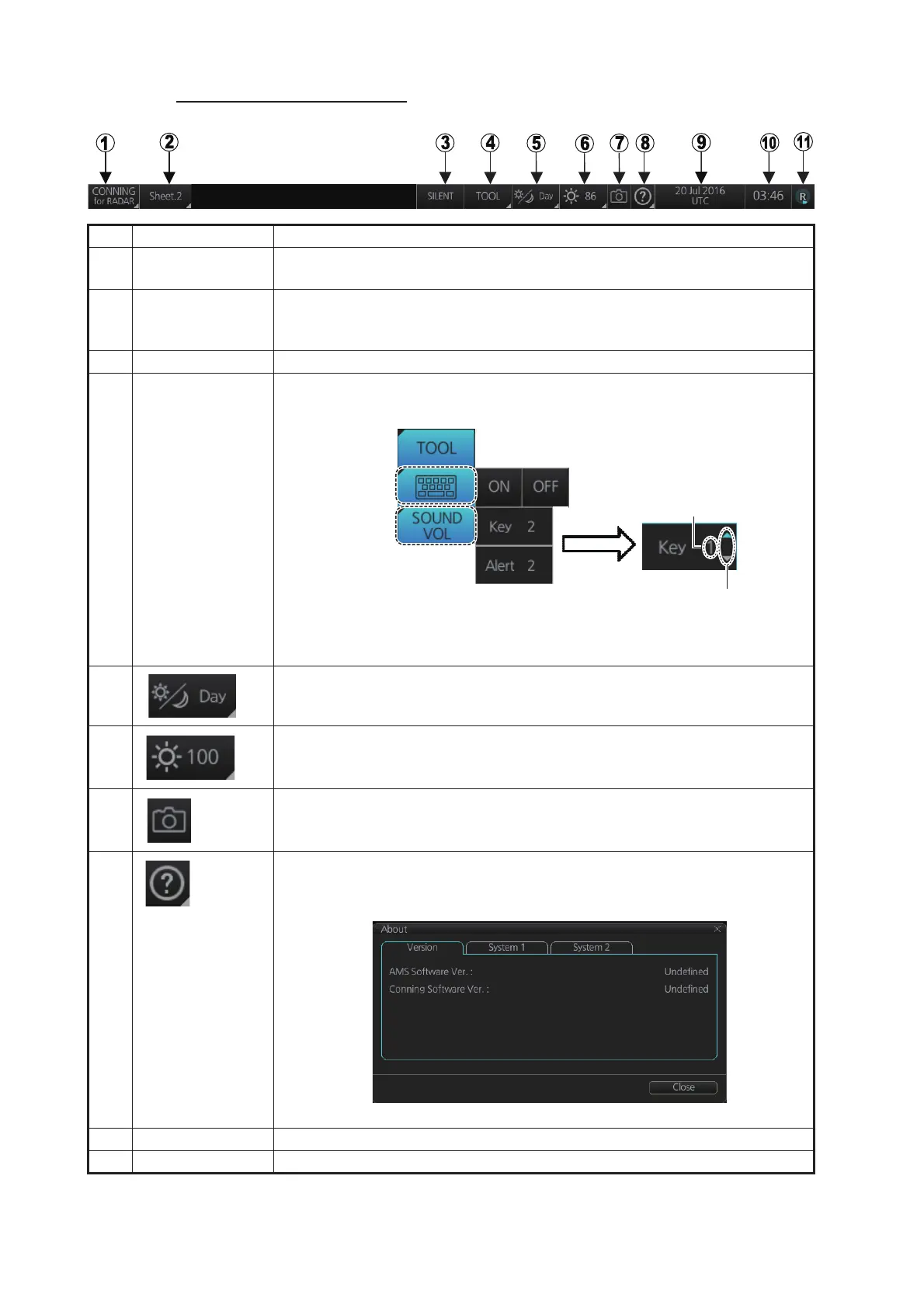
24. CONNING DISPLAYS
24-2
Conning display Status bar
No. Button Description
1 Operating mode Selects the operating mode, [RADAR], [CHART for RADAR] or [CON-
NING].
2 Conning display
sheet
Selects the conning display sheet to use, Sheet.1 - Sheet.6. (Sheet name
is decided at installation. “Sheet x” (x=sheet number) is the default sheet
name.)
3 [SILENT] Goes to the [SILENT] mode. See section 6.7.
4 [TOOL] Shows, hides the software keyboard; adjusts the volume of the key beep
and audio alert.
5 Selects a display palette. See section 1.5.
6 Adjusts the brilliance of a the monitor. See section 1.6.
7 Takes a screenshot. See section 1.21.
8 Displays AMS and conning software version and system information. The
information shown in the figure may differ from your own. See
section 1.24.
9 Date See section 1.20.
10 Time See section 1.20.
To adjust a
volume, put
cursor in
applicable
box.
Click up arrow
to raise volume;
down arrow to
lower volume.
Volume setting
Shows, hides
software keyboard
Adjusts volume of
key beep, audio
alert



 To Next Page