Operation – Therapy
User Manual corpuls
3
90 ENG - Version 2.1 – P/N 04130.2
5.6.2 Starting the Metronome
Prerequisite: The device is in AED- or manual defibrillation mode.
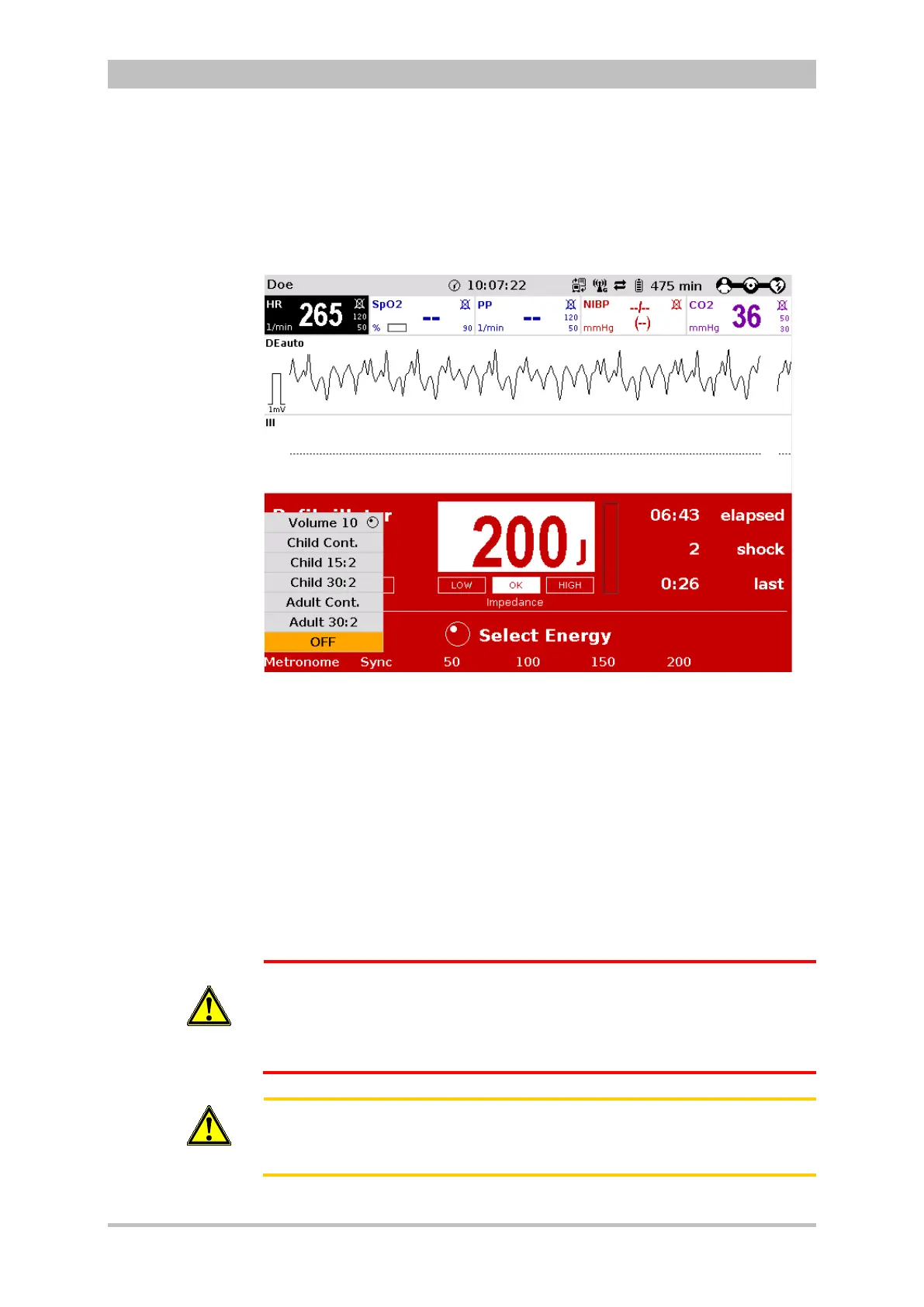
1. Press the softkey [Metronome] repeatedly until the required mode is
selected.
Fig. 5-16 Softkey context menu metronome
2. To change the volume of the metronome signals, mark the field "Volume"
and confirm by pressing the jog dial.
3. Select the required volume by turning the jog dial.
4. To confirm the settings and close the configuration dialogue, press the jog
dial.
If the user switches to monitoring mode during CPR, the metronome function
stays active. The metronome can be deactivated via the softkey [Metr. OFF].
The QRS tone is deactivated automatically when the metronome function is
active.
WARNING
The metronome pauses at reaching readiness for shock in AED or manual
defibrillation mode.
After the shock has been released or 10 secs after readiness for shock
without releasing the shock, the metronome resumes signalling the
compression tone.
Caution
During ECG analysis in AED mode the metronome pauses. If subsequently
no shock is recommended, the metronome resumes signalling the
compression tone.



 To Next Page