Procedure in case of malfunctions
User Manual corpuls
3
250 ENG - Version 2.1 – P/N 04130.2
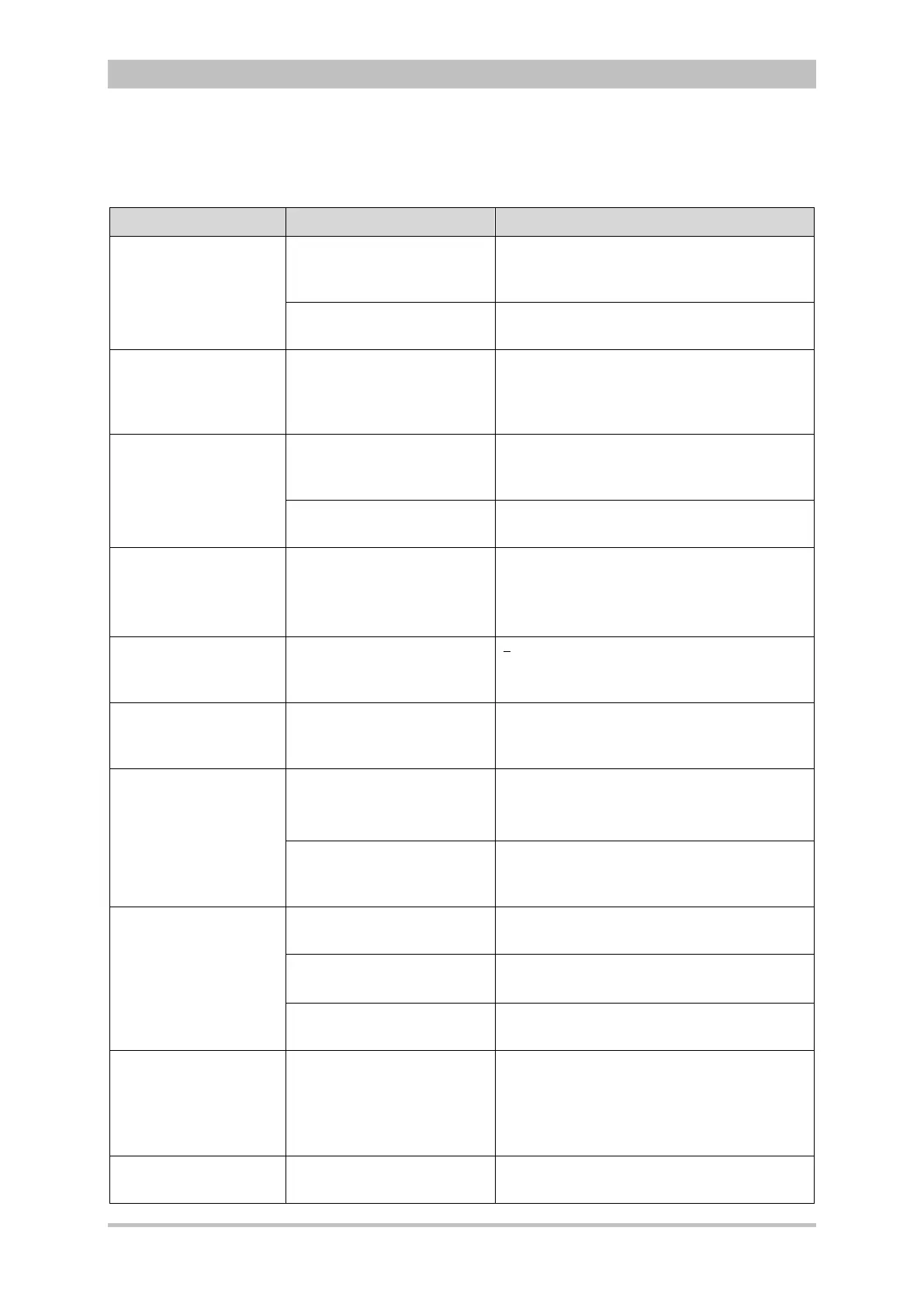
10.2 Troubleshooting and Corrective Actions
Malfunction Possible cause Measure
The loudspeaker of the
monitoring unit is too
faint or inaudible.
The loudspeaker volume
has been selected too low.
Set the volume to a readily audible value
(see chapter 7.3 Alarm Configuration,
p. 155).
The opening of the
loudspeaker is dirty
Clean the opening of the loudspeaker
The loudspeaker of the
monitoring unit is
buzzing in modular or
semi-modular use.
The disconnection signal of
the defibrillator/pacer unit is
activated.
For information on the disconnection signal
see chapter 7.4.3 Configuration of the
Defibrillation Function (Persons
Responsible for the Device), page 163.
The acoustic signal
transmitter of the
patient box is too faint
or inaudible.
The acoustic signal
transmitter volume has
been selected too low.
Set the volume to a readily audible value
(see chapter 7.3 Alarm Configuration,
p. 155).
The opening of the acoustic
signal transmitter is dirty.
Clean the opening of the acoustic signal
transmitter.
The time is incorrectly
displayed.
The time is not correctly
set.
Set the time correctly (see chapter 7.1.1
General System Settings, p. 137).
The permanent setting can only be made
by persons responsible for the device.
The date is incorrectly
displayed.
The date is not correctly
set.
Correctly set the date (see chapter 7.4.2
General System Settings (Person
responsible for the device), p. 160).
Time/date invalid A date before the release of
the current software was
entered
Enter the date correctly (see chapter
7.4.2 General System Settings (Person
responsible for the device), p. 160)
Functions such as D-
ECG, LT-ECG and
NIBP not available
(greyed softkeys).
Internal error.
Switch off the corpuls
3
and restart.
If the error persists, contact sales and
service partners.
Patient box and/or
defibrillator/pacer are/is
switched off.
Switch on patient box and/or
defibrillator/pacer.
LT-ECG not available No CompactFlash
®
card
inserted
Insert CompactFlash
®
card correctly
No original CompactFlash
®
card inserted.
Only use original corpuls
3
-
CompactFlash
®
cards.
The CompactFlash
®
card is
full.
Delete the data on the CompactFlash
®
card
and re-insert.
corpuls
3
starts with a
black screen and the
headline „corpuls3
Software Update
Mode“
The jog dial was pressed
during switching on or is
blocked.
Make sure that the jog dial can be turned
and is not blocked
Switch off the corpuls
3
by pressing the
On/Off key for at least 8 sec. and restart
Configuration export
failed
The configuration was not
saved.
The configuration has to be saved before
exporting.



 To Next Page