User Manual corpuls
3
Procedure in case of malfunctions
ENG - Version 2.1 – P/N 04130.2 251
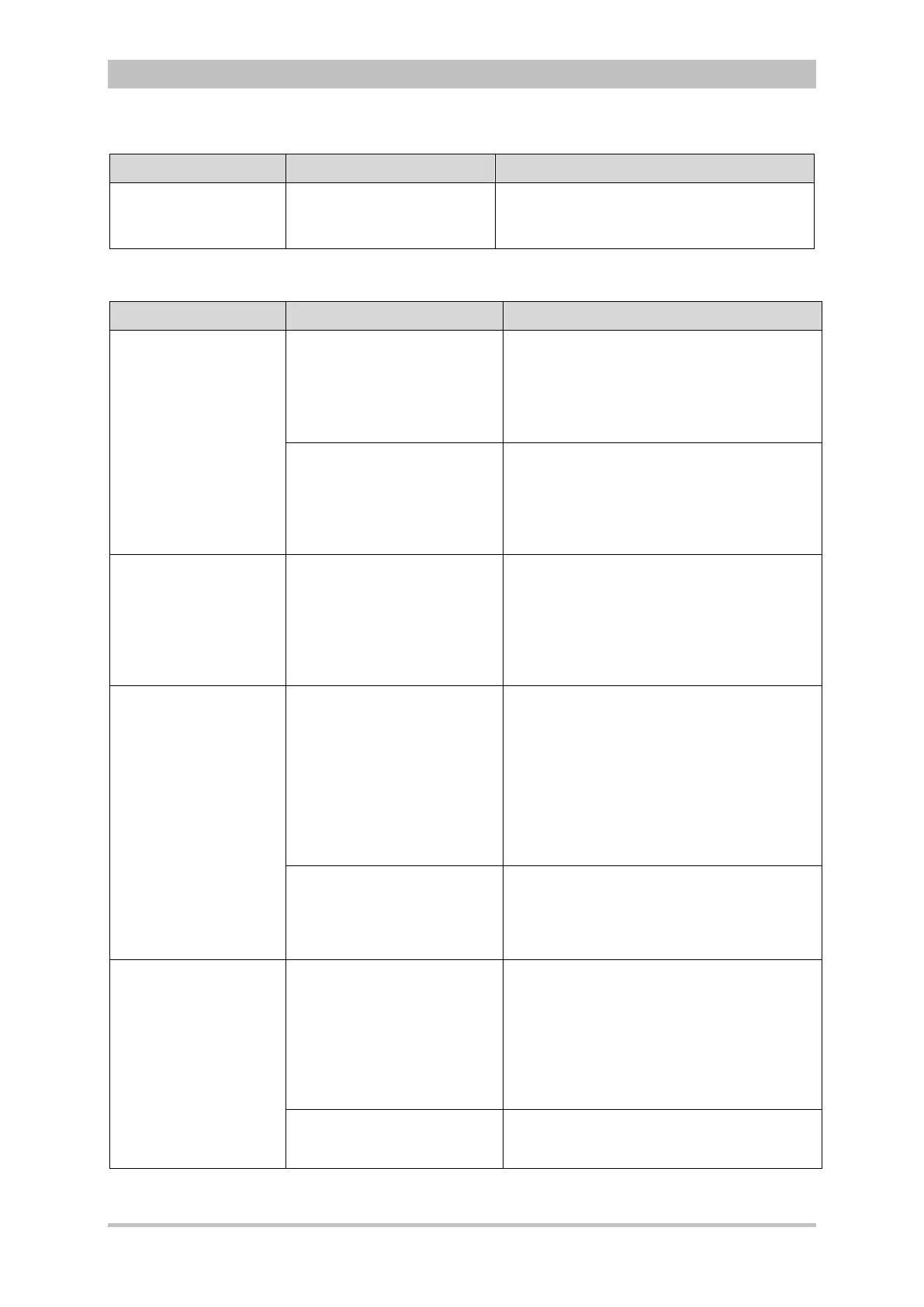
Malfunction Possible cause Measure
Configuration import
failed
The configuration file has
been written with a different
software version.
Contact sales and service partners.
10-2 General malfunctions
Malfunction Possible cause Measure
Error message „No
connection to
Defibrillator
Unit “
The defibrillator/pacer is
outside the radio range.
Check if the defibrillator module is
switched on.
Reduce the distance between the module
or
connect the modules mechanically.
Foreign body in front of the
infrared interface.
Check if there are foreign bodies in front
of the infrared interface of the individual
modules.
Remove foreign bodies.
If necessary, clean the infrared interfaces.
The monitoring unit
cannot be switched on
(operation as a
compact device).
Malfunction in the network
connection. The On/Off key
on the monitoring unit was
last pressed for more than 8
sec.
Disconnect the monitoring unit from the
defibrillator/pacer and the patient box.
Check if the defibrillator/pacer and
patient box are switched on.
Switch on the monitoring unit again by
pressing the On/Off key.
Modules cannot
connect (operation as
compact unit).
Foreign bodies in front of
infrared interface
Check if foreign bodies are located in
front of infrared interfaces on individual
modules.
Remove foreign objects.
Clean infrared interfaces if necessary.
If, necessary, use corpuls
3
with
wireless communication.
Contact sales and service partners.
Connection authorisation
(Pairing) does not take place
(message text “Pairing
failed”)
Check if all modules are switched on.
Repeat pairing.
If the error cannot be eliminated, contact
sales and service partners.
Radio connection
range low Operation
of disconnected
modules only possible
at short range.
The radio unit in the patient
box is shadowed by metallic
or metallised objects, by
people or body parts of the
patient.
The antenna of the radio unit is located at
the top of the patient box, If possible,
choose a position that allows unimpeded
view to the other modules
Put patient box to an upright position or
use appropriate bracket
Remove metallic or metallised objects
Possibly a technical defect Connect modules mechanically.
Contact sales and service partners.
10-3 Network malfunctions



 To Next Page