Introduction
User Manual corpuls
3
12 ENG - Version 2.1 – P/N 04130.2
3.2.2 Monitoring Unit
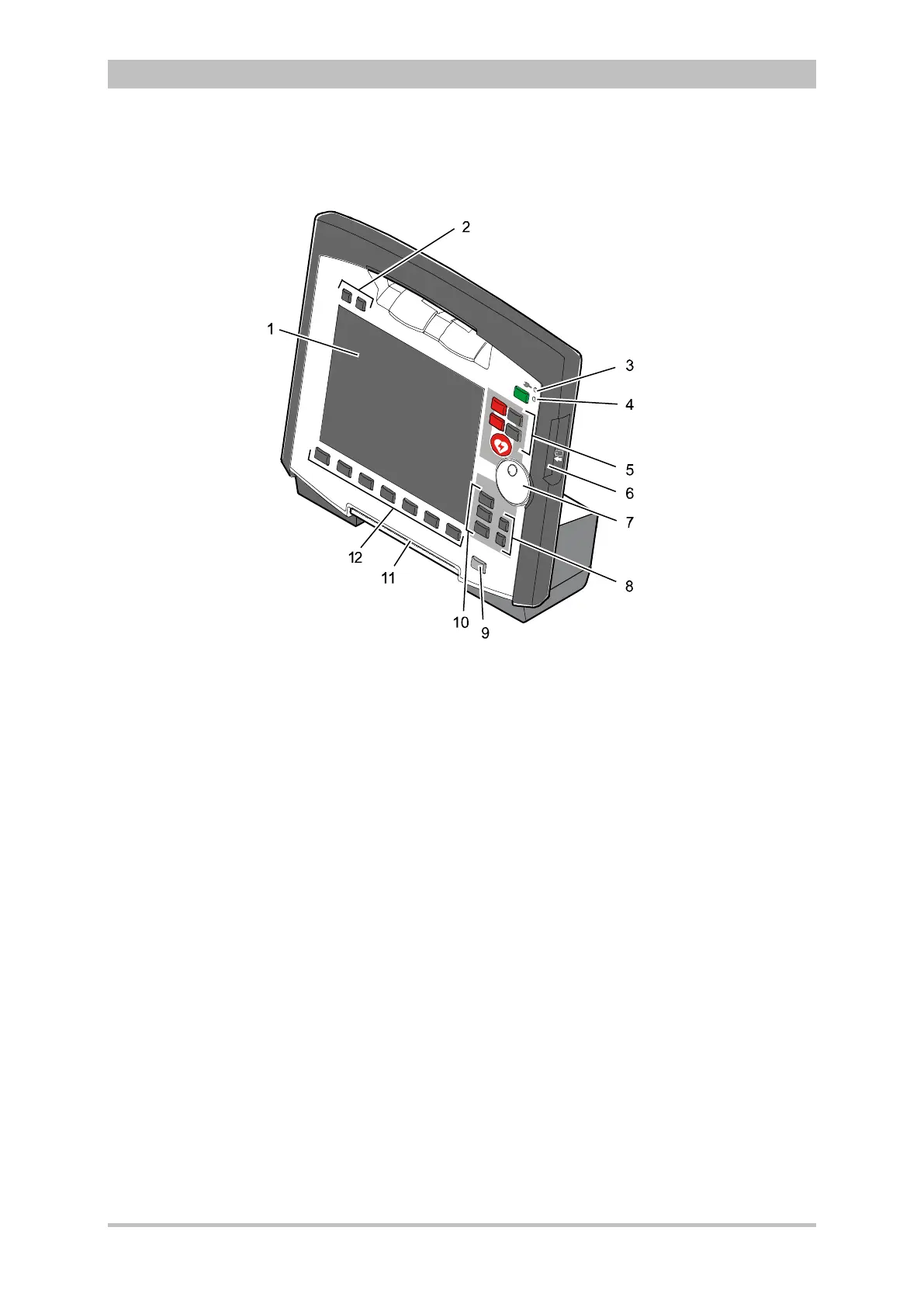
Fig. 3-5 Monitoring Unit
1 Display
2 Alarm and event function keys
3 Status LED power supply/charging status
4 On/Off key with operating status LED
5 Defibrillation mode function keys
6 Insurance card reader
7 Jog dial and alarm light
8 Function keys for navigation
9 Print key
10 Operating mode keys
11 Printer
12 Softkeys
The monitoring unit is the central user interface of corpuls
3
. The monitoring
unit comprises the display (item 1), the printer (item 11) and the insurance card
reader (item 6, option), as well the jog dial (item 7), the function keys (items 2, 5,
8 and 9), the operating mode keys (item 10) and the softkeys (item 12).
The jog dial is used to navigate in the main menu, the parameter and curve
context menus and in the display areas on the display.
An alarm light is integrated into the jog dial.
The monitor, pacer and operation browser functions can be selected directly by
pressing the function keys.
Softkey assignment varies according to the selected function. Softkey
assignments are described in the chapters dealing with the respective functions.



 To Next Page