User Manual corpuls
3
Operation – Therapy
ENG - Version 2.1 – P/N 04130.2 85
5.5.3 Starting the Pacer Function
Prerequisite: Device is switched on.
1. Press the Pacer key to run the pacer function.
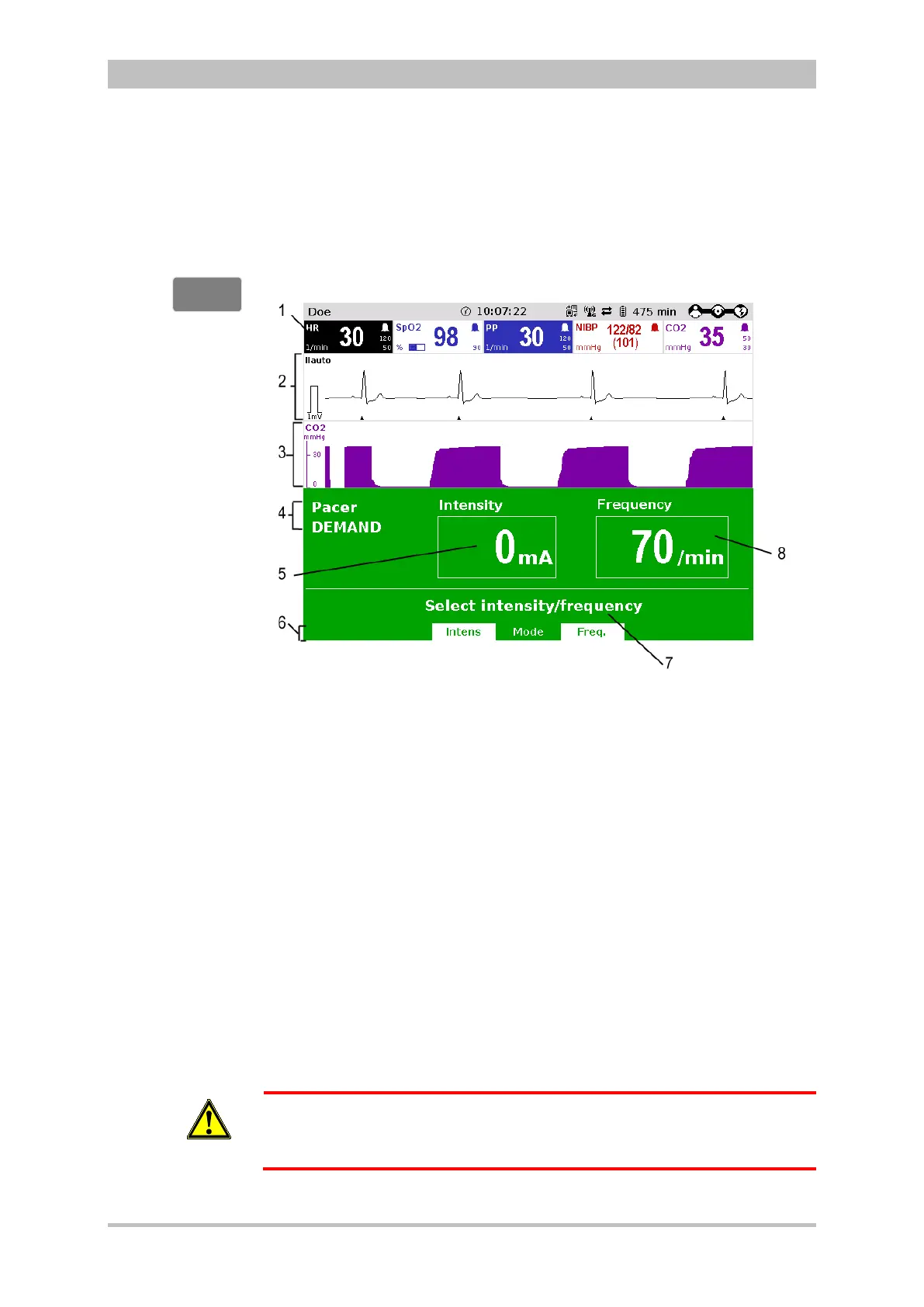
The following screen structure appears:
Fig. 5-13 Pacer, initial screen
1 Heart rate parameter field
2 Current ECG (recording II/DEauto)
3 Configurable curve field
4 Pacer operating mode
5 Selected intensity
6 Softkey assignment
7 Operating instruction
8 Selected frequency
The pacer always starts in DEMAND operating mode.
2. Press the softkey [Mode], if the operating mode FIX is to be used. If
DEMAND operating mode is to be used, continue with step 4.
3. Press the softkey [FIX] to select FIX operating mode.
4. Press the softkey [Freq.] and select the required frequency with the jog dial.
The pacing frequency can be adjusted in 5/min increments within the range of
30/min to 150/min.
WARNING
Pacing begins automatically as soon as an intensity of more than 0 mA is
selected.
5. Press the softkey [Intens] and select the required intensity with the jog dial.
FIX or DEMAND
operating mode



 To Next Page