General Operating Instructions
User Manual corpuls
3
62 ENG - Version 2.1 – P/N 04130.2
4.6.3 Patient Box Charging Bracket
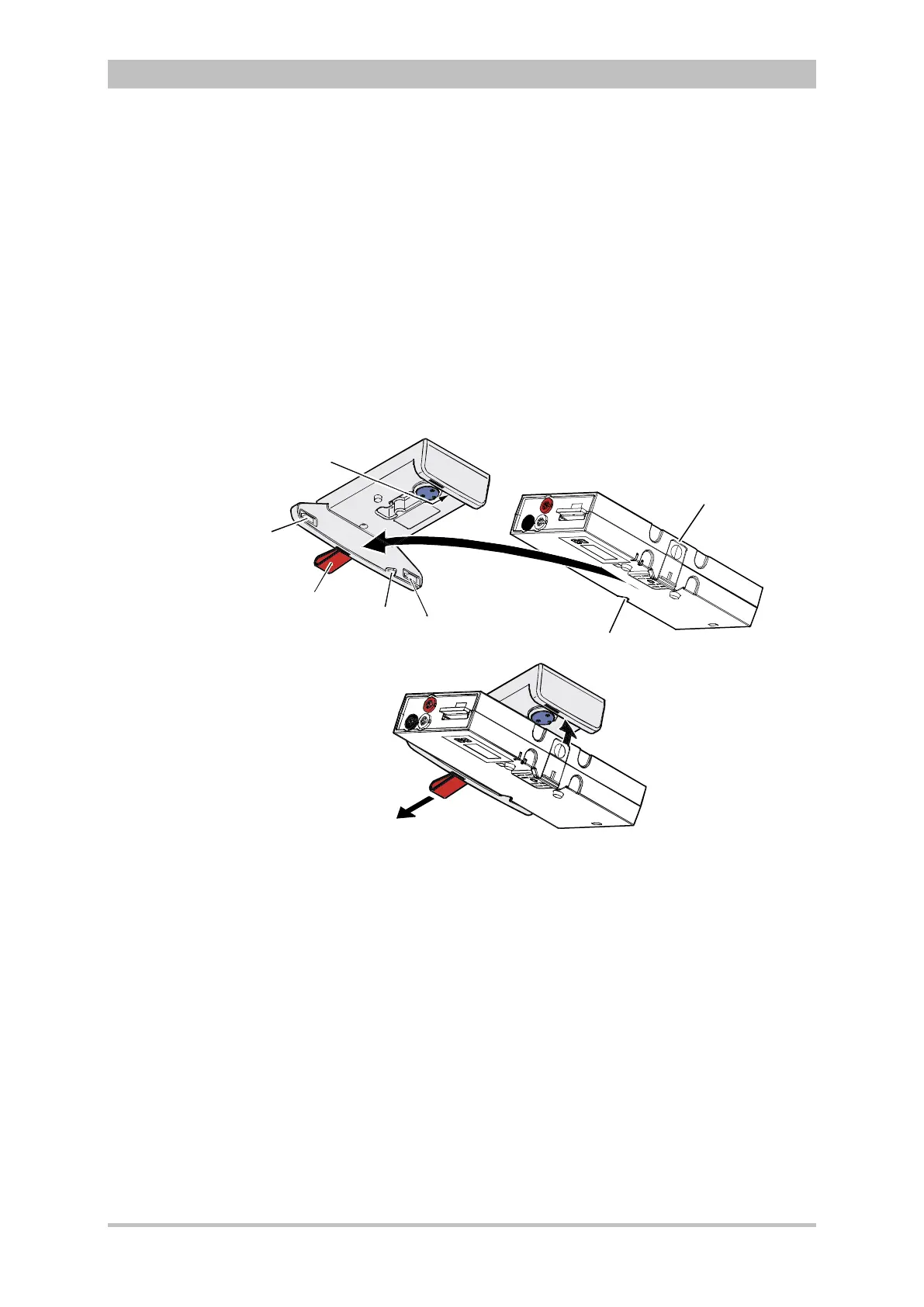
1. Position the patient box as shown in Fig. 4-33.
2. Fit the patient box with its bottom side onto the long part of the charging
bracket (item A):
The recesses on the patient box engage in both pins (item 4) on the
charging bracket.
The connection coding (item 5) fits in the recess (item 3) on the patient box.
3. Tilt the patient box upwards to the charging bracket (item B) until the lock
audibly engages at the patient box.
4. Make sure that the patient box is engaged in the guides and the closures.
5. Connect the safety belt below the patient box and pull tight (not illustrated).
Fig. 4-33 Inserting the patient box into the charging bracket (ceiling
installation)
1 Lock
2 Closure
3 Connection coding recess
4 Pins
5 Connection coding
6 Loop
1. Disconnect the safety belt (not illustrated in Fig. 4-33).
2. Firmly hold the patient box and pull the loop (item 6) sideways (item C).
3. Remove the patient box from the bracket.



 To Next Page