Operation – Therapy
User Manual corpuls
3
94 ENG - Version 2.1 – P/N 04130.2
5.7.3 Working with CPR Feedback
Prerequisite: Device is switched on.
The CPR feedback system starts automatically when the corPatch CPR
sensor is applied.
1. If necessary, select a curve field for displaying the compression
progression (CPR) and call up the curve context menu.
2. Assign the CPR curve to the selected curve field.
3. If necessary, select a parameter field for displaying the CPR rate and call
up the parameter context menu.
4. Assign the CPR rate to the selected parameter field.
5. If necessary, select in the main menu "Defib" ► "CPR" and further adjust
the configurations of the CPR Feedback system.
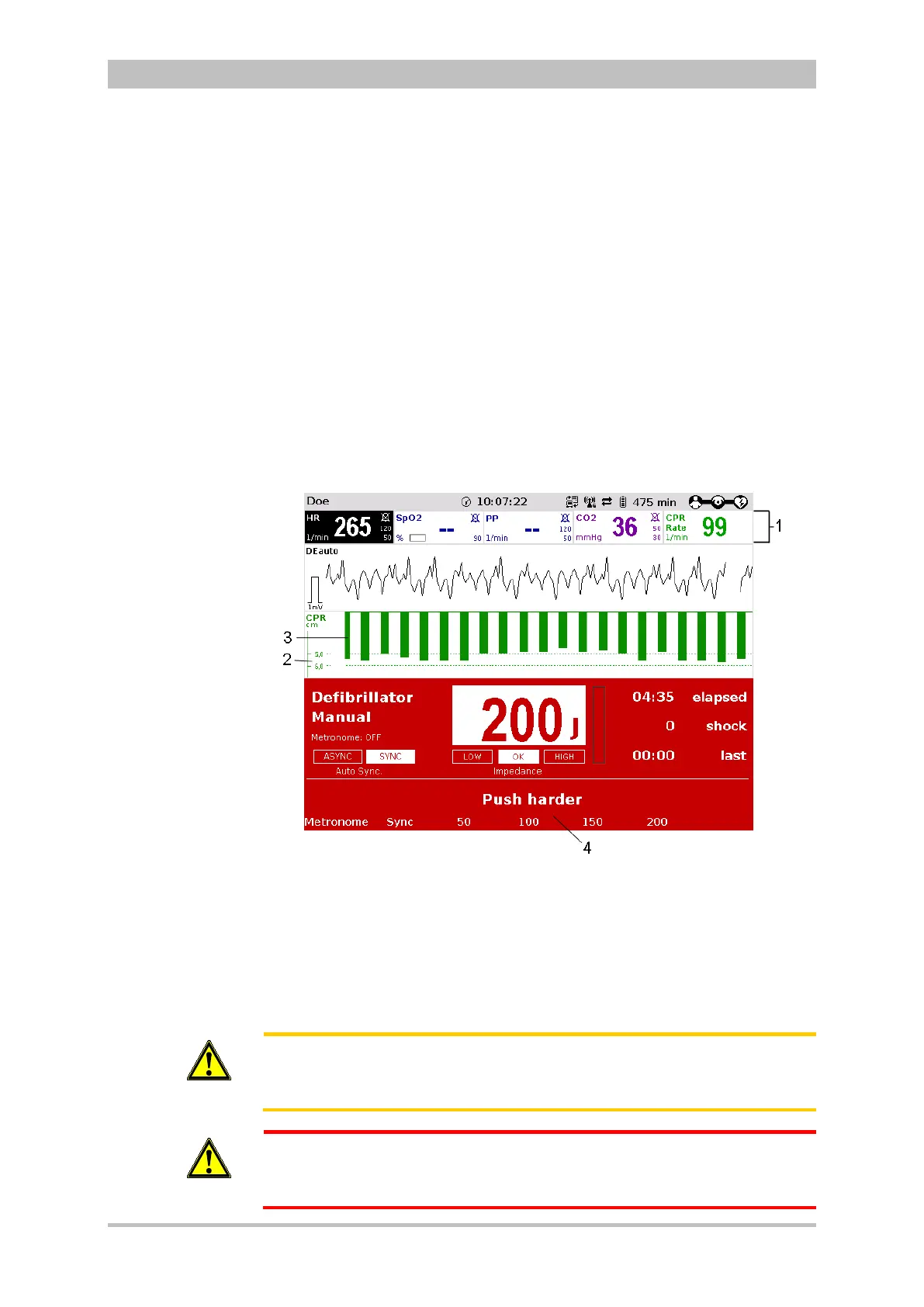
Fig. 5-19 CPR feedback
1 Parameter field CPR rate
2 Selected depth of the thorax compressions
3 Curve field CPR
4 Operating instruction
If necessary, the compression depth and the used measuring unit can be
adjusted in the context menus and in the configuration menu.
Caution
The detection of the rate and depth of the thorax compressions can be
compromised by vibrations.
WARNING
During the phase between compressions, the user has to make sure that the
pressure is completely relieved from the thorax. Otherwise, there can be
false-negative feedback.



 To Next Page