Introduction
User Manual corpuls
3
24 ENG - Version 2.1 – P/N 04130.2
3.4.1 Alarm Signals at the Monitoring unit
Physiological and technical alarms are signalled at the monitoring unit via the
status line, the vital parameter field, the jog dial and by acoustic signals. The
positions of the operation- and display elements are described in chapter 4.1
Operating and Display Elements, page 31.
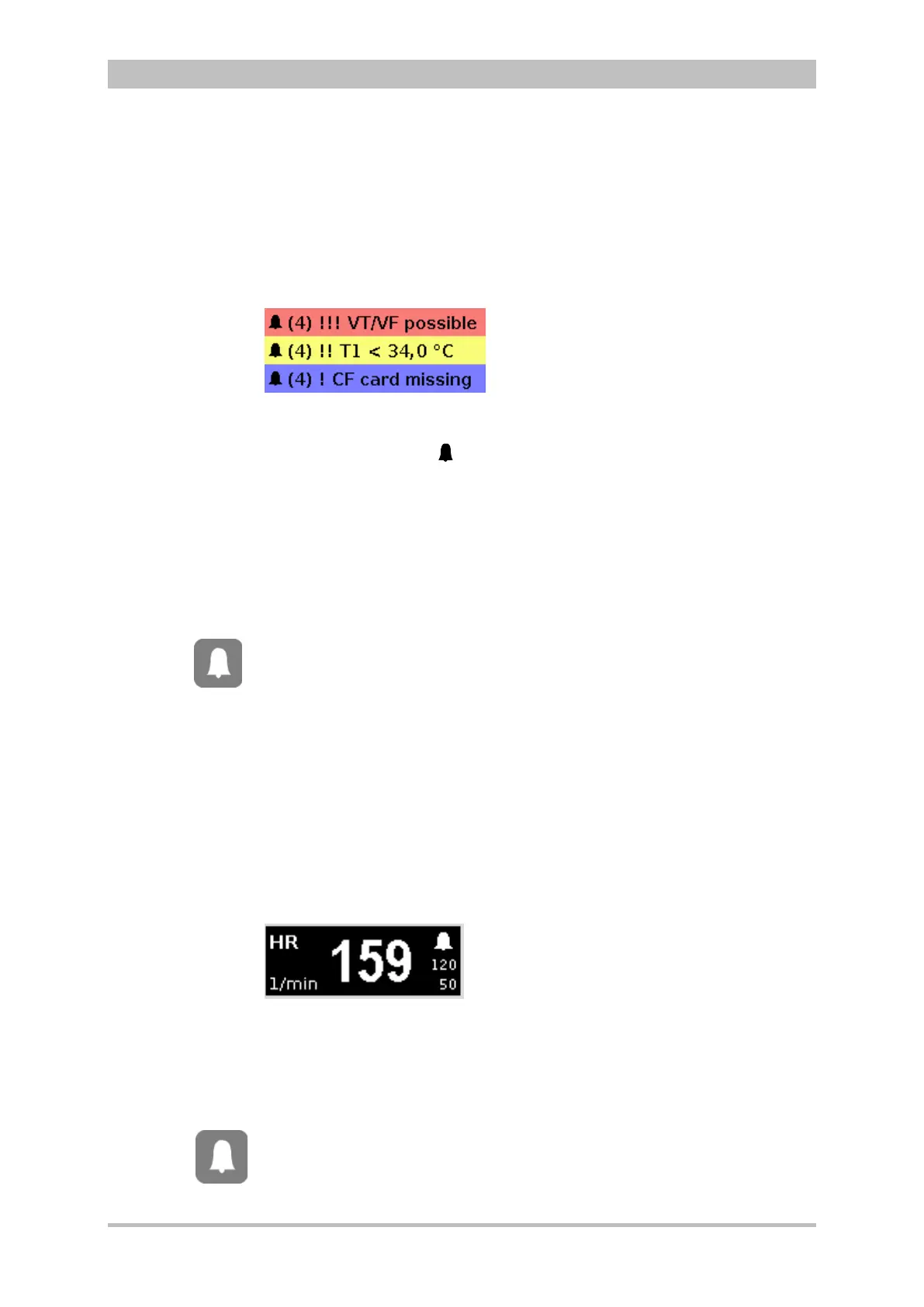
Alarm signal in the status line
Fig. 3-15 Alarm message in the status line
− The bell symbol
indicates an alarm.
− The number in brackets indicates the number of active alarms
(here 4 alarms)
− The number of exclamation marks indicates the priority of the alarm
(!!! – high; !!HIGH – medium; ! – low)
− The colour of the status line indicates the priority of the alarm
(red – high; yellow – medium; blue – low)
− The alarm is displayed as a text message together with the pre-set
limit value.
Pressing the Alarm key once opens the alarm history which lists the last 8
alarms. The individual alarms can be confirmed by pressing the Alarm key
again. In this case, the most recent alarm message is deleted from the status
line of the monitoring unit and from the display of the patient box.
In the alarm history all active and non-active alarms are displayed that have not
yet been confirmed; with the alarms being sorted top-down from active (top) to
non-active (bottom). Within the active and non-active alarms, the alarms are
sorted by priority and then in descending order by the time of their occurrence.
The alarm history can contain up to 256 alarms. Preferably these should be
confirmed as soon as possible. If more than 256 un-confirmed alarms
accumulate, the oldest alarm is overwritten.
Certain technical alarms are displayed in red type. These alarms cannot be
deleted from the status line and alarm history.
Alarm signal in parameter field displayed in inverted colours:
Fig. 3-16 Inverted parameter field
− This display appears only for physiological alarms.
− The parameter field can only be displayed in inverted colours when the
display of this parameter field is configured.
− The parameter field remains in inverted colours for as long as the
measured value falls below or exceeds the pre-set limit value or until the
alarm for this measured value is disabled.
This applies regardless of whether the alarm message in the status line
has been confirmed by pressing the Alarm key or not.
hist



 To Next Page