EasyManua.ls Logo

HP 262SA - Page 231

HP 262SA
390 pages
Print Icon
To Next Page IconTo Next Page
To Previous Page IconTo Previous Page
Loading...
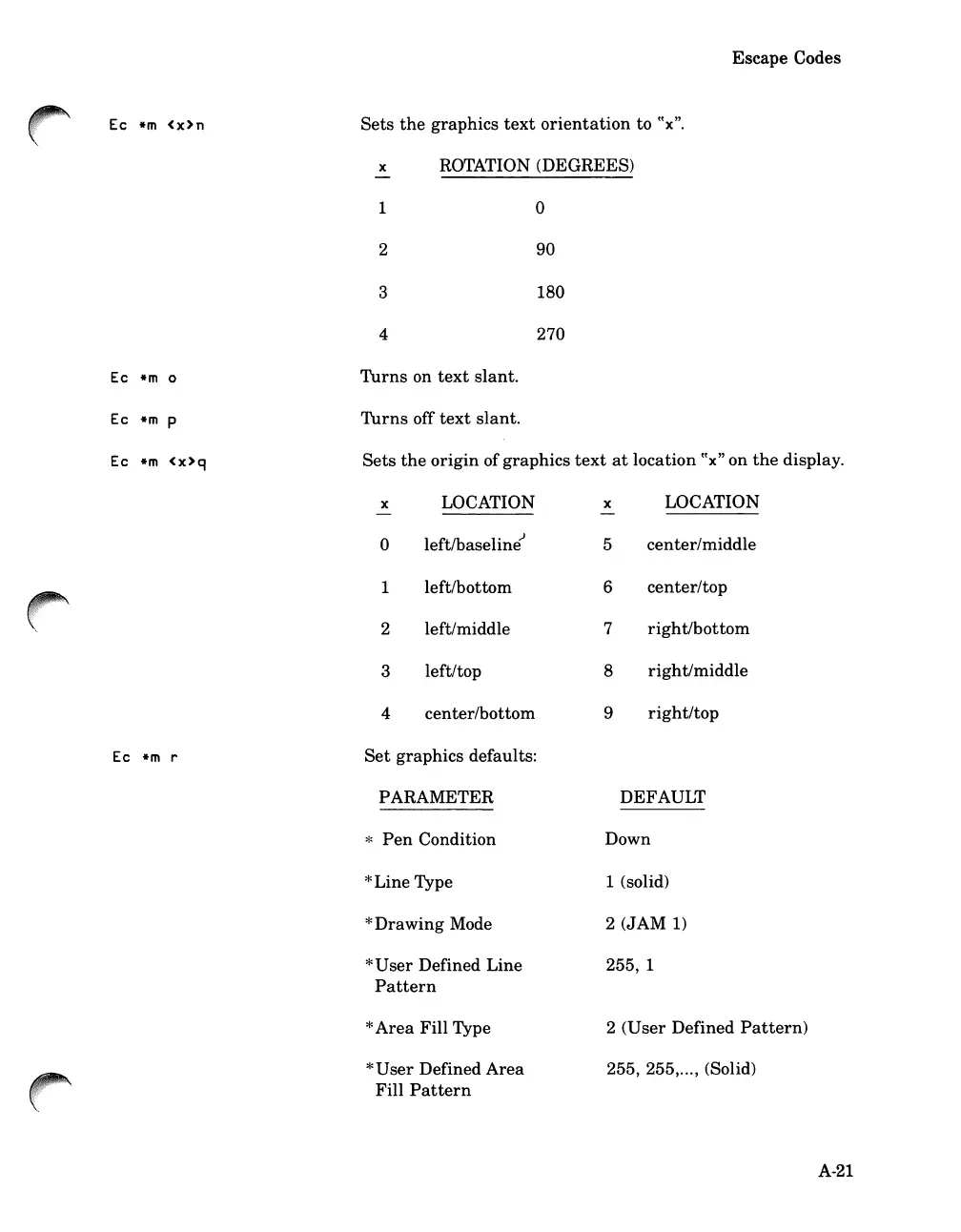
Ec
*m
<x>n
Ec
*m
0
Ec
*m
p
Ec
*m
<x>q
Escape Codes
Sets
the
graphics
text
orientation
to
((x".
x ROTATION (DEGREES)
1 0
2
90
3 180
4 270
Turns
on
text
slant.
Turns
off
text
slant.
Sets
the
origin
of
graphics
text
at
location ((x" on
the
display.
Ec
*m
r
x LOCATION
0
left/baselinEi
1
left/bottom
2 left/middle
3
left/top
4
center/bottom
Set
graphics
defaults:
PARAMETER
*
Pen
Condition
*Line
Type
*Drawing
Mode
*
User
Defined Line
Pattern
*
Area
Fill Type
*
User
Defined
Area
Fill
Pattern
x
LOCATION
5
center/middle
6
center/top
7
right/bottom
8
righ
t/middle
9
right/top
DEFAULT
Down
1 (solid)
2
(JAM
1)
255, 1
2
(User
Defined
Pattern)
255, 255,..., (Solid)
A-21

Table of Contents

Related product manuals