Graphics
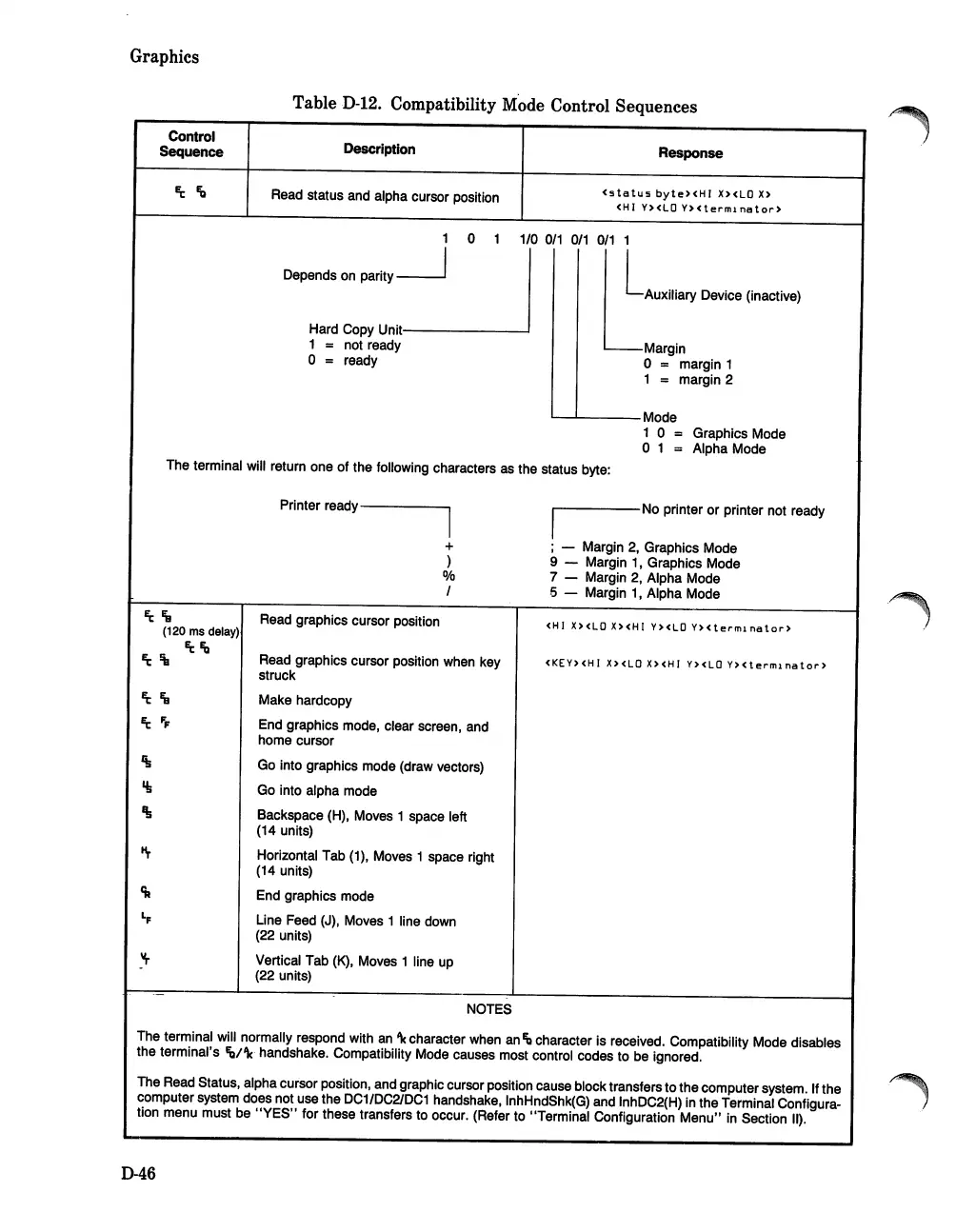
TableD-12. Compatibility Mode Control Sequences
Control
Sequence
Description
Read status and alpha cursor position
1 0 1
Depends
on
parity
~
Response
(status
byte>(HI
X><LO
x>
<HI
Y>
<LOY> ( t e r m1
na
tor>
1/0
0/1 0/1 0/1
1
LAUXiliary
Device (inactive)
Hard Copy
Unit--------'
1 = not ready
o = ready
~Margin
o = margin 1
1 = margin 2
'-------
Mode
1 0
= Graphics Mode
o 1 = Alpha Mode
The terminal will return one
of
the
folloWing characters as the status byte:
~Fg
(120
ms
delay)
~Fo
Printer read
y
-----
I
+
)
0/0
1
Read graphics cursor position
Read graphics cursor position when key
struck
Make hardcopy
End graphics mode, clear screen, and
home cursor
Go into graphics mode (draw vectors)
Go into alpha mode
Backspace (H), Moves 1 space left
(14 units)
Horizontal Tab (1), Moves 1 space right
(14 units)
End graphics mode
Line Feed (J), Moves 1 line down
(22 units)
Vertical Tab
(K),
Moves 1 line up
(22 units)
NOTES
I~-----
No printer
or
printer not ready
; - Margin 2, Graphics Mode
9 - Margin 1, Graphics Mode
7 - Margin 2, Alpha Mode
5 - Margin 1, Alpha Mode
<HI
X>
<LOX> <HI Y><LOY> <t
e,.
m1
na
tor>
(KEY><HI X>(LO X><HI Y><LO
Y><termlnator>
The terminal will normally respond with an
'\
character when an
Fo
character is received. Compatibility Mode disables
the
terminal's Ib/'k handshake. Compatibility Mode causes most control codes to be ignored.
The Read Status, alpha cursor position, and graphic cursor position cause block transfers
to
the
computer system. If
the
computer system does not use the
DC1/DC2IDC1
handshake, InhHndShk(G) and InhDC2(H) in
the
Terminal Configura-
tion menu must be
"YES"
for these transfers to occur. (Refer to "Terminal Configuration
Menu"
in Section II).
046













 To Next Page