EasyManua.ls Logo

HP 262SA - Page 376

HP 262SA
390 pages
Print Icon
To Next Page IconTo Next Page
To Previous Page IconTo Previous Page
Loading...
3276/78
Emulation
Mode
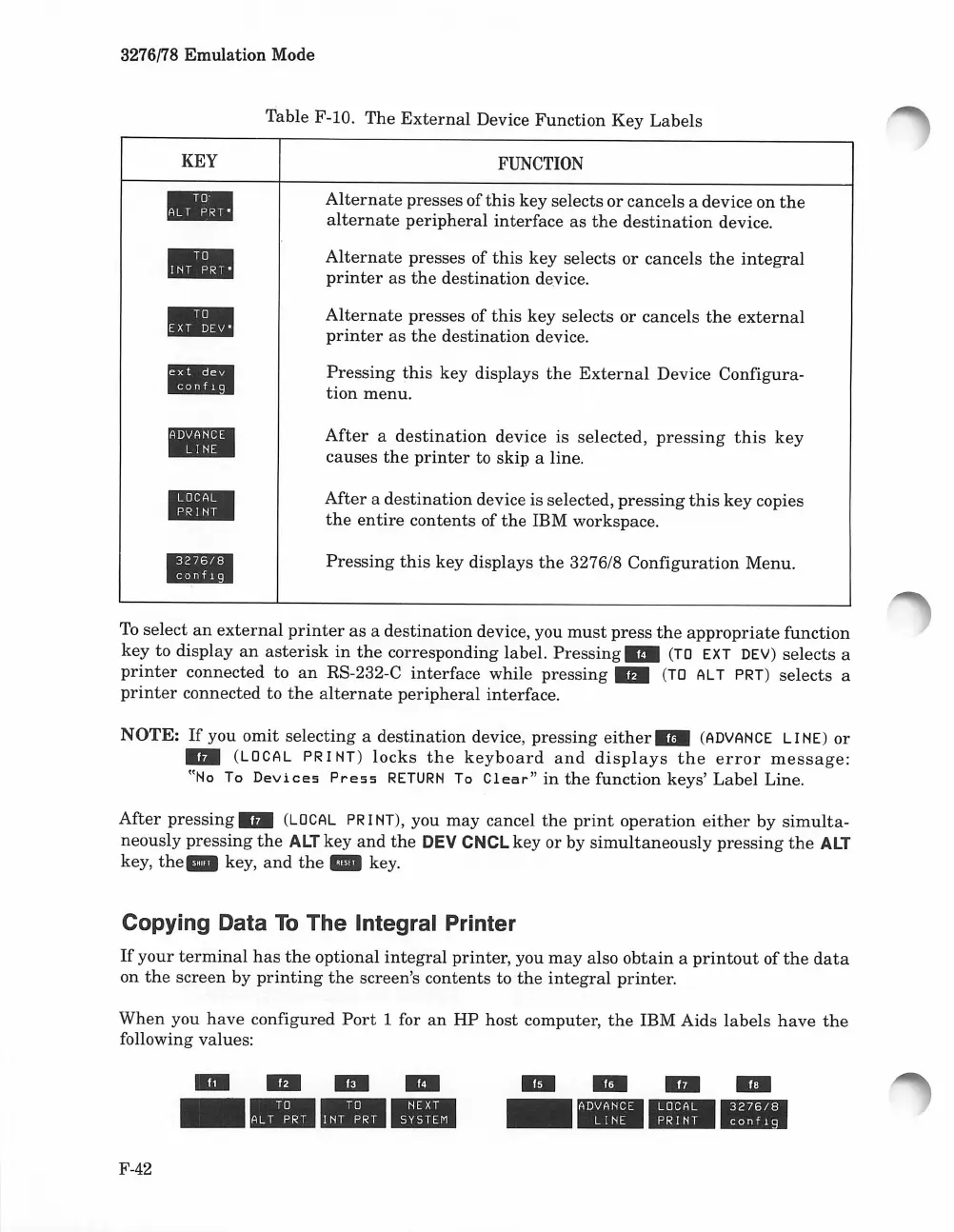
Table F-IO.
The
External
Device
Function
Key
Labels
KEY
-
II1II
l1li
l!IIII!I.B
IBiJiIIEI
I!!II.mI
mIDI
FUNCTION
Alternate
presses of
this
key selects
or
cancels a device
on
the
alternate
peripheral
interface
as
the
destination
device.
Alternate
presses of
this
key
selects or cancels
the
integral
printer
as
the
destination
device.
Alternate
presses of
this
key
selects
or
cancels
the
external
printer
as
the
destination
device.
Pressing
this
key displays
the
External
Device Configura-
tion
menu.
After
a
destination
device is
selected,
pressing
this
key
causes
the
printer
to skip a line.
After
a
destination
device is selected,
pressing
this
key
copies
the
entire
contents of
the
IBM workspace.
Pressing
this
key
displays
the
3276/8
Configuration
Menu.
To
select
an
external
printer
as
a
destination
device, you
must
press
the
appropriate
function
key
to
display
an
asterisk
in
the
corresponding label.
Pressing"
(TO
EXT DEV)
selects
a
printer
connected to
an
RS-232-C
interface
while
pressing"
(TO
ALT PRT)
selects
a
printer
connected to
the
alternate
peripheral
interface.
NOTE:
If
you
omit
selecting
a
destination
device,
pressing
either"
(ADVANCE
LINE)
or
..
(LOCAL
PR
I
NT)
locks
the
keyboard
and
displays
the
error
message:
"No
To
Devices
Press
RETURN
To
Clear"
in
the
function keys'
Label
Line.
After
pressing"
(LOCAL
PR
I NT), you
may
cancel
the
print
operation
either
by
simulta-
neously
pressing
the
ALT
key
and
the
DEV
CNCL
key
or
by
simultaneously
pressing
the
ALT
key,
the.
key,
and
the
_ key.
Copying Data
To
The Integral Printer
If
your
terminal
has
the
optional
integral
printer, you
may
also
obtain
a
printout
of
the
data
on
the
screen
by
printing
the
screen's contents to
the
integral
printer.
When
you
have
configured
Port
1 for
an
HP
host computer,
the
IBM Aids
labels
have
the
following values:
F-42
..
....
..
----
........
----

Table of Contents

Related product manuals