EasyManua.ls Logo

HP 262SA - Page 44

HP 262SA
390 pages
Print Icon
To Next Page IconTo Next Page
To Previous Page IconTo Previous Page
Loading...
Configuring
the
Terminal
Table
3-3.
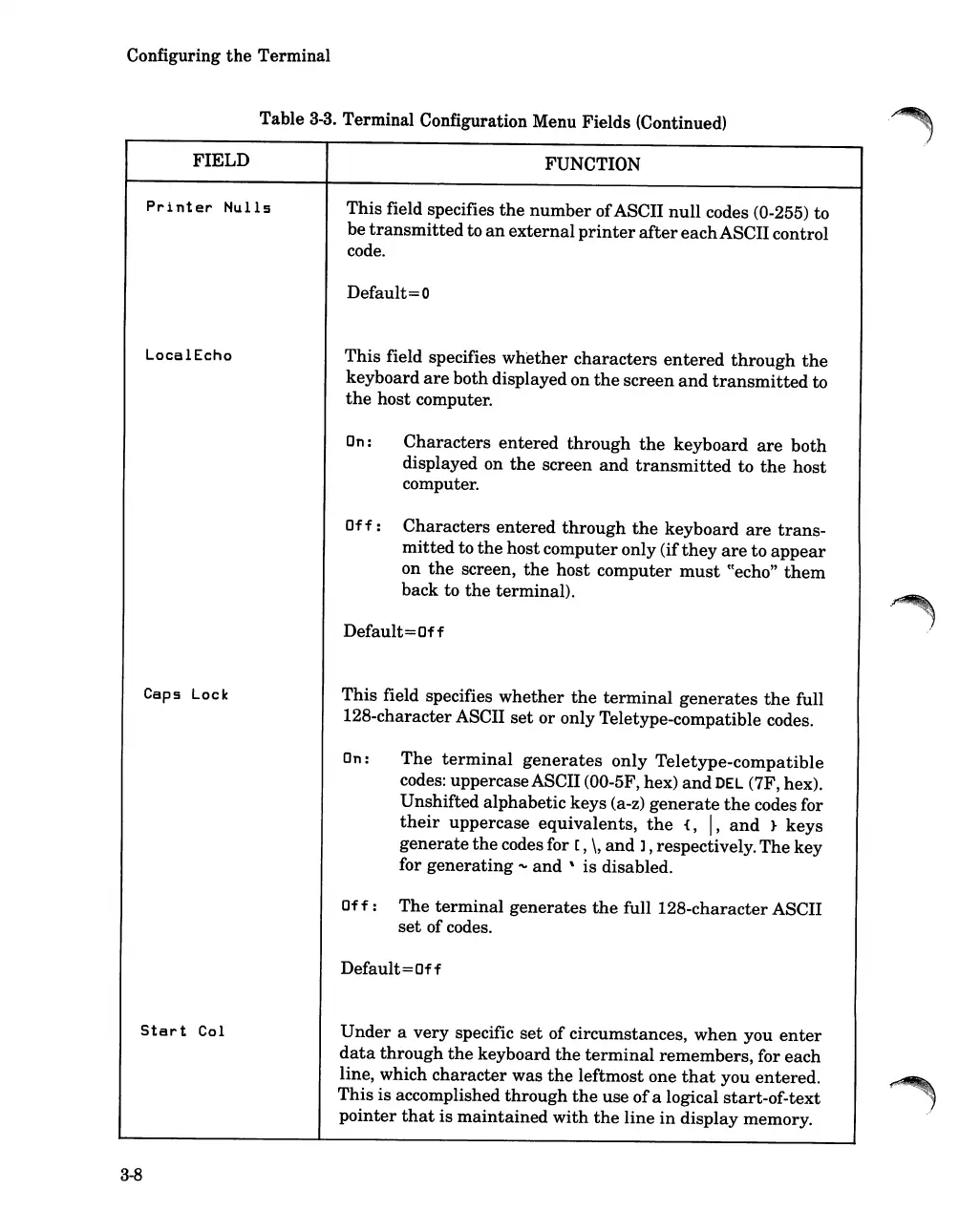
Terminal Configuration Menu Fields (Continued)
FIELD
FUNCTION
Printer
Nulls
This
field specifies
the
number
ofASCII
null
codes (0-255) to
be
transmitted
to
an
external
printer
after
each
ASCII control
code.
Default= 0
LocalEcho
This
field specifies
whether
characters
entered
through
the
keyboard
are
both displayed on
the
screen
and
transmitted
to
the
host computer.
On:
Characters
entered
through
the
keyboard
are
both
displayed on
the
screen
and
transmitted
to
the
host
computer.
Off:
Characters
entered
through
the
keyboard
are
trans-
mitted
to
the
hostcomputer only (if
they
are
to
appear
on
the
screen,
the
host
computer
must
cCecho"
them
back to
the
terminal).
Default=Off
Caps Lock
This
field specifies
whether
the
terminal
generates
the
full
128-characterASCII
set
or only Teletype-compatible codes.
On:
The
terminal
generates
only
Teletype-compatible
codes: uppercaseASCII
(OO-5F,
hex)
and
DEL
(7F, hex).
Unshifted alphabetic keys (a-z)
generate
the
codes for
their
uppercase equivalents,
the
{,
I,
and
}
keys
generate
the
codes for
[,
\,
and
], respectively.
The
key
for
generating
'\,0
and
'
is
disabled.
Off:
The
terminal
generates
the
full 128-characterASCII
set
of codes.
Default=Off
Start
Col
Under
a
very
specific
set
of circumstances,
when
you
enter
data
through
the
keyboard
the
terminal
remembers, for each
line, which character was
the
leftmost one
that
you entered.
This
is
accomplished through
the
use
of
a logical start-of-text
pointer
that
is
maintained
with
the
line
in
display memory.
3-8

Table of Contents

Related product manuals