EasyManua.ls Logo

HP 262SA - Page 49

HP 262SA
390 pages
Print Icon
To Next Page IconTo Next Page
To Previous Page IconTo Previous Page
Loading...
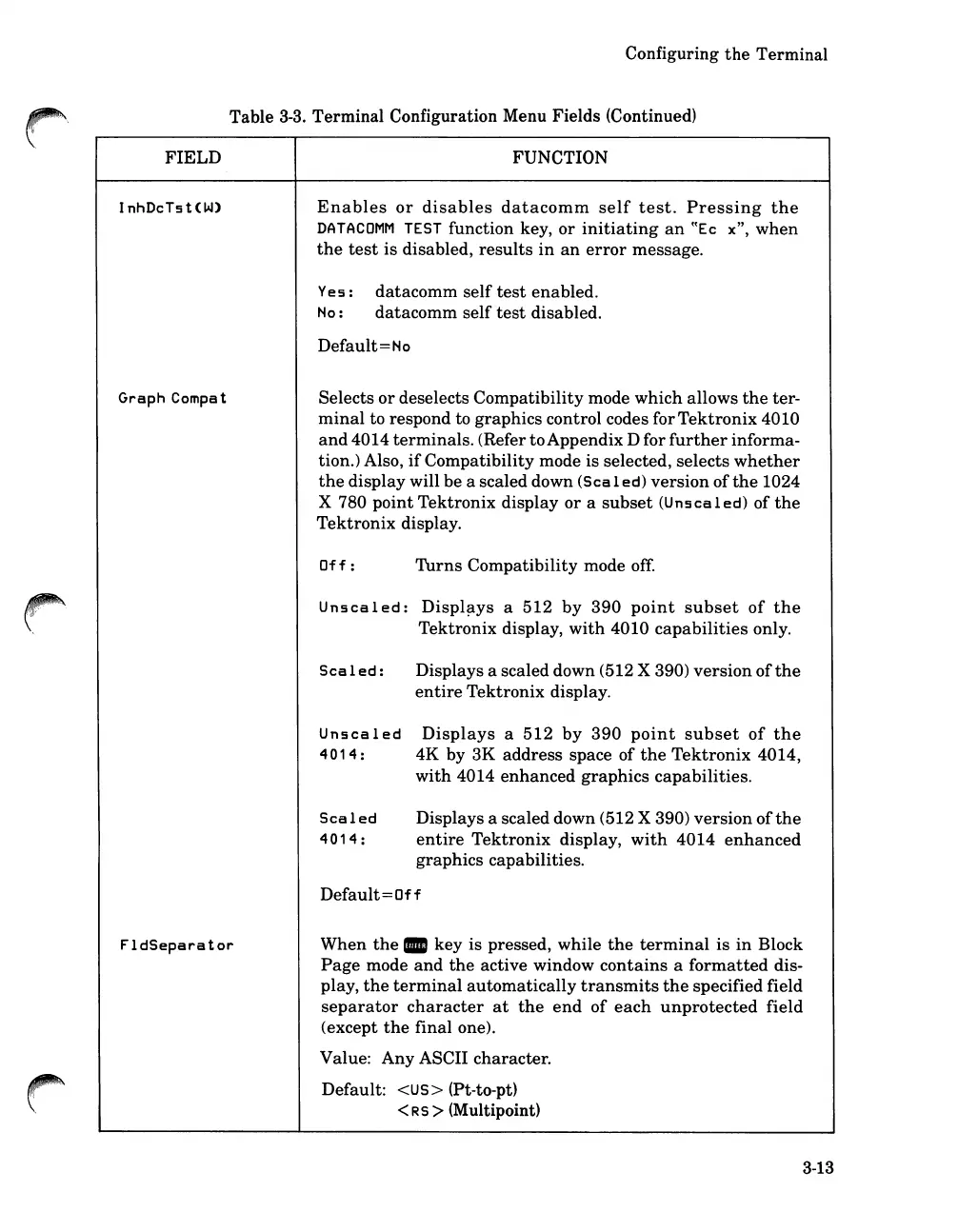
FIELD
InhDeTst<W)
Graph
Compa
t
Configuring
the
Terminal
Table
3-3.
Terminal Configuration Menu Fields (Continued)
FUNCTION
Enables
or
disables
datacomm
self
test.
Pressing
the
DATACOMM
TEST
function key,
or
initiating
an
((Ee
x",
when
the
test
is
disabled,
results
in
an
error
message.
Yes:
datacomm
self
test
enabled.
No:
datacomm
self
test
disabled.
Default=No
Selects
or
deselects
Compatibility
mode
which
allows
the
ter-
minal
to respond to
graphics
control codes for
Tektronix
4010
and
4014
terminals.
(Refer
to
Appendix D for
further
informa-
tion.) Also,
if
Compatibility
mode is selected, selects
whether
the
display will
be
a scaled down (SeaI ed)
version
of
the
1024
X 780
point
Tektronix
display
or
a
subset
(Unsealed)
of
the
Tektronix
display.
Of
f :
Turns
Compatibility
mode
off.
Uns
ea
I
ed:
Displ~ys
a
512
by
390
point
subset
of
the
Tektronix
display,
with
4010
capabilities
only.
Scaled:
Unsealed
4014:
Scaled
4014:
Displays a scaled down (512 X 390)
version
of
the
entire
Tektronix
display.
Displays
a
512
by
390
point
subset
of
the
4K
by
3K
address
space
of
the
Tektronix
4014,
with
4014
enhanced
graphics
capabilities.
Displays a scaled down (512 X 390)
version
of
the
entire
Tektronix
display,
with
4014
enhanced
graphics
capabilities.
FldSeparator
Default=Off
When
the.
key is pressed, while
the
terminal
is
in
Block
Page
mode
and
the
active window
contains
a
formatted
dis-
play,
the
terminal
automatically
transmits
the
specified field
separator
character
at
the
end
of
each
unprotected
field
(except
the
final one).
Value:
Any
ASCII character.
Default: <US> (Pt-to-pt)
<R5 > (Multipoint)
3-13

Table of Contents

Related product manuals