Configuring
the
Terminal
Table
3-3.
Terminal Configuration Menu Fields (Continued)
FIELD
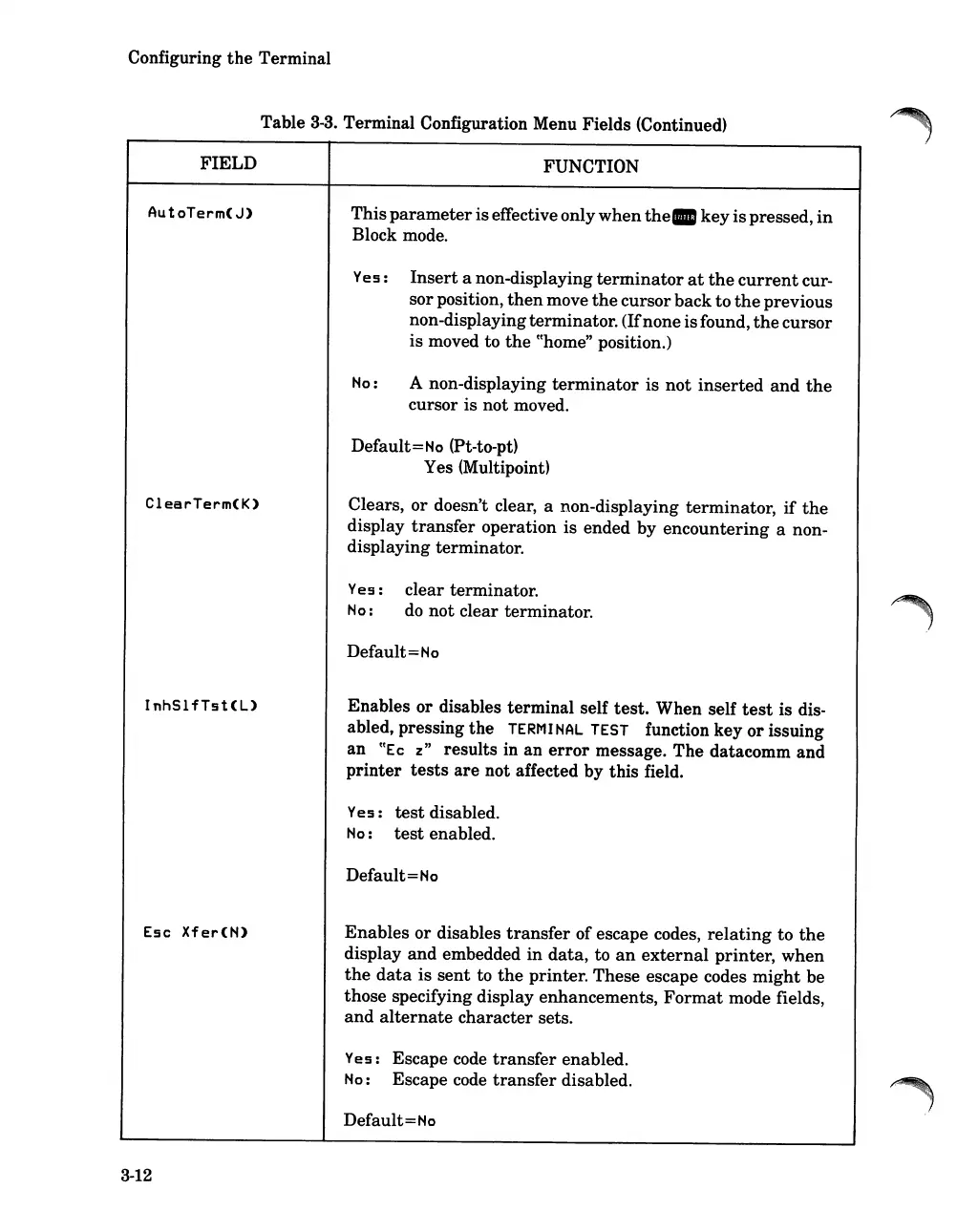
AutoTerm(J)
ClearTerm(K)
InhSlfTst(L)
Esc
Xfer(N)
3-12
FUNCTION
This
parameter
iseffective only
when
the.
key
is
pressed,
in
Block mode.
Yes:
Insert
a non-displaying
terminator
at
the
current
cur-
sorposition,
then
move
the
cursorback to
the
previous
non-displayingterminator. (Ifnone isfound,
the
cursor
is
moved to
the
cChome"
position.)
No:
A non-displaying
terminator
is
not
inserted
and
the
cursor is not moved.
Default=No (Pt-to-pt)
Yes (Multipoint)
Clears, or doesn't clear, a non-displaying terminator,
if
the
display
transfer
operation is ended by
encountering
a non-
displaying terminator.
Yes: clear terminator.
No:
do
not clear terminator.
Default=No
Enables or disables terminal self
test.
When self
test
is dis-
abled, pressing
the
TERMI
NAL
TEST
function key
or
issuing
an
cCEc
z"
results in an
error
message.
The
datacomm and
printer
tests
are
not affected by this field.
Yes:
test
disabled.
No
:
test
enabled.
Default=No
Enables
or disables
transfer
of escape codes,
relating
to
the
display
and
embedded
in
data,
to
an
external
printer,
when
the
data
is
sent
to
the
printer. These escape codes
might
be
those specifying display enhancements,
Format
mode fields,
and
alternate
character sets.
Yes: Escape code
transfer
enabled.
No:
Escape code
transfer
disabled.
Default=
No













 To Next Page