EasyManua.ls Logo

HP 262SA - Page 47

HP 262SA
390 pages
Print Icon
To Next Page IconTo Next Page
To Previous Page IconTo Previous Page
Loading...
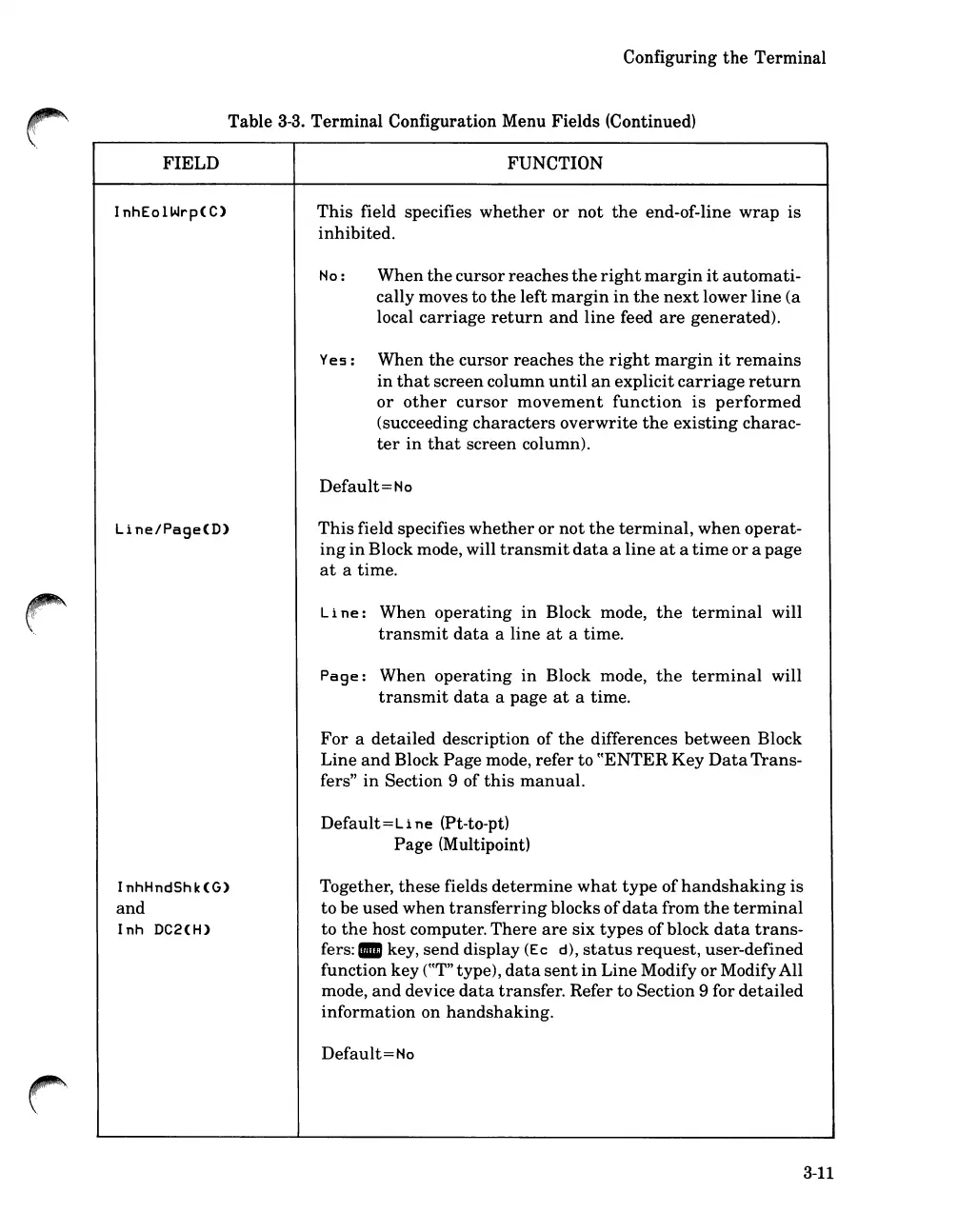
FIELD
Configuring
the
Terminal
Table
3-3.
Terminal Configuration Menu Fields (Continued)
FUNCTION
InhEolWrp(C)
Line/Page(D)
InhHndShk(G)
and
Inh
DC2(H)
This
field specifies
whether
or
not
the
end-of-line
wrap
is
inhibited.
No:
When
the
cursor
reaches
the
right
margin
it
automati-
cally moves to
the
left
margin
in
the
next
lower
line
(a
local
carriage
return
and
line
feed
are
generated).
Yes: When
the
cursor
reaches
the
right
margin
it
remains
in
that
screen
column
until
an
explicit
carriage
return
or
other
cursor
movement
function
is
performed
(succeeding
characters
overwrite
the
existing
charac-
ter
in
that
screen column).
Default
=
No
This
field specifies
whether
or
not
the
terminal,
when
operat-
ing
in
Block mode, will
transmit
data
a
line
at
a
time
or
a
page
at
a time.
Line:
When
operating
in
Block mode,
the
terminal
will
transmit
data
a
line
at
a time.
Page:
When
operating
in
Block mode,
the
terminal
will
transmit
data
a
page
at
a time.
For
a
detailed
description
of
the
differences
between
Block
Line
and
Block
Page
mode,
refer
to
cCENTER
Key
Data
Trans-
fers"
in
Section 9 of
this
manual.
Default=Li
ne (Pt-to-pt)
Page (Multipoint)
Together,
these
fields
determine
what
type
of
handshaking
is
to be
used
when
transferring
blocks
of
data
from
the
terminal
to
the
host
computer.
There
are
six
types
of
block
data
trans-
fers:.
key,
send
display
(Ec
d),
status
request,
user-defined
function
key
rCT"
type),
data
sent
in
Line
Modify
or
ModifyAll
mode,
and
device
data
transfer. Refer
to
Section 9 for
detailed
information
on
handshaking.
Default=No
3-11

Table of Contents

Related product manuals