EasyManua.ls Logo

HP 262SA - Page 59

HP 262SA
390 pages
Print Icon
To Next Page IconTo Next Page
To Previous Page IconTo Previous Page
Loading...
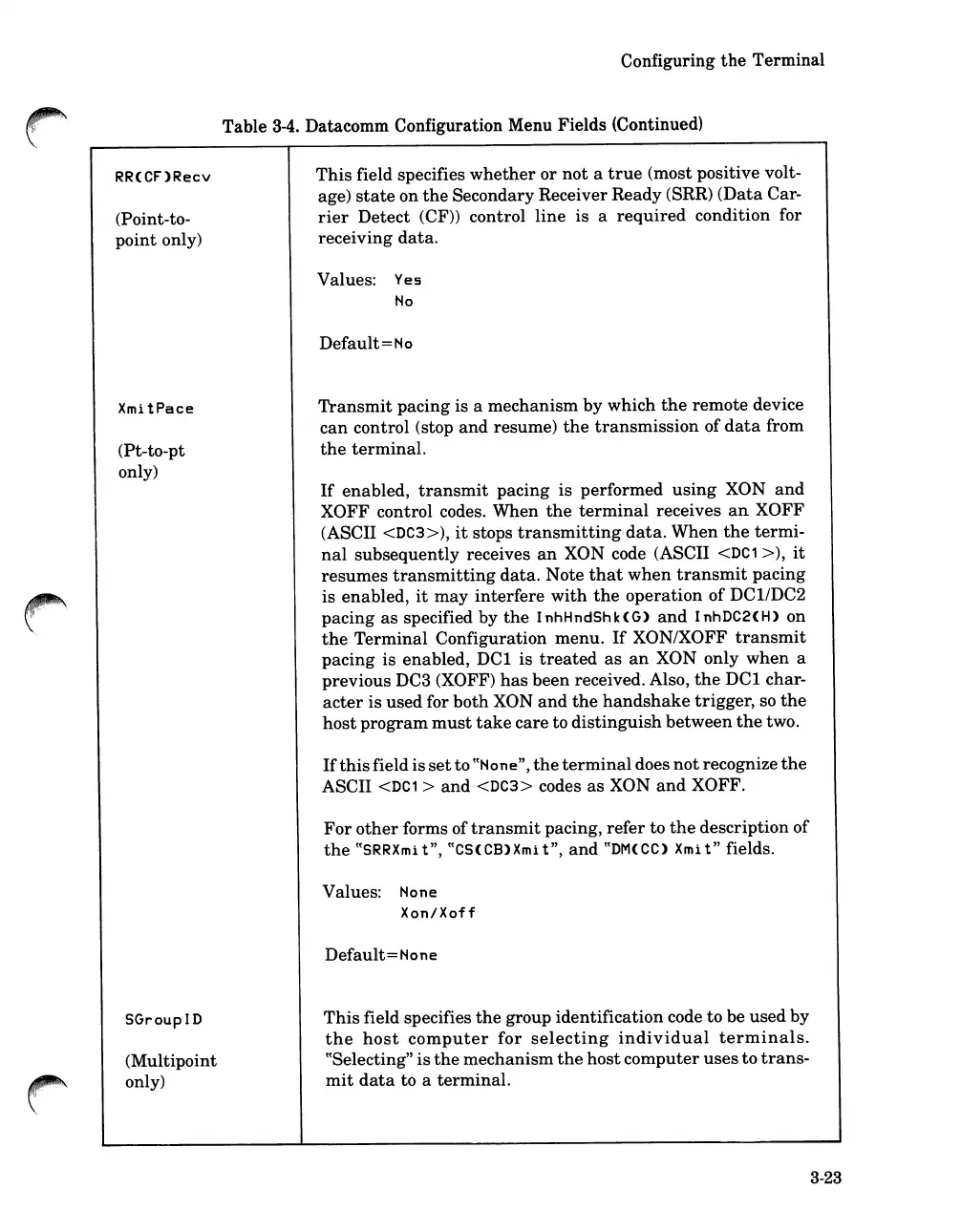
RR<CF>Recv
(Point-to-
point
only)
XmitPace
(Pt-to-pt
only)
SGroupID
(Multipoint
only)
Configuring
the
Terminal
Table
3-4.
Datacomm Configuration Menu Fields (Continued)
This
field specifies
whether
or
not
a
true
(most positive volt-
age)
state
on
the
Secondary Receiver Ready (SRR)
(Data
Car-
rier
Detect
(CF)) control
line
is a
required
condition for
receiving
data.
Values:
Yes
No
Default
=
No
Transmit
pacing is a
mechanism
by
which
the
remote
device
can
control (stop
and
resume)
the
transmission
of
data
from
the
terminal.
If
enabled,
transmit
pacing
is
performed
using
XON
and
XOFF control codes. When
the
terminal
receives
an
XOFF
(ASCII
<DC3»,
it
stops
transmitting
data.
When
the
termi-
nal
subsequently
receives
an
XON code (ASCII
<DC1
»,
it
resumes
transmitting
data.
Note
that
when
transmit
pacing
is
enabled,
it
may
interfere
with
the
operation
of
DCI/DC2
pacing
as
specified by
the
InhHndShk<G>
and
InhDC2<H>
on
the
Terminal
Configuration
menu.
If
XON/XOFF
transmit
pacing
is enabled,
DCI
is
treated
as
an
XON only
when
a
previous
DC3 (XOFF)
has
been
received. Also,
the
DCI
char-
acter
is
used for
both
XON
and
the
handshake
trigger,
so
the
host
program
must
take
care
to
distinguish
between
the
two.
If
this
field is
set
to
((Hone",
the
terminal
does
not
recognize
the
ASCII
<DC1
>
and
<DC3> codes
as
XON
and
XOFF.
For
other
forms of
transmit
pacing,
refer
to
the
description
of
the
((SRRXmi
t",
((CS<CB>Xmi
t",
and
((DM<CC>
Xmi
t"
fields.
Values:
None
Xon/Xoff
Default=None
This
field specifies
the
group
identification
code to be
used
by
the
host
computer
for
selecting
individual
terminals.
((Selecting"
is
the
mechanism
the
host
computer
uses
to
trans-
mit
data
to a
terminal.
3-23

Table of Contents

Related product manuals