iZ Technology Corporation
MOVE
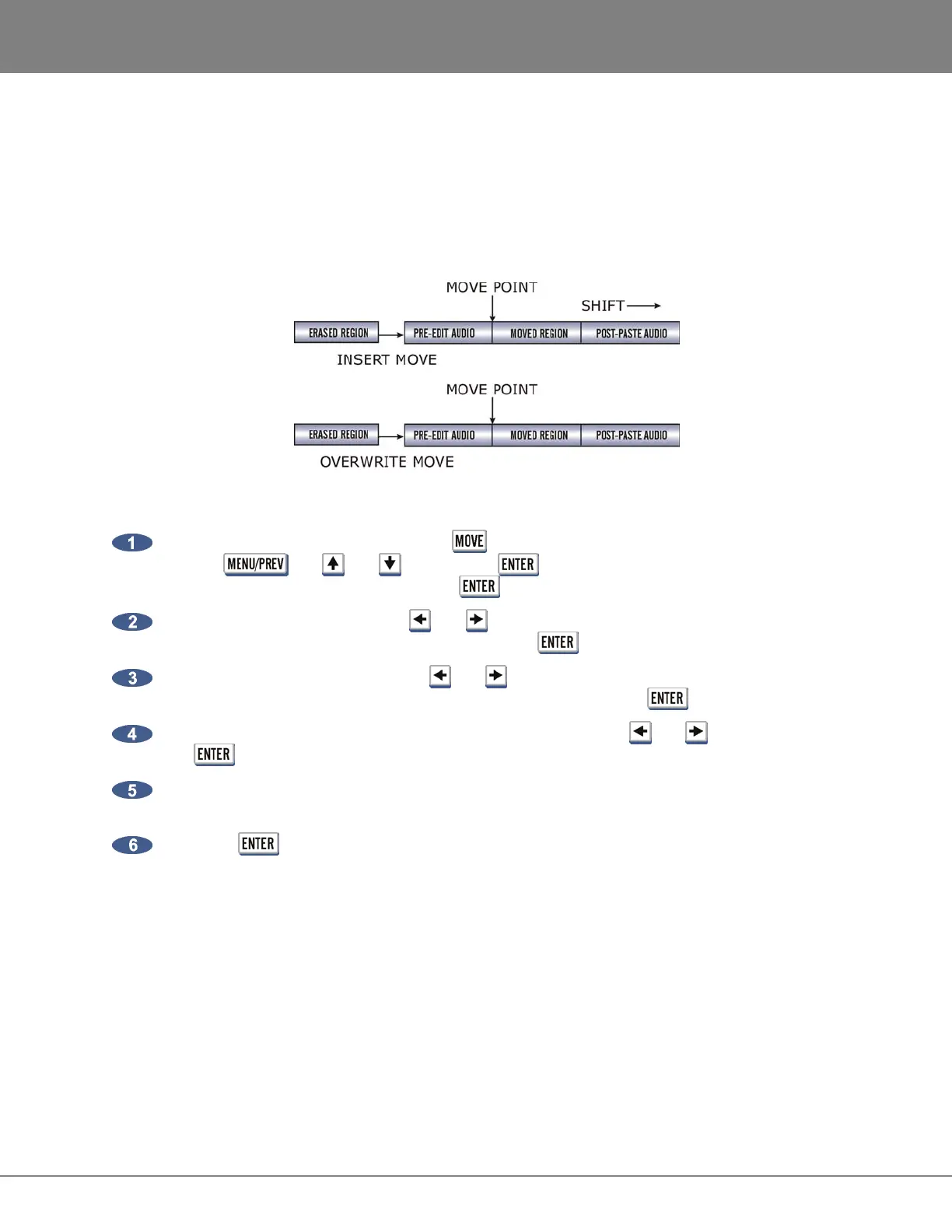
MOVE repositions the audio defined by the track-region. It can also be used to move audio from one track
to another. The original audio location(s) of the track-region will be left blank just like in an erase
procedure. Audio is not transferred to the clipboard during a MOVE, so clipboard material will not be
replaced. Audio following the moved track-region will be affected differently depending on whether insert
or overwrite is used to perform the move.
To move audio:
After marking a time region, pressing the key on the Session Controller or the KC-24 or
use the , the and keys and the key to go to the MAIN MENU / EDIT
MENU / MOVE menu item and press the key.
Select the tracks to move. Use the and keys to select either ALL or TRACK ARM. Use the
Track Arm keys to select individual tracks. Press the key.
Select the destination tracks. Use the and keys to select either SAME or OTHER. When
selecting OTHER use the Track Arm keys to select tracks. Press the key.
Select either the INSERT or OVERWRITE move modes using the and keys and press
the key.
Use any of the transport/locate functions or the Jog/Shuttle Wheel to specify the MOVE TO:
location.
Press the key to move the track-region to the new location.



 To Next Page