262334 92 Revision A
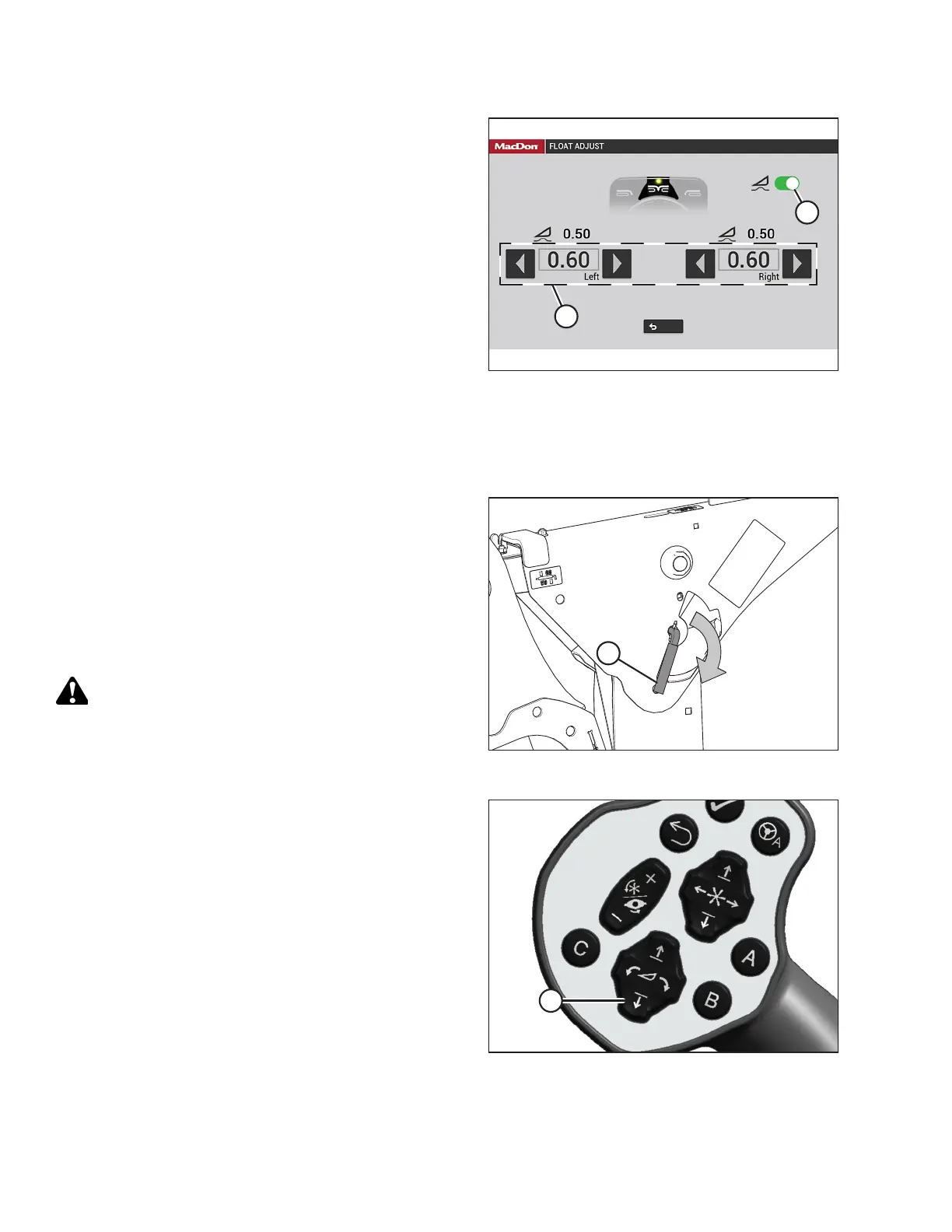
Figure 3.133: HarvestTouch
™
Display
4. Press arrows (A) to adjust left or right float settings.
NOTE:
Float adjustments of 1.0 (out of 10) change the header
weight at the cutterbar by approximately 91 kg (200 lb.).
Adjust the float in increments of 0.05 to optimize field
performance.
5. Press switch (B) to remove or resume the header float.
Removing and Restoring Float – M2 Series Windrowers
The header float can be removed and restored using the HarvestTouch
™
Display.
Figure 3.134: Safety Prop Lever
1. Disengage the safety props on both lift cylinders as follows:
a. Turn lever (A) away from the header to raise the safety
prop until the lever locks into the vertical position.
b. Repeat the previous step for the opposite cylinder.
NOTE:
If the safety prop will NOT disengage, raise the header to
release the prop.
DANGER
Ensure that all bystanders have cleared the area.
2. Start the engine.
Figure 3.135: Ground Speed Lever (GSL)
3. Press HEADER DOWN switch (A) on the ground speed lever
(GSL) to fully lower the rotary disc header.
OPERATION



 To Next Page