262334 156 Revision A
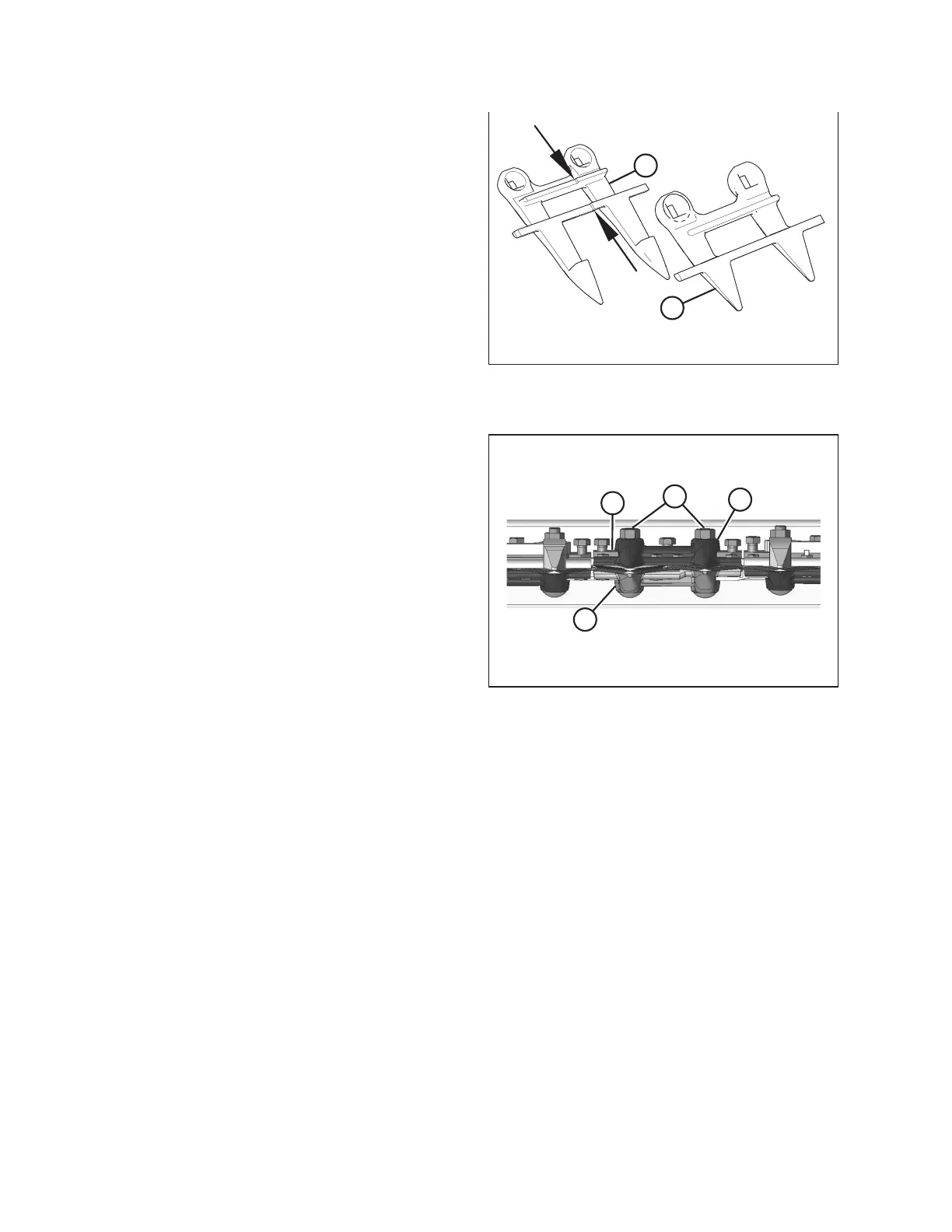
Figure 4.43: Stub Guard Identification
A - Normal Guard B - Center Guard
IMPORTANT:
Ensure center guard (B) has offset cutting surfaces.
Figure 4.44: Stub Guard Adjustment
NOTE:
Top guide (C) (which is an inverted stub guard) must
accommodate the two overlapping knives at center guard
location on double-knife header. Ensure replacement is
correct part.
IMPORTANT:
Ledger surfaces of center and adjacent guards must be
vertically aligned to avoid interference with knife sections.
3. Position replacement guard (B), adjuster bar (D), top
guide (C), and install bolts and nuts (A). Do NOT tighten the
hardware.
4. Check and adjust clearance between hold-down and knife. Refer to 4.8.8 Hold-Downs, page 156.
4.8.8 Hold-Downs
Hold-downs (also referred to as guides) keep the knife in contact with the guard cutting surface. It is important to adjust
the hold-downs properly.
Hold-downs are designed to accommodate specific guard locations and guard types:
• Center hold-down – Located at the center of the cutterbar on double-knife headers. Allows for knife overlap.
• Standard hold-down – Used at all other locations.
MAINTENANCE AND SERVICING



 To Next Page