262334 116 Revision A
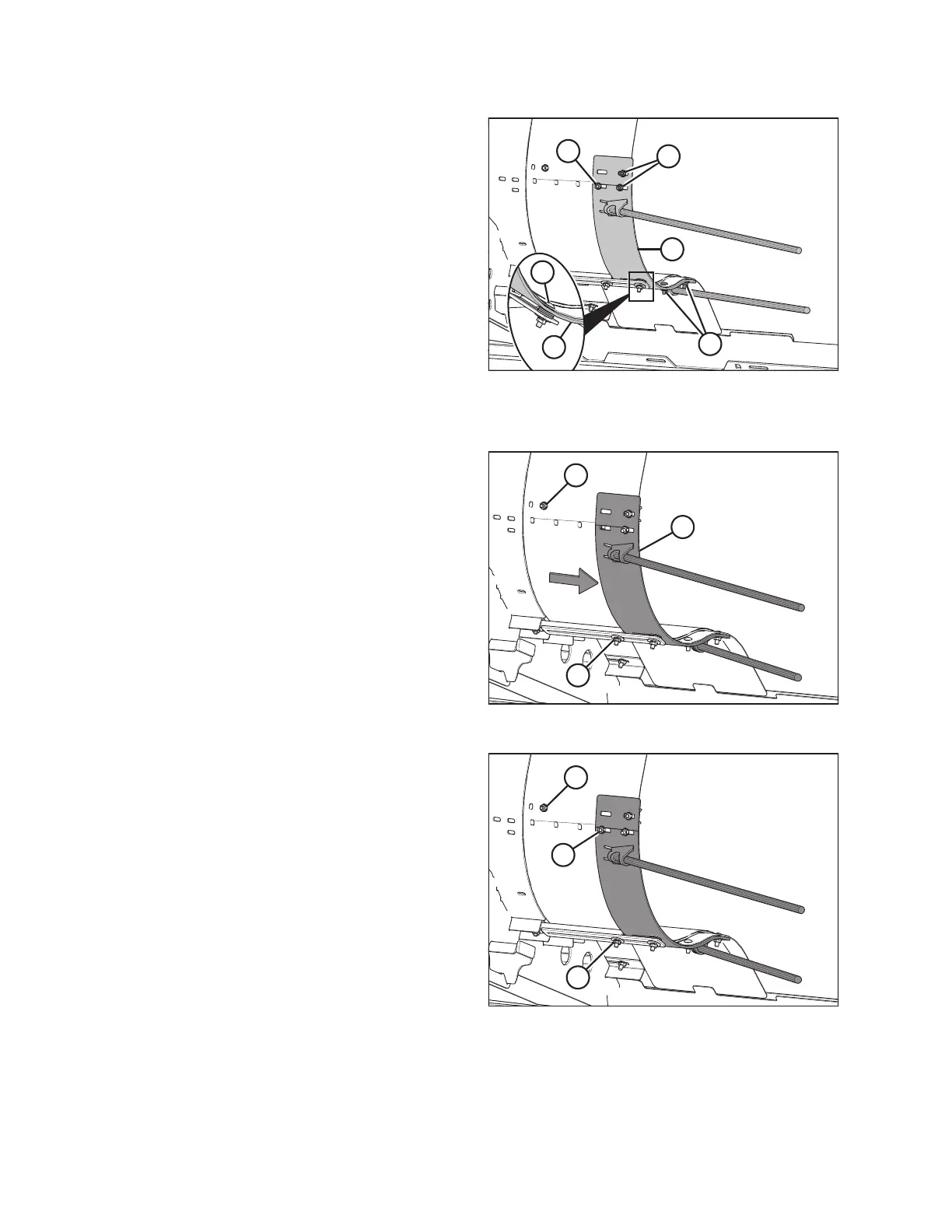
Figure 3.168: Left Side Deflector and Hardware
3. Install left deflector (A) using nuts and bolts (B) and nut,
bolt, and five washers (C) retained from the previous step.
Torque all the nuts to 11.5 Nm (102 lbf·in / 8 lbf·ft).
NOTE:
Do NOT install nut (D) if the pan extension’s width will be
adjusted.
NOTE:
Do NOT torque nuts if the pan extension’s width will be
adjusted.
4. Repeat the steps for installing the pan extension on the
opposite side of the header.
Adjusting the Pan Extension’s Width
Figure 3.169: Left Side Pan Extension
5. Remove nut and bolt (A).
6. Loosen nut (B), but do NOT remove it.
7. Slide pan extension (C) with the swath forming rods inboard
to the desired position, aligning the holes on the pan
extension and the header.
Figure 3.170: Left Side Pan Extension
8. Replace bolt and nut (A). Torque nut (A) and nut (B) to
11.5 Nm (102 lbf·in / 8 lbf·ft).
9. Install nut and bolt (C) and torque it to 11.5 Nm
(102 lbf·in / 8 lbf·ft).
10. Repeat the steps for adjusting the pan extension on the
right side of the header.
OPERATION



 To Next Page