262334 187 Revision A
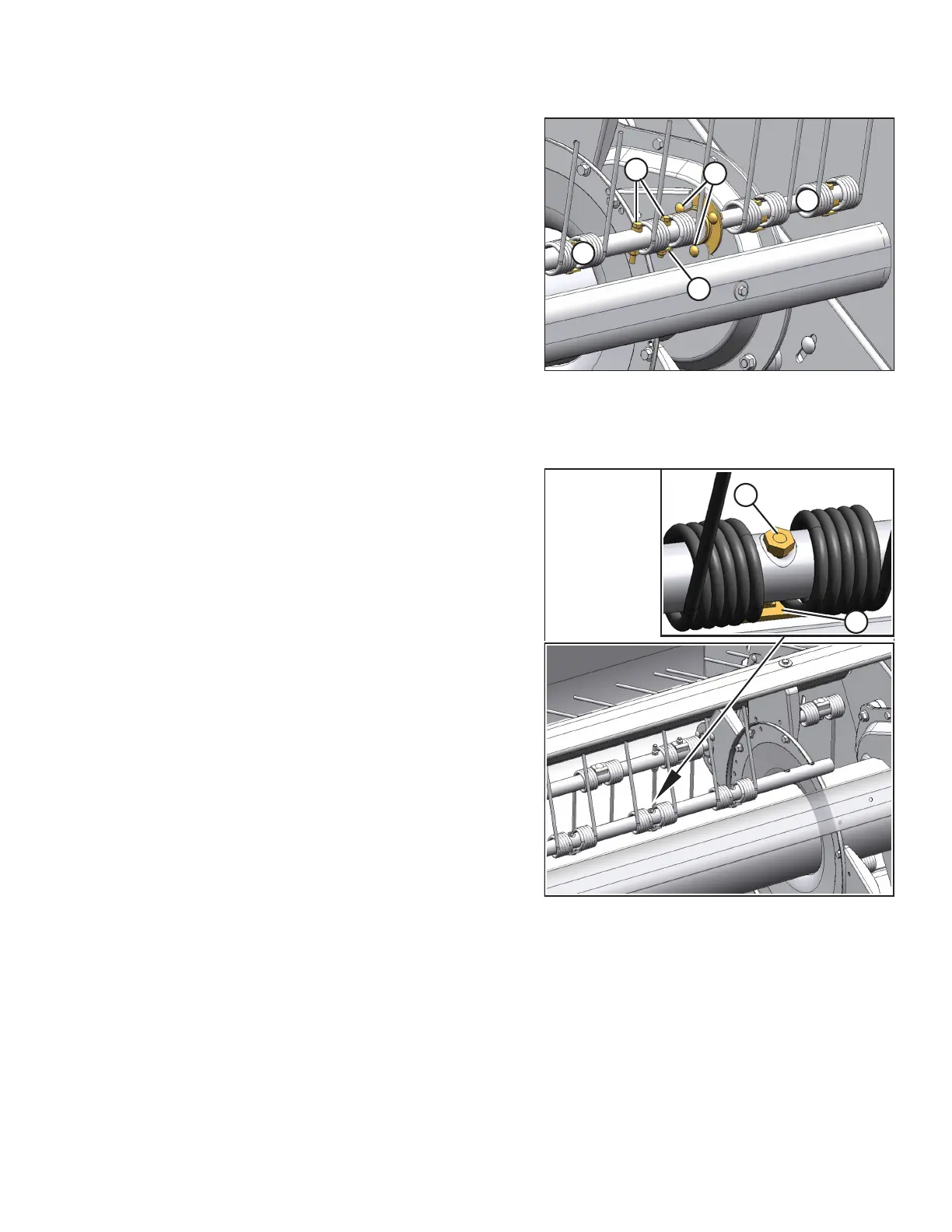
Figure 4.116: Disc #4
A - Shoulder bolts B - Keeper
C - Flangette Mounting Bolts Y - Section Y
Z - Section Z
1. Remove shoulder bolts (A) and keeper (B) connecting tine
bar sections Z and Y at reel disc #4.
2. Remove flangette mounting bolts (C) at reel disc #4.
3. Lift the tine bar away from the reel arms, and remove
complete tine bar section Z, complete with the bearing
assembly.
4. To replace the tine bar bearing, refer to 4.6.3 Installing
Sealed Bearings, page 141.
Figure 4.117: Disc #4
A - Bolt B - Keeper
5. Replace the tine as follows:
a. Remove bolt (A) and keeper (B) on the tine to be
replaced.
b. Remove the bolts and the keepers on the tines as
required to facilitate the replacement of the damaged
or worn tine.
c. Slide the tines off the tine bar.
d. Install the tines on the tine bar, and secure them with
bolts (A) and keepers (B). Install the nut with tapered
side against the tine bar. Do NOT install the bolts in the
end tines at this time.
6. Install tine bar extension Z including bearing to section Y at
reel disc #4.
MAINTENANCE AND SERVICING



 To Next Page