Newtec Proprietary
Confidentiality: Unrestricted
V1.0
260/314
Feature Descriptions MDM6000 Satellite Modem
14.13.2 Test Traffic Monitoring
The test traffic monitoring feature allows to capture the test traffic received by the "remote" device in
end to end IP tests.
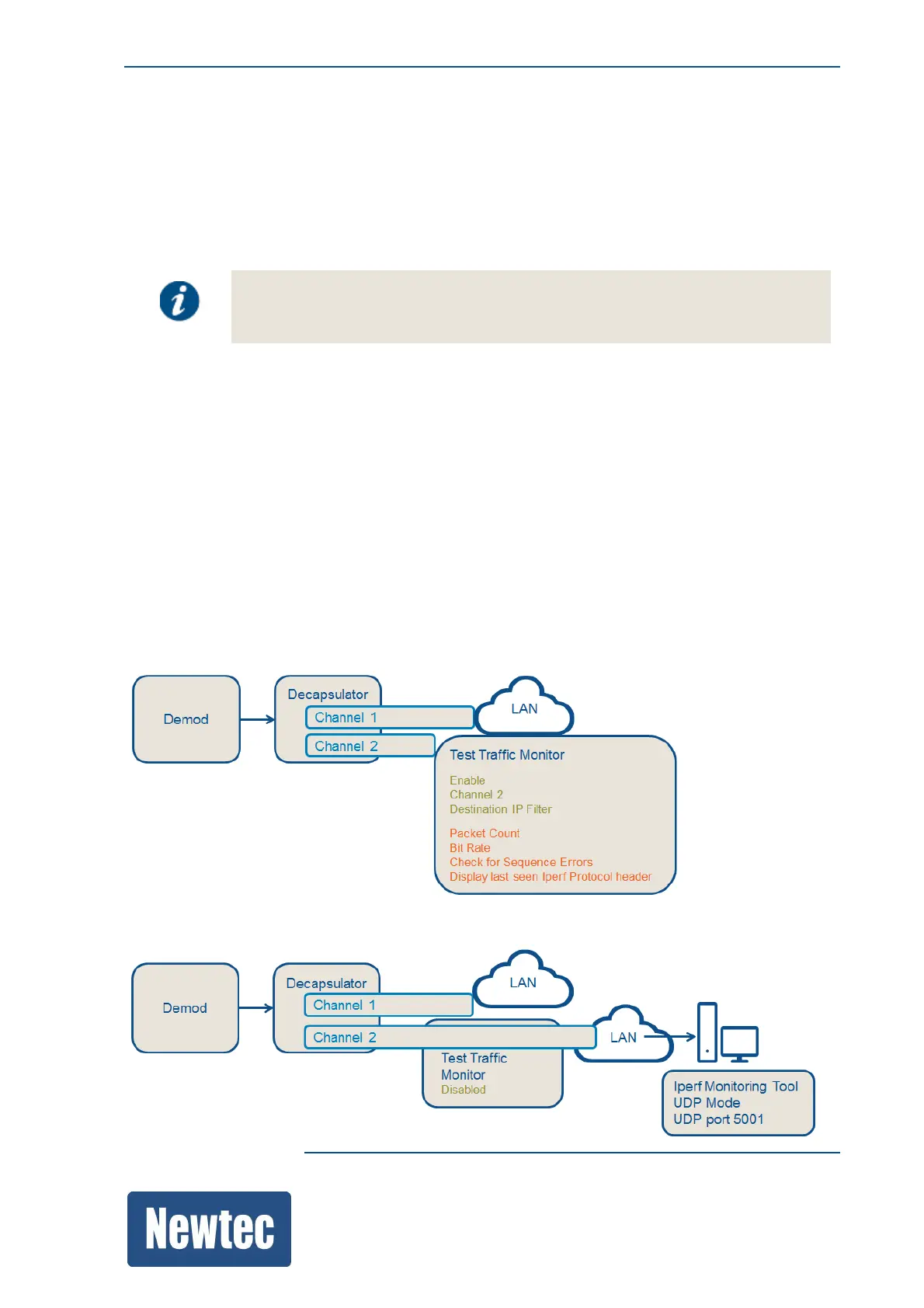
The following two scenarios are possible:
• Enable the Test Traffic Monitor on a specific channel and define a destination IP Filter.
By default this is set to a link local address, this to perform exact monitoring
between the modulator and demodulator.
Entering another IP address can impact the normal traffic!
It can also be used to perform diagnostics on the setup, for example to see if a ping to a certain IP address
reaches the demodulator.
When "test" traffic is detected:
– The packet counter increases;
– A check for sequence errors is performed;
– The IPerf protocol is displayed;
– The bit rate is displayed.
• Disable the Test Traffic Monitor.
In this case all traffic is forwarded onto the LAN.
Use an IPerf monitoring tool to capture the traffic on your "own" tool.
Make sure to use UDP mode and listen on UDP port 5001 with the monitoring tool.
The following figures show these scenarios.



 To Next Page