Newtec Proprietary
Confidentiality: Unrestricted
V1.0
69/314
How to Manage the Device MDM6000 Satellite Modem
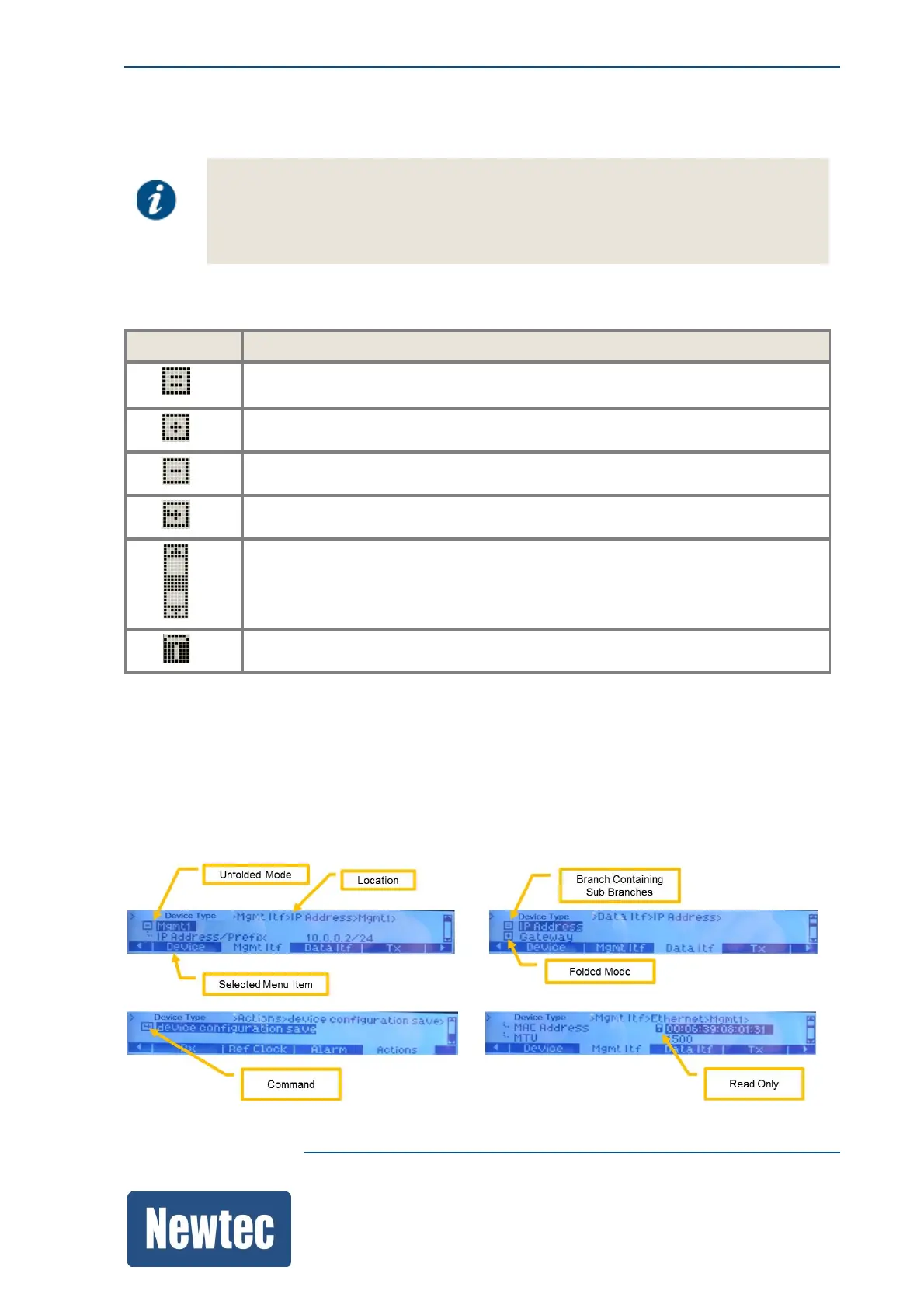
11.6.4 Tree Menu Pane
• The first row of the tree menu indicates the current location in the device.
For example:
MDM6000 > Device> Identification
• A selectable item in the tree menu pane is visualized with a dark background.
The following table describes the icons that are used by the tree menu pane.
Icons Description
Indicates a branch that contains no sub branches. All parameters exist directly
under this branch.
Folded mode.
Unfolded mode.
Indicates an action. (for example: Save).
Scroll bar
Indicates that more than one line exists under this selection.
Indicates a read only parameter.
In this pane, the parameters are listed vertically.
» Navigate through this pane by using the up/down arrow of the navigation buttons;
» Unfold a branch by using the right arrow or pressing OK;
» Fold a branch by using the left arrow or pressing ESC.



 To Next Page