Newtec Proprietary
Confidentiality: Unrestricted
V1.0
85/314
How to Manage the Device MDM6000 Satellite Modem
11.7.12 Software Upgrade (CLI)
Make sure that the upgrade file (installer.bin) is uploaded to your MDM6000.
To do this use the FTP to upload the installer.bin file. Please refer to:
FTP(FileTransferProtocol).onpage90
When the upgrade file is available use the CLI to perform the software upgrade.
» Login as expert
MDM6000]# device
MDM6000 device]# softwareupgrade filename=installer_MDM6000_1.3.bin reboot=yes
***hardware reset requested***
OK
Make sure that to use the correct filename, the previous is just an example!
11.7.13 Dynamic Tables
The data model of the MDM6000 Satellite Modem uses a lot of tables. These tables are used to keep
related information together.
The CLI allows to display these tables. Furthermore it is possible to access and change values of a
parameter in a specific row and column, this makes the tables dynamic.
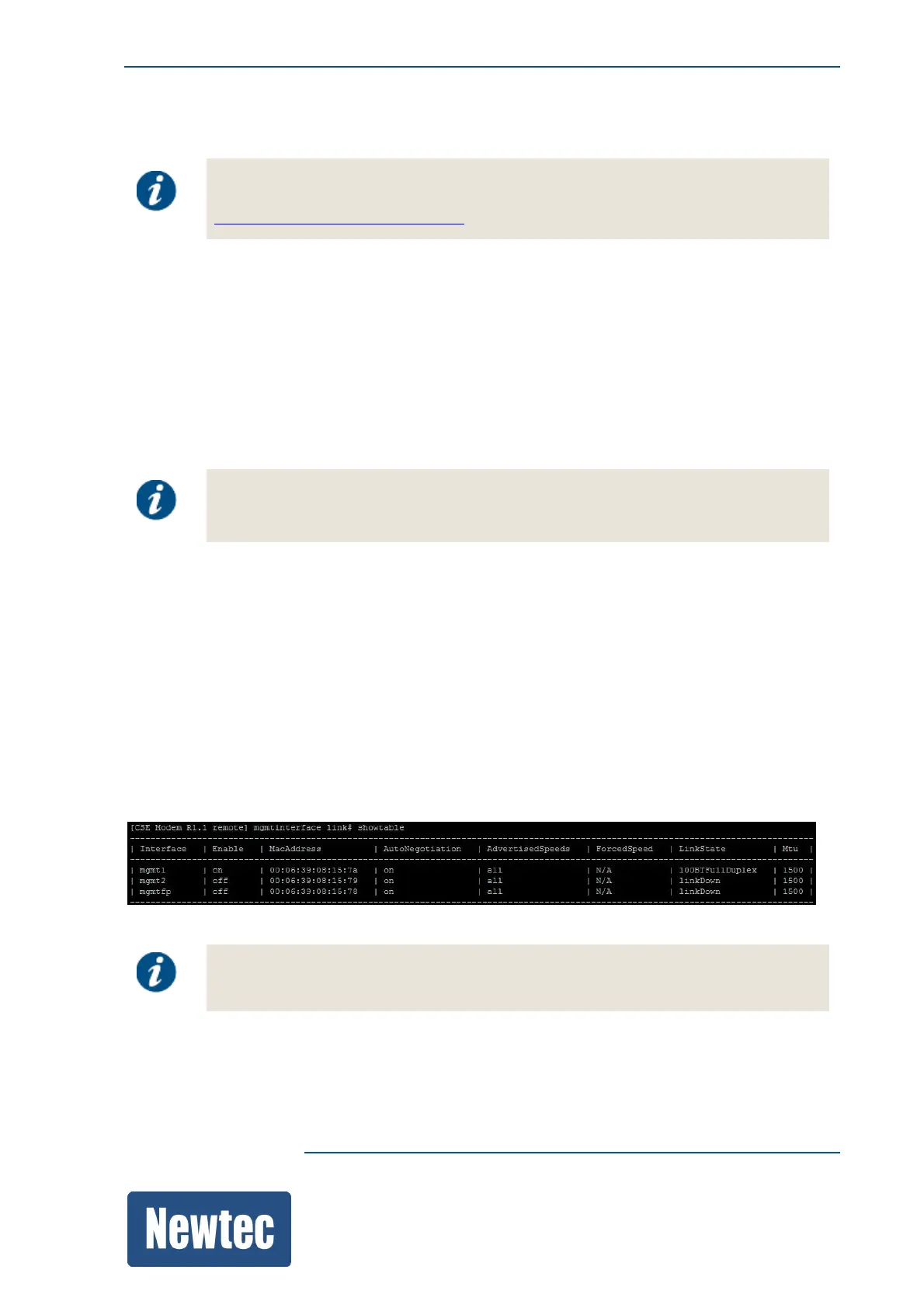
The command "showtable" displays the entire table including column headers.
The following figure shows the layout of a table in the CLI.
Make sure that the resolution of the display is wide enough. When this is not the case
the column indication becomes unclear.



 To Next Page