266 Chapter 6 The Océ TDS700 Power Logic® controller application
Concept of the 'Scan destinations'
[49]
If you do not want to use the toolbar options, there are 2 alternative methods to
perform actions. You can use the menu options in the top toolbar of the Océ TDS700
Power Logic
®
controller application or you can right-click to access a menu to
perform actions on the selected scan destinations or scan jobs.
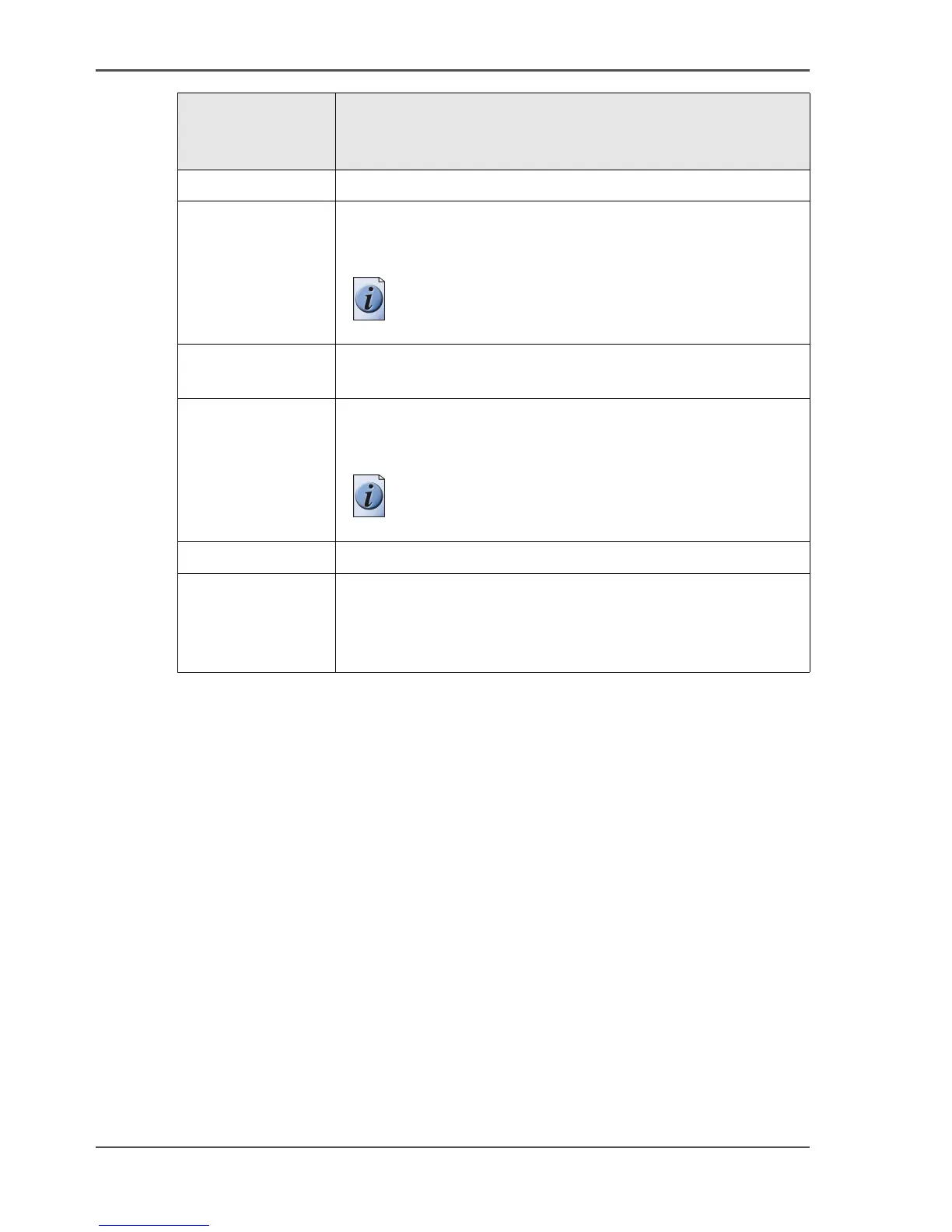
Options in the
'Scan jobs'
workspace
Description
'New' Create a new scan job destination.
'Delete'
■ Delete the selected scan jobs destination(s).
■ Delete the selected scan job(s) in the 'Scan jobs' view area.
Note: You cannot remove scanned files that are
stored at a remote location.
'Properties' ■ View and / or edit the properties of a scan job destination.
■ View the properties of the selected scan job.
'View' This option is present if you have a valid license for the Océ
View Station
®
LT application. The option allows you to view
a scanned file that is stored at a local destination.
Note: Files that are stored at a remote destination
cannot be viewed.
'Print' Use this option to print a scan job to the 'Scheduled jobs'.
Send (future
function)
Use this option to send the selected scanned file(s) on the
controller to their initial destination. You cannot use this
function for scanned files that are located at a remote
location.




 To Next Page