48 Chapter 2 Use the Océ TDS700 to print a job
Printer operator panel actions
Off-line menu options
[8]
Key operator settings
Use the key above the graphical display of the printer operator panel to access the
following options. Make sure that the printer is put in off- line mode first.
Note: The settings you access via this key are not the same as the key operator
settings in the Océ TDS700 Power Logic
®
controller application.
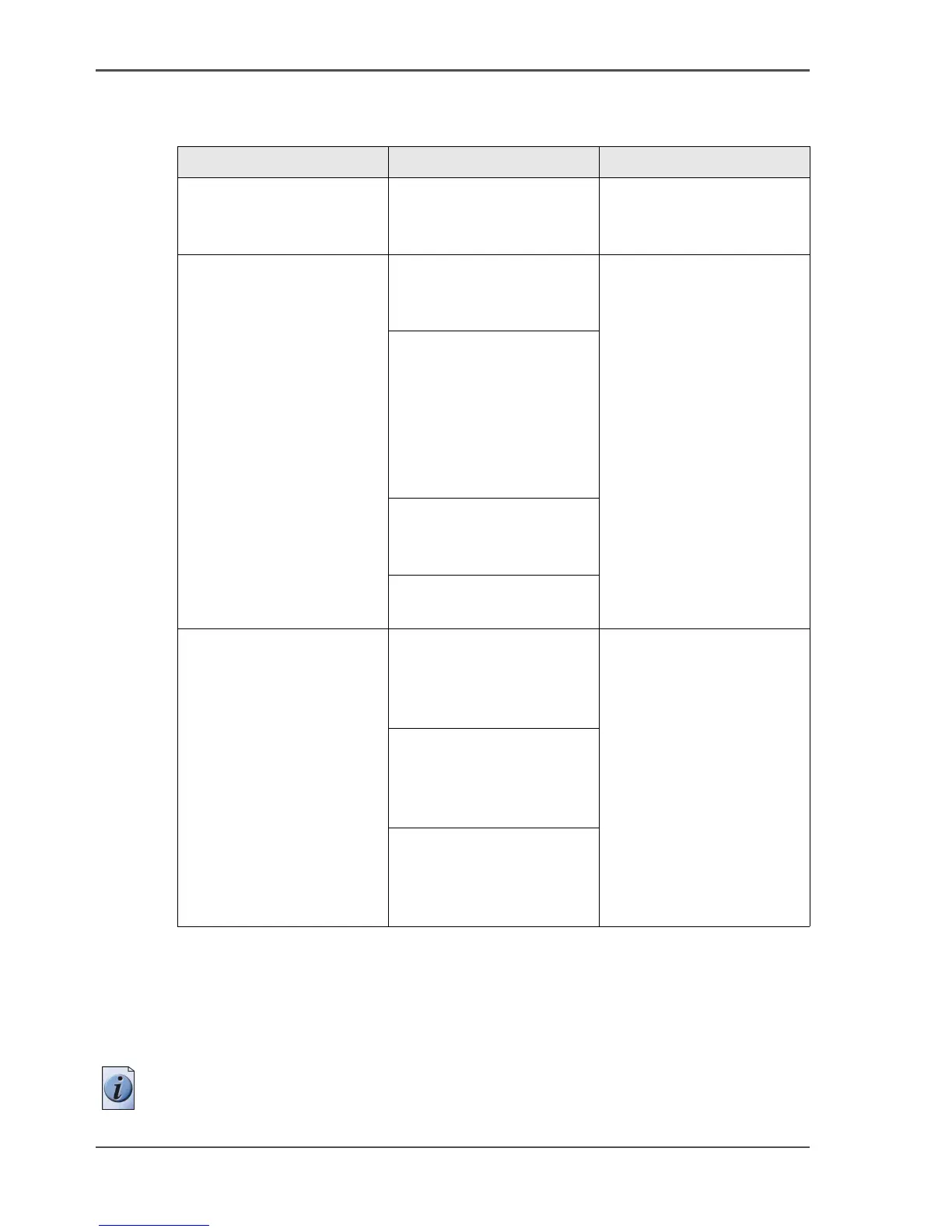
[8] Off-line menu
Menu Secondary menu(s) Description
Language List of 2 languages You can toggle between
the 2 main language on
the printer operator panel.
Off-line folding
(optional)
Input
■ Method
■ Legend
All the settings except the
Special setting are job
settings that can be set for
an individual off-line
folding job. The default
values for these settings
are set by the key operator
in the Océ TDS700 Power
Logic
®
controller
application.
Binding
■ Binding
■ Reinforce
Binding
■ Edge
■ on /off
Package
■ Width
■ Length
Special
■ Knife
Media Roll
■ Type
■ Material
■ Size
You can use the Media
menu to define the
contents of the media
drawer(s) and / or sheet
feeder(s) and the manual
feeder.
Manual
■ Type
■ Material
■ Size
Sheets
■ Type
■ Material
■ Size












 To Next Page