Mixer : Horus/Hapi Preamp Remote Controls
10 - 236
Horus/Hapi Preamp Remote Controls
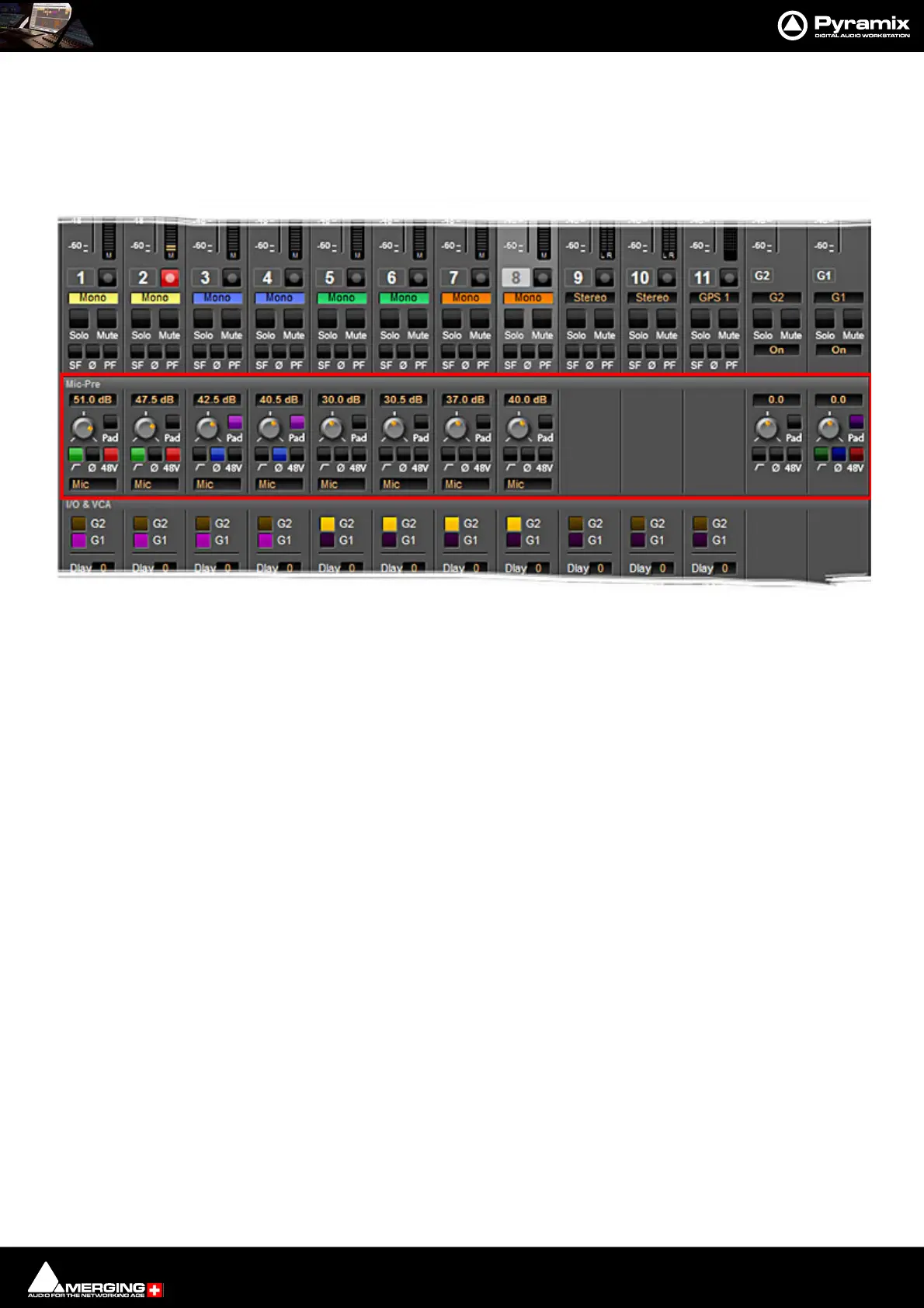
If you are using the Merging Technologies Horus/Hapi I/O with analog inputs, remote control of the analog pre-
amps is available in the Pyramix Mixer. The controls appear automatically in the mixer when a strip’s input is
patched to a Horus/Hapi analog preamp.
Note: Please ensure that AD inputs have first been connected in the RAVENNA Easy Connect
application. Once connected they will be available in the Pyramix Mixer.
If the Horus/Hapi Preamp Remote section is not visible click on the + Expand button on the right-hand side of the
mixer.
The controls enable analog gain to be set, the Pad and High-pass Filter to be activated, 48V Phantom Power to be
switched, Phase to be reversed and the Preamp to be switched between Mic and Line. If Channels patched to
Horus analog preamps are ‘VCA’ grouped then the Preamp Remote Controls in the VCA Group strip will affect all
members of the Group.
Note: GPS Channels do not support the Horus/Hapi Preamp Remote controls when connected
to Horus/Hapi analog inputs.
Mixer showing Horus Preamp Remote Controls



 To Next Page