Project Processes : Archiving Metadata
16 - 437
Archiving Metadata
Overview
Custom Metadata may be user defined and associated with rendered files. Metadata may be added during:
•Render
•Mixdown
• Directly during Recording (Normal Recording and Dubbing modes)
Single Media, One File per Track and One File per Bus are supported. The same Metadata Set is embedded in all
files in the latter two cases.
Riff and RF64 (>4GB) Files are supported.
Note: If a file is almost at the 4GB boundary and updating its Metadata would take it over this
limit then the update will be refused.
Any Media Markers set in any files in the Timeline are also exported in the Metadata XML.
Defining Metadata
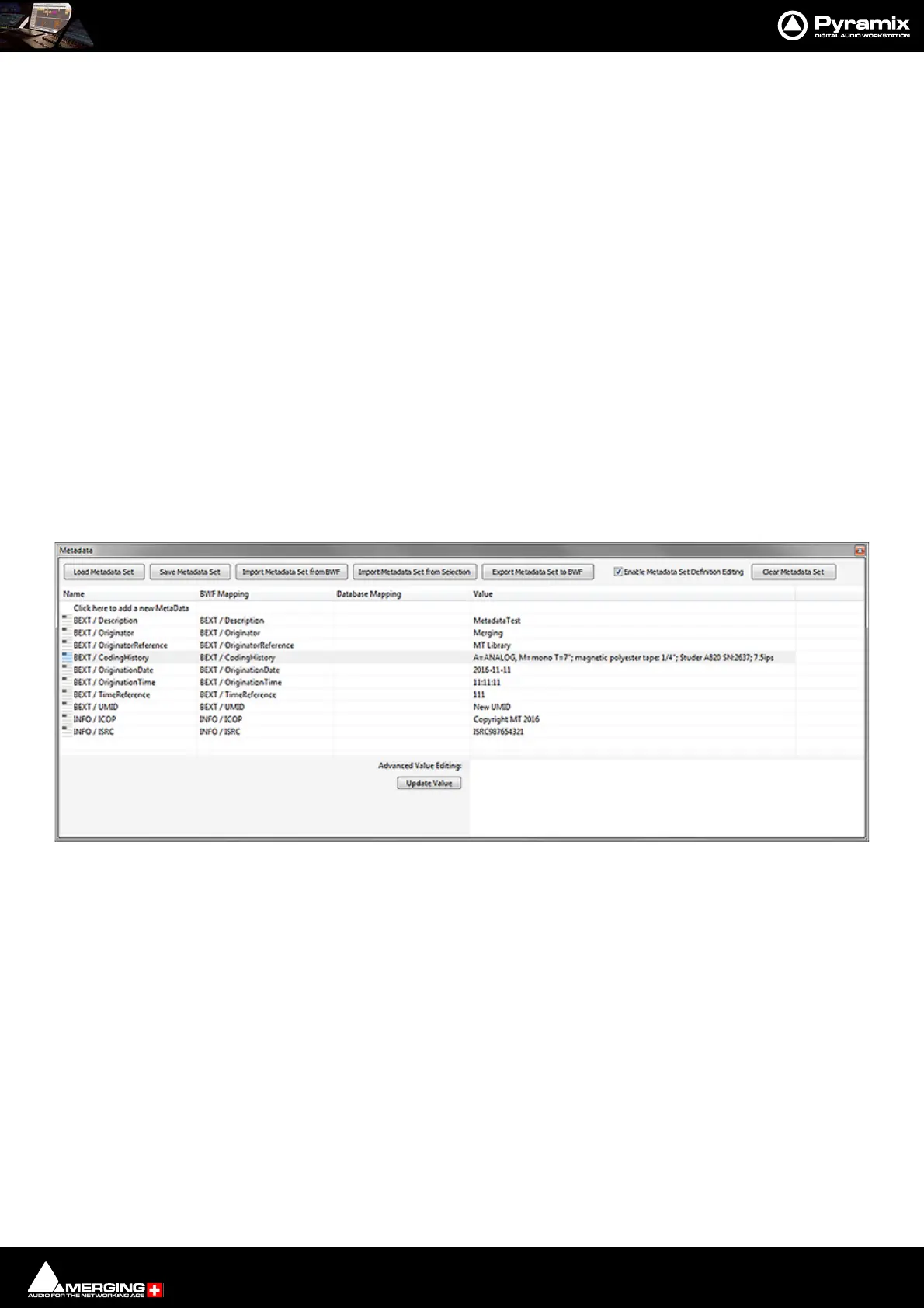
The Metadata is defined in the Metadata Tab Window
Metadata Tab Window
Load Metadata Set and
Save Metadata Set Load and Save, respectively, the Metadata definition including the BWF map-
ping and Values. Metadata definition templates can be created that can be
loaded in other projects.
Import Metadata Set from BWF Opens a File Browser window to locate the target BWF file. When the target
file is selected, clicking on Open loads the Metadata set present in the BEXT and
LISTINFO chunks.
Import Metadata Set from Selection Imports the Metadata set from the (BWF) Clip currently selected in the
Timeline.



 To Next Page