Project Processes : Rendering Projects
16 - 447
Rendering Projects
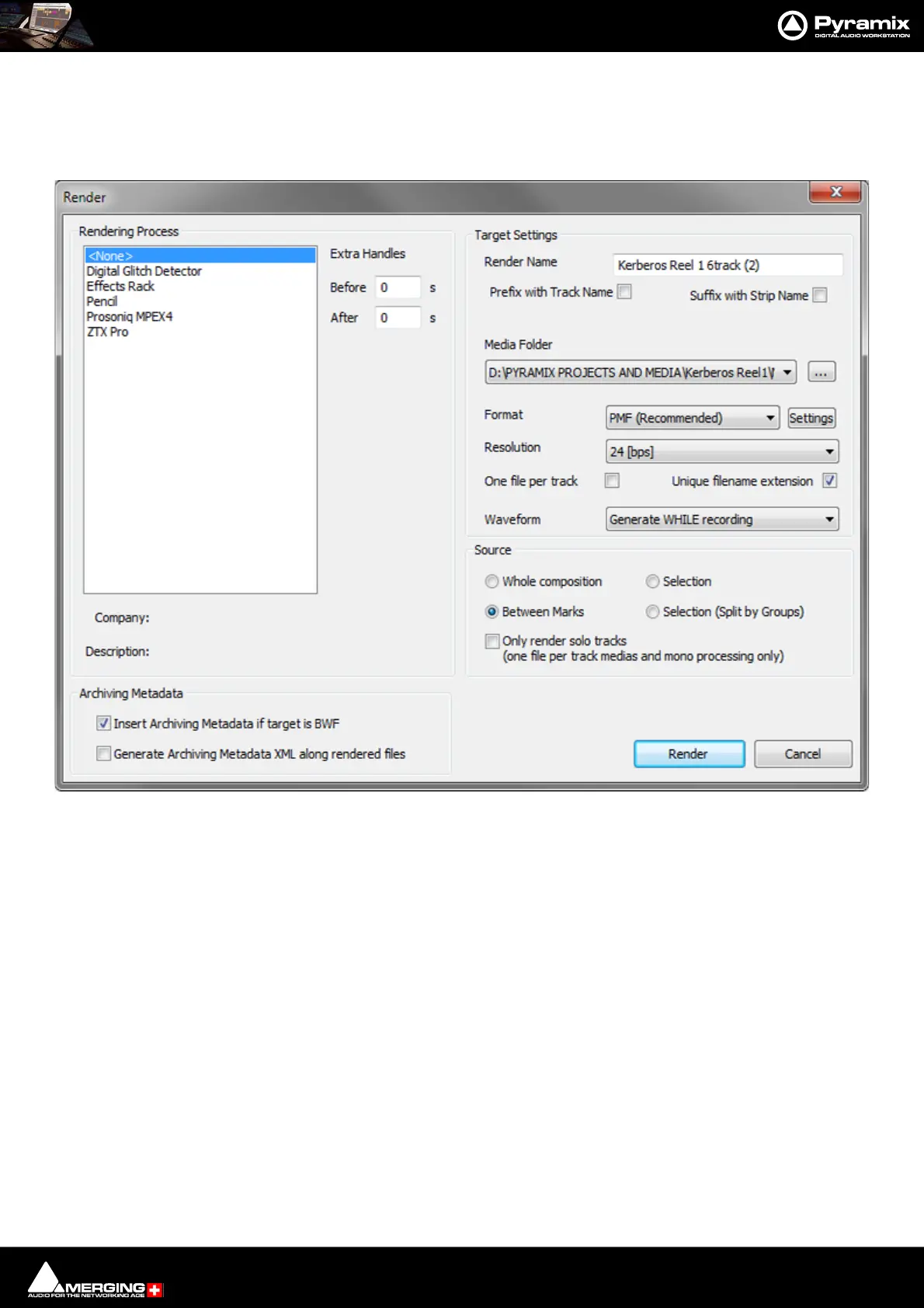
The Render function available in menu Project > Render offers a choice of Rendering plug-Ins. Please see also:
Render with Archiving on page 439
Rendering Process Lists the Rendering Processes and is where you select the one required.
Extra Handles The before and after boxes allow a time value to be entered for extra material
(where available) to be included in the material used for analysis by the process
(where applicable).
Note: Handles added in the Render menu are not meant to be processed. They're only used to
give some extra material to processes that need analyzing before or after the given portion of
data.
Handles will NEVER be processed by any Render plug-ins.
Target Settings Affect the Output File.
Render Name A text entry box where any legal filename may be entered.
Media Folder The drop-down list allows mounted Drives/folders to be selected as the destina-
tion for the output file. The adjacent ... button opens a browser window if more
options or a new folder are required.
Resolution A drop down list with all valid choices of bit-depth for the output file(s)
One file per track When checked, multi-track sources will be rendered as separate files.
Unique filename extension When checked, ensures the output files have unique extensions.



 To Next Page