Mixer : Mixer Configuration from the Mix! page
10 - 248
Adding Audio Buses
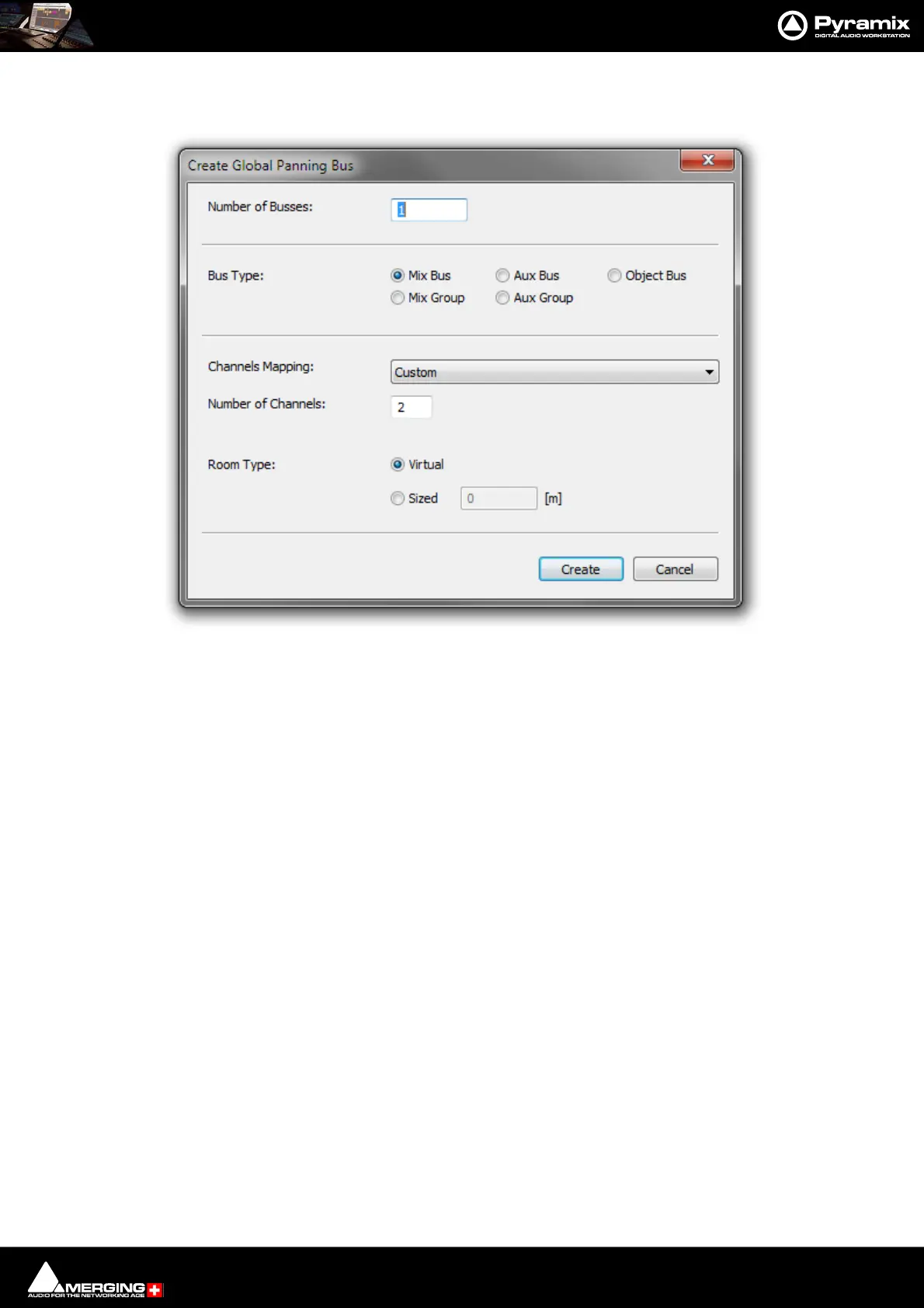
Select Bus > Add > General Mixing Bus. The Create > General Purpose Mixing Bus dialog opens
Number of Buses: Type the number of Buses to be created in the field. (Default is 1)
Bus Type: The radio buttons determine which type of General Mixing Bus will be created:
•Mix Bus
•Aux Bus
•Object Bus
•Mix Group
•Aux group
Channels Mapping: The drop-down lists all the pre-defined Room / Channel mappings and Custom.
In most cases there will be a suitable mapping in the list. If you choose Custom
then set the number of Audio Channels:
Number of Channels: Only available when Custom is chosen in Channel Mapping:
Room Type The radio buttons give the choice of Virtual Or Sized. If sized is selected enter a
value in meters in the field.
Create Creates the Bus or Buses with the parameters selected and exits the dialog.
Cancel Exits the dialog without creating any Buses.
Create General Purpose Mixing Bus dialog



 To Next Page