MAIN DRIVE AND IMAGE UP/DOWN SHIFTING DRIVE SECTION
SM 3-119 C262/C265
Replacement
Adjustment
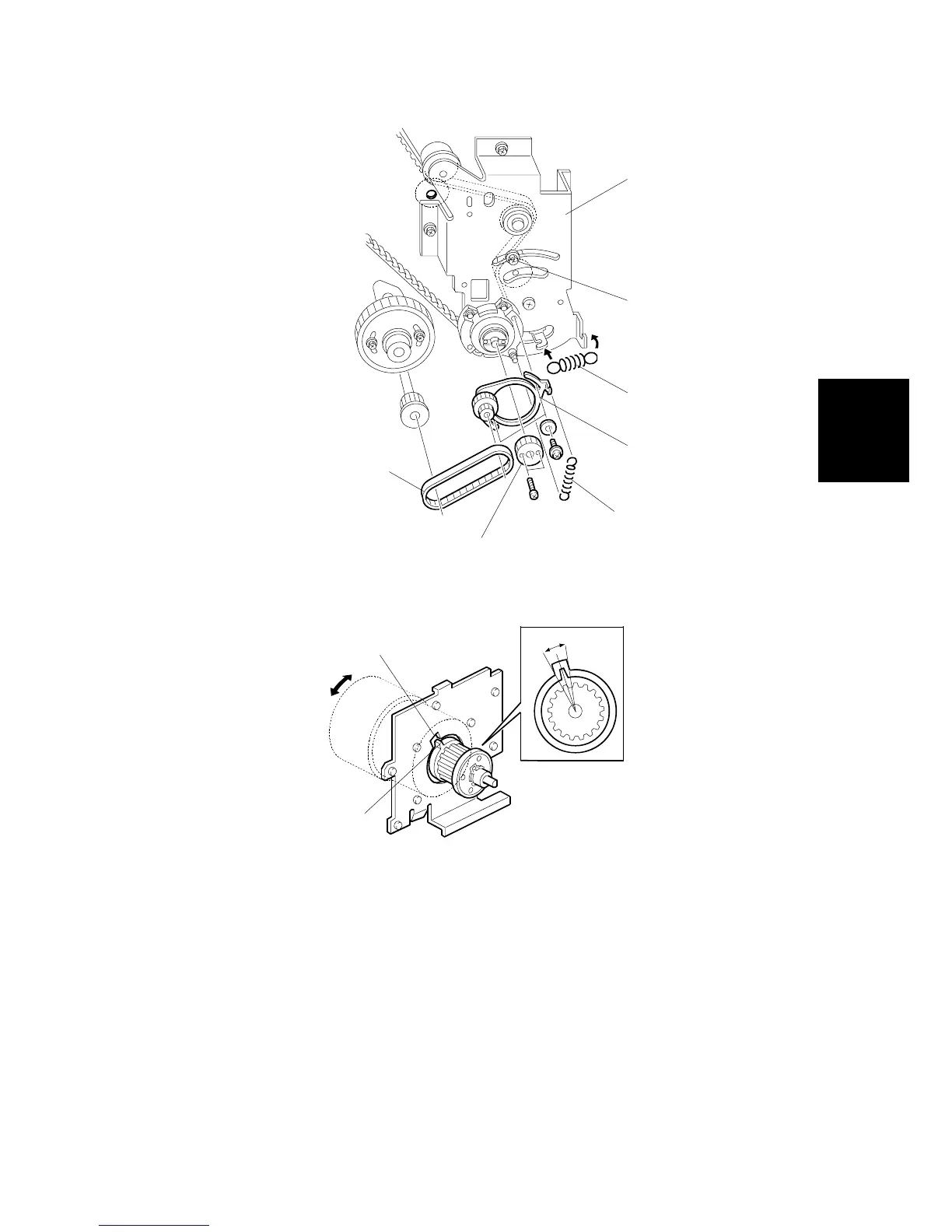
6. Install the bracket [H] ( x 5, Cord clamp x 2, Bearing x 2).
7. Align the cutout in the bracket [I] with the pawl on the torque limiter [J] as
shown.
8. Attach the spring [K] and secure the screw [L].
NOTE: If the cutout and pawl are in line, the main motor drive is OK. If they are
not, remove the spring [K], then make sure that the cutout and pawl are
in line again.
9. Install the gear [M] ( x 2).
10. Install the pulley bracket [N] and the timing belt [O] ( x 2).
11. Install the spring [P].
C262R144.WMF
C262R150.WMF
[H]
[I]
[J]
[K]
[L]
[M]
[N]
[O]
[P]


 To Next Page