SERVICE PROGRAM MODE
SM 5-25 C262/C265
Service
Tables
15: SP 2-6-27, 2-6-28
When there is too much ink in the drum, you must remove the ink. To do this, you
must make a blank master, then remove the ink.
1. First, set SP 2-6-27 to ON. This enables the rest of this procedure.
2. Press the “Auto Cycle” button and the Start button together. The machine
automatically wraps a master around the drum, applies pressure to transfer the
ink into the master (at this time, the drum rotates a set number of times), and
removes the master. Then another blank master is wrapped, to prevent the ink
in the drum from becoming dry.
During this procedure, the excess ink in the drum transfers to the master. If there is
a lot of excess ink, you must make more than one master. SP 2-6-28 sets the
number of masters that are made.
After you finish, you can keep SP 2-6-27 on. Then if the problem occurs again, you
can instruct the user by phone or mail about how to do the above procedure, and
you do not have to go there yourself.
16: 2-10 (Color Ink Detection)
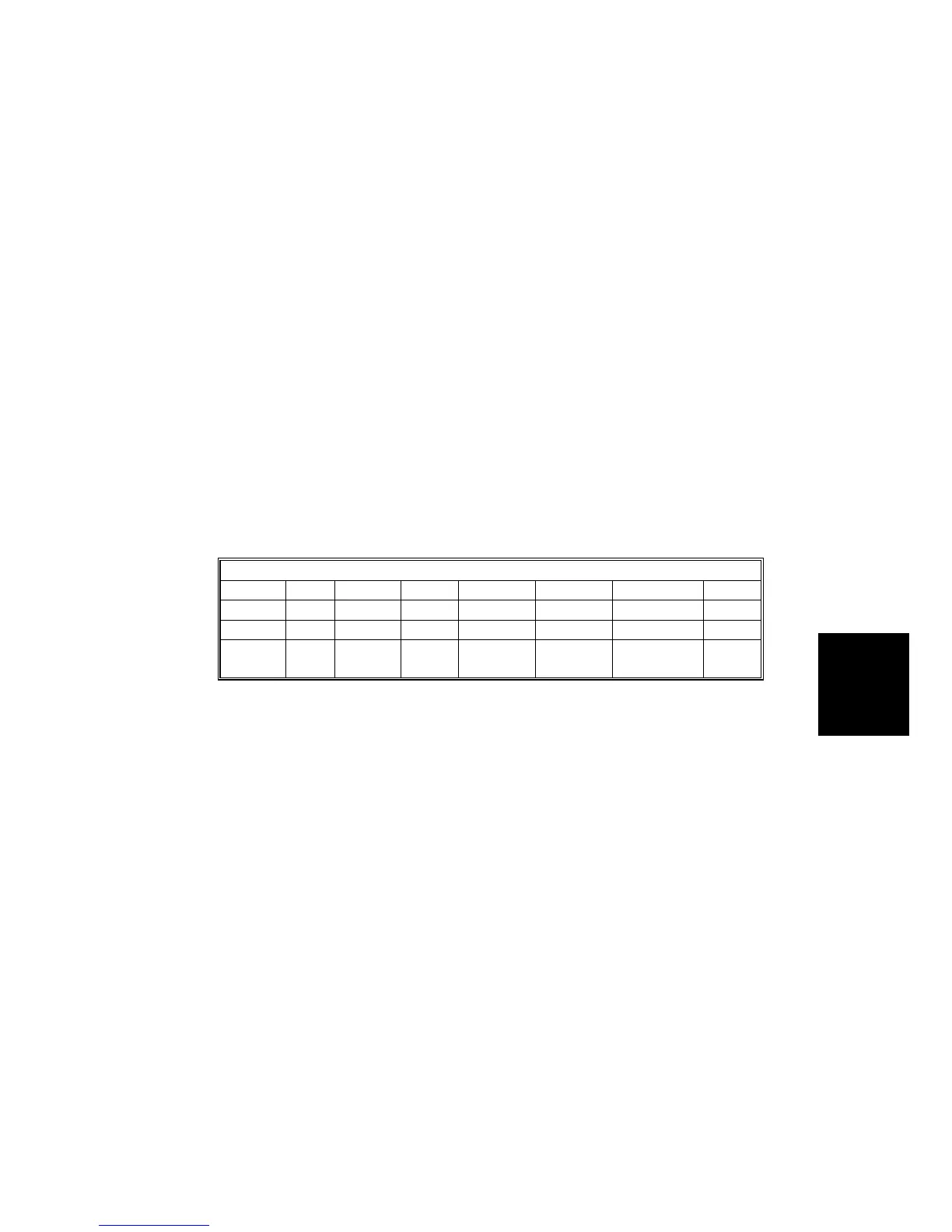
There are 15 possible colors that can be specified with SP 2-10-1 to -4.
Allocation of color codes
0 1 2 3 4 5 6 7
Other Red Blue Green Brown Gray Yellow Purple
8 9 10 11 12 13 14
Maroon Navy Orange Teal
Red
Base
Blue
Base
Yellow
Base
Default: 0 (other)


 To Next Page