Network eManager®
Features of Network eManager
Strata CIX Programming Vol.1 12/09 2-25
Network eManager®
Example 2 – Multiple Strata CIX Nodes
All Users located in the same Users Folder
This example is more complex because it requires assistance from the Network Administrator.
For example, this customer has two CIX nodes: one in Los Angeles and one in Irvine. All of the users, however, are
stored in the same default Users folder. Since all the users are stored in the same folder, Strata Synch must be told
how to differentiate users belonging to the Los Angeles CIX versus users belonging to the Irvine CIX.
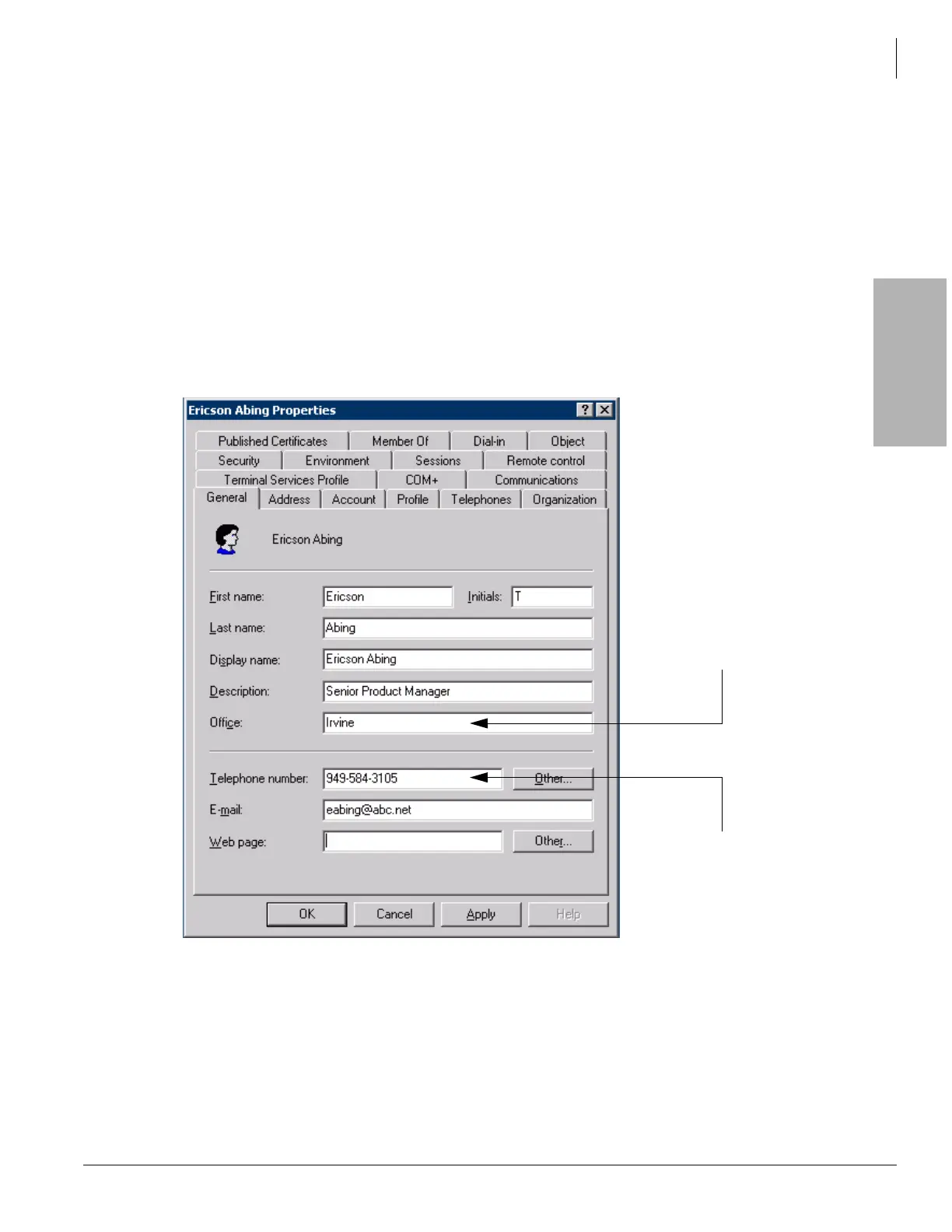
The only way to differentiate users is to put a tag in the Users properties window to allow Strata Synch to filter the
different nodes. In the screen below, the user Ericson Abing belongs to the Irvine office as shown in the Office
field. Users in the Los Angeles office would be tagged as belonging to the Los Angeles location.
Important! The Telephone number field must be populated. ADS uses this field to assign the extension
number. If this field is left blank no station is created for this name.
In the General tab - the Office field
is used to identify the user location.
The last four digits (default) are
used to create the extension
and the voicemail account.



 To Next Page