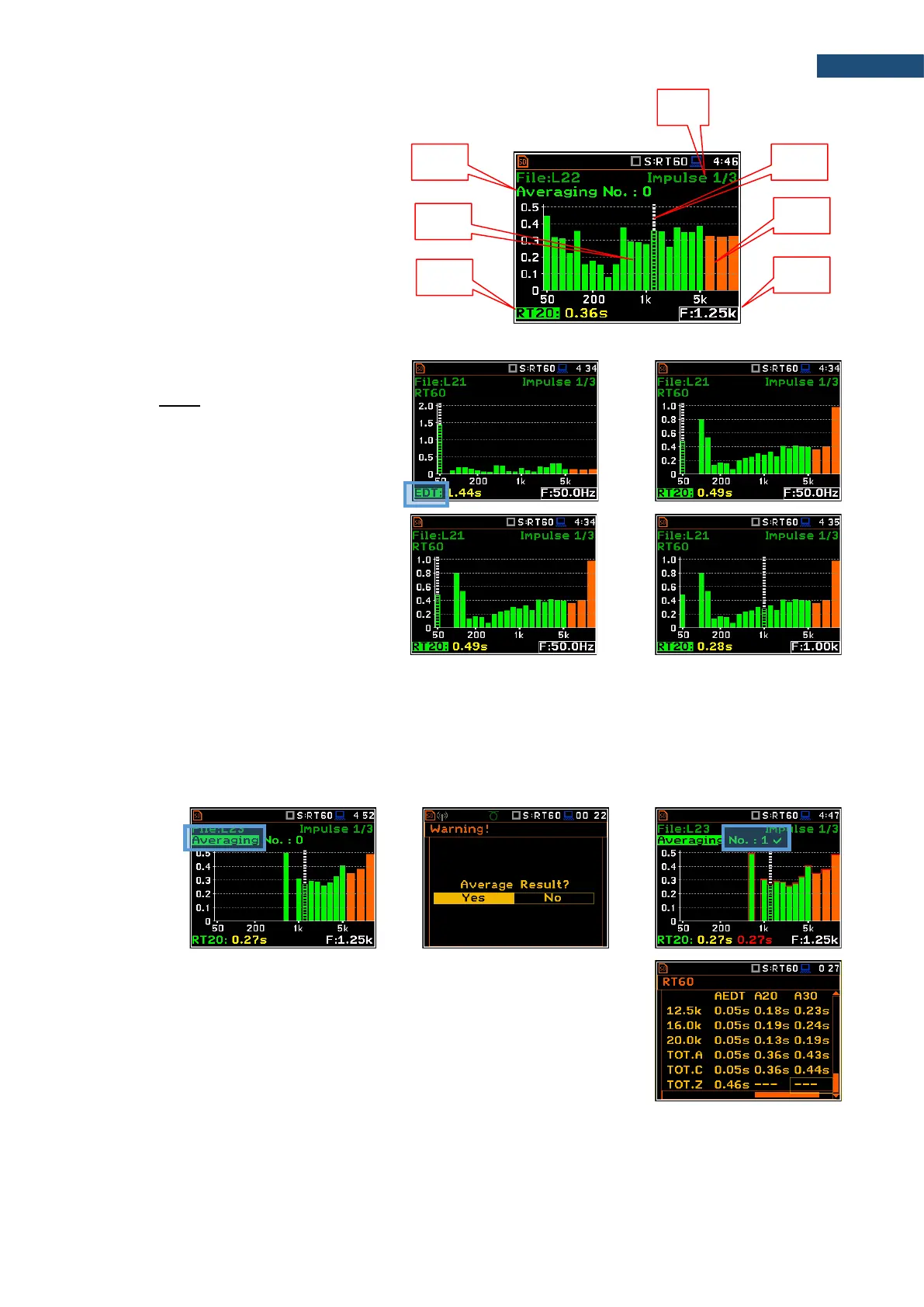
Bar plot of RT60 results
1. Number of averaged results
2. RT 1/3 octave plot
3. Name of the RT result and its value
4. Used RT60 calculation method
5. Cursor position
6. RT results for Total values
7. Cursor position value (central band
frequency)
Changing the RT result
When the field 3 is active the RT60 analysis
result can be changed with the ◄ / ► key
pressed together with <Alt>.
Changing the cursor position
You may change the cursor position with the
◄ / ► key.
Averaging of RT results
The Averaging field enables averaging of the reverberation time results from several measurements.
To make averaging of the new results with the results calculated earlier (the <Start> key should be pressed,
and first measurement completed), select the Averaging field and press <ENTER>. In the Warning screen,
select Yes and press <ENTER>. In the field No.: x, the value x will be increased by one and the symbol will
inform that the results have been averaged.
<Start> 1
st
meas. <ENT> <ENT>
When the averaging is On, additional columns appear in the RT60 result table,
named: AEDT, A20, A30 and A.User.
To clear averaging, select the field No.: x and press <ENTER>. In the Clear Averaging screen, select Yes
and press <ENTER>. In the field No.: x, the value x will be zerrowed and the symbol will disappear.



 To Next Page