Teledyne API T703/T703U Calibrator Operation Manual Communications
95
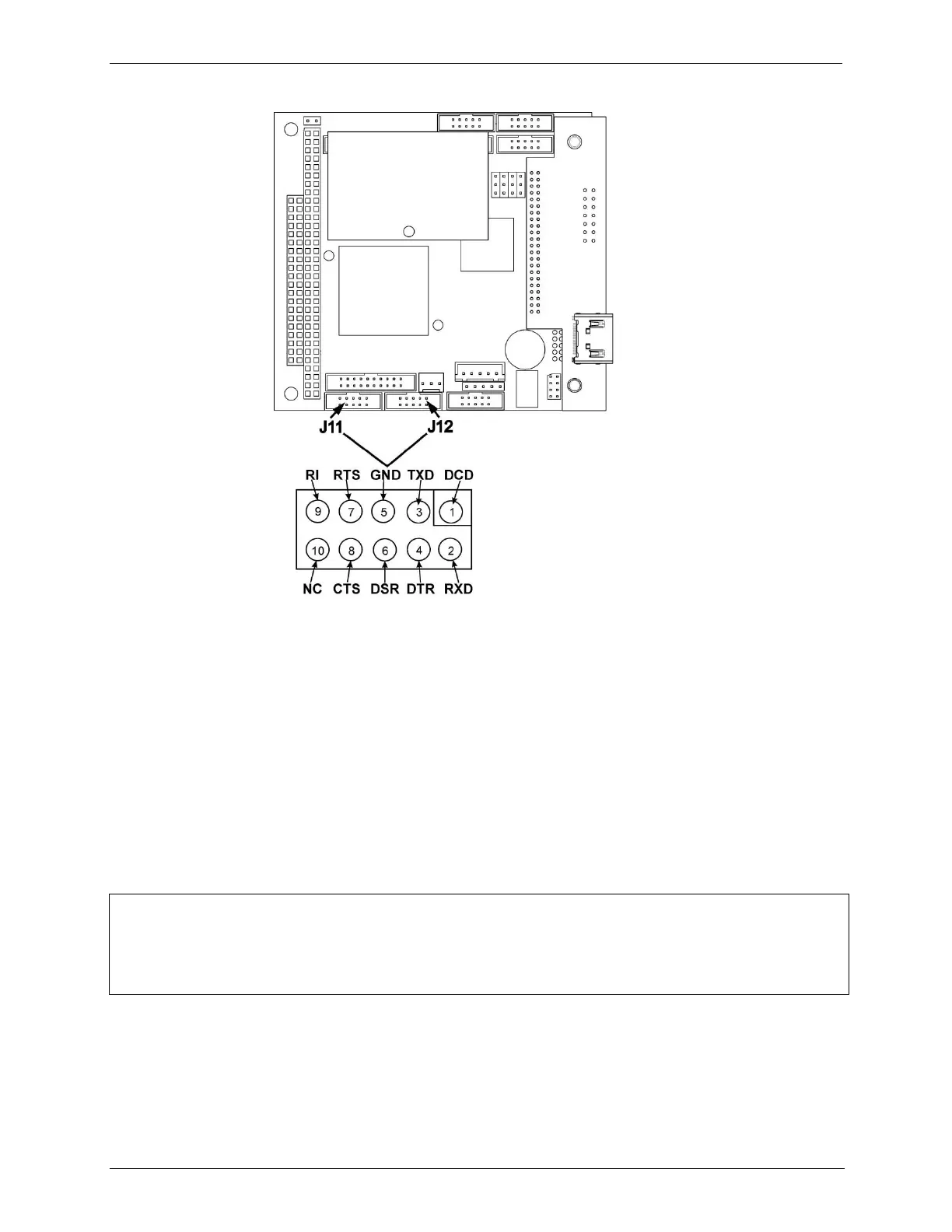
Figure 5-2: CPU COM1 & COM2 Connector Pin-Outs for RS-232 Mode
Teledyne API offers two mating cables, one of which should be applicable for
your use.
Part number WR000077, a DB-9 female to DB-9 female cable, 6 feet long.
Allows connection of the serial ports of most personal computers. Also
available as Option 60 (see Section 1.2).
Part number WR000024, a DB-9 female to DB-25 male cable. Allows
connection to the most common styles of modems (e.g. Hayes-compatible)
and code activated switches.
Both cables are configured with straight-through wiring and should require no
additional adapters.
NOTE
Cables that appear to be compatible because of matching connectors may incorporate internal
wiring that makes the link inoperable. Check cables acquired from sources other than Teledyne
API for pin assignments before using.
To assist in properly connecting the serial ports to either a computer or a modem,
there are activity indicators just above the RS-232 port. Once a cable is
connected between the calibrator and a computer or modem, both the red and
green LEDs should be on.
If the lights are not lit, use the slide switch on the rear panel to switch between
DTE and DCE modes



 To Next Page