TH2829X Series Operation Manual Chapter 7 Transformer Auto Scanning Test
7.7.19 Transformer ID
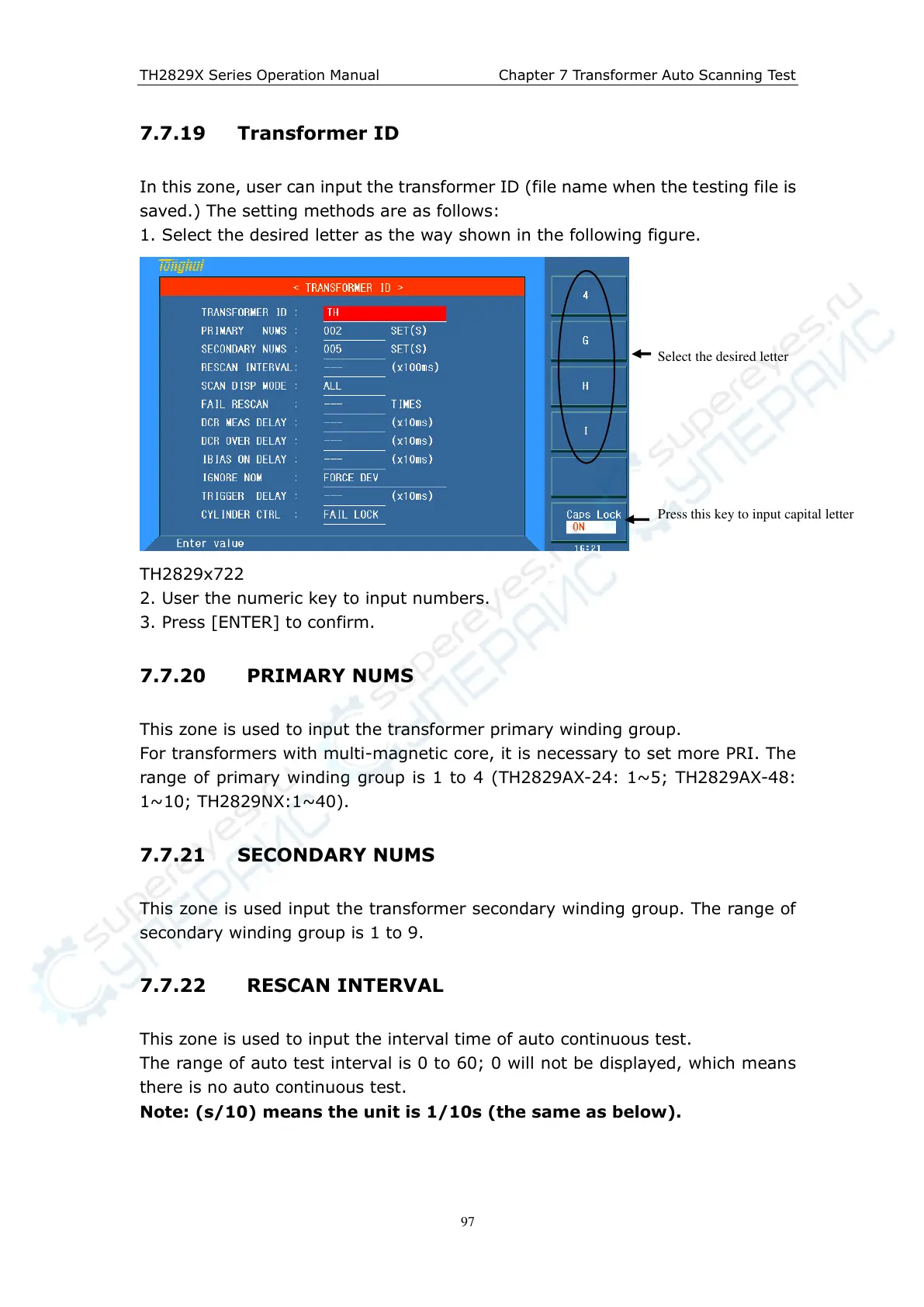
In this zone, user can input the transformer ID (file name when the testing file is
saved.) The setting methods are as follows:
1. Select the desired letter as the way shown in the following figure.
TH2829x722
2. User the numeric key to input numbers.
3. Press [ENTER] to confirm.
7.7.20 PRIMARY NUMS
This zone is used to input the transformer primary winding group.
For transformers with multi-magnetic core, it is necessary to set more PRI. The
range of primary winding group is 1 to 4 (TH2829AX-24: 1~5; TH2829AX-48:
1~10; TH2829NX:1~40).
7.7.21 SECONDARY NUMS
This zone is used input the transformer secondary winding group. The range of
secondary winding group is 1 to 9.
7.7.22 RESCAN INTERVAL
This zone is used to input the interval time of auto continuous test.
The range of auto test interval is 0 to 60; 0 will not be displayed, which means
there is no auto continuous test.
Note: (s/10) means the unit is 1/10s (the same as below).
Select the desired letter
Press this key to input capital letter



 To Next Page