TH2829X Series Operation Manual Chapter 7 Transformer Auto Scanning Test
*.TRS file.
<Transformer ID>
<Transformer Pin Setup> and the corresponding sub-pages
<Transformer Test Condition> and the corresponding sub-pages
<Transformer Scan Test> and the corresponding sub-pages
7.13.6.2 U-disk manage performance
Just as the description mentioned above, USB HOST interface is a standard
configuration of TH2829X, so external U disks can be used as the storage media
and can store setup files of 500 groups.
TH2829X supports the following storage devices (U disk):
Meet the standard of USB 1.0/1.1
Capacitance:32MB/256MB/2GB / 4GB
File format:FAT16, FAT32 (Formatting under Microsoft Windows
operation system)
7.13.7 Operation steps for file manage
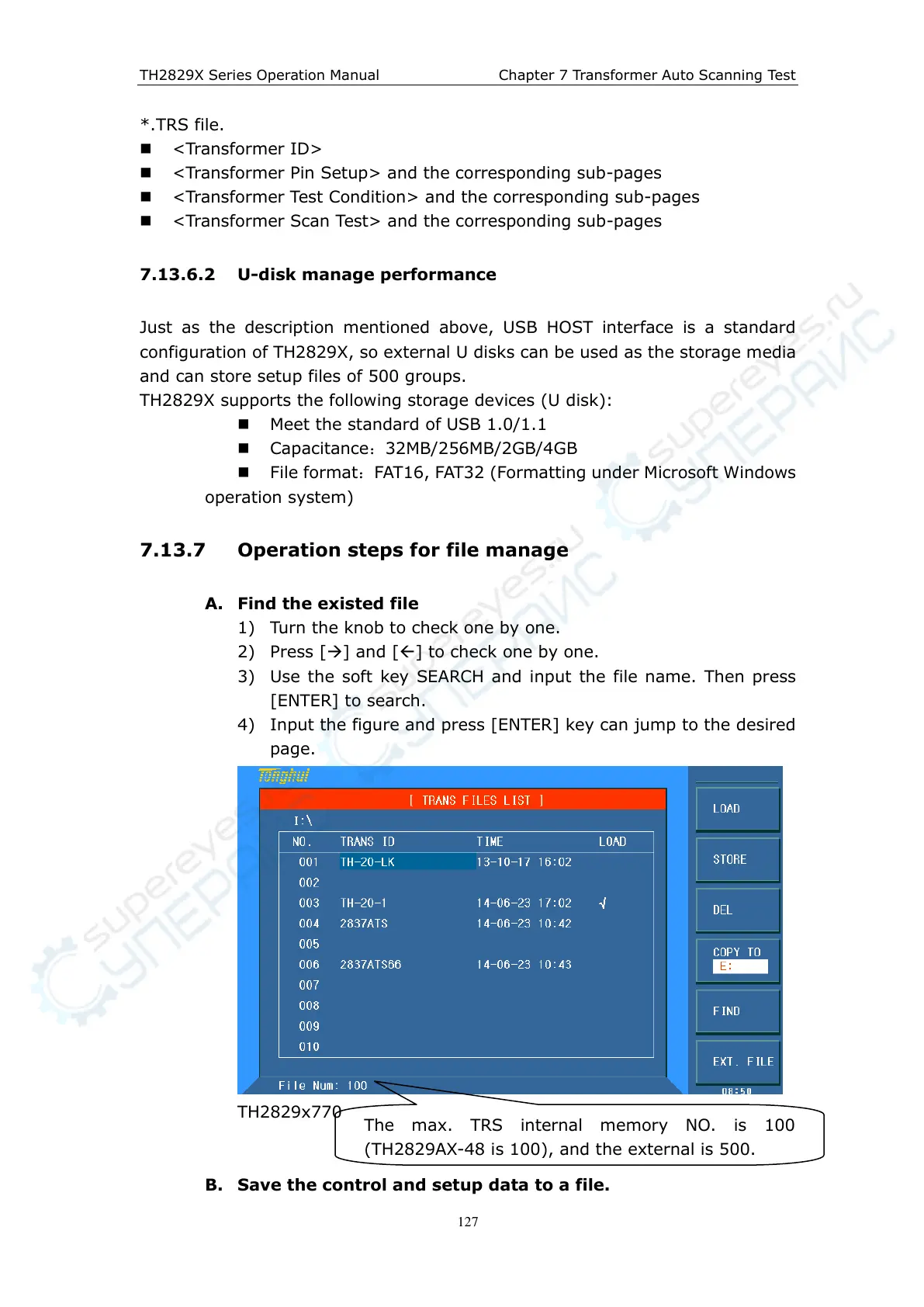
A. Find the existed file
1) Turn the knob to check one by one.
2) Press [] and [] to check one by one.
3) Use the soft key SEARCH and input the file name. Then press
[ENTER] to search.
4) Input the figure and press [ENTER] key can jump to the desired
page.
TH2829x770
B. Save the control and setup data to a file.
The max. TRS internal memory NO. is 100
(TH2829AX-48 is 100), and the external is 500.



 To Next Page