TH2829X Series Operation Manual Chapter 6 Transformer Single-machine Test
6.2 <Transformer Measure Setup>
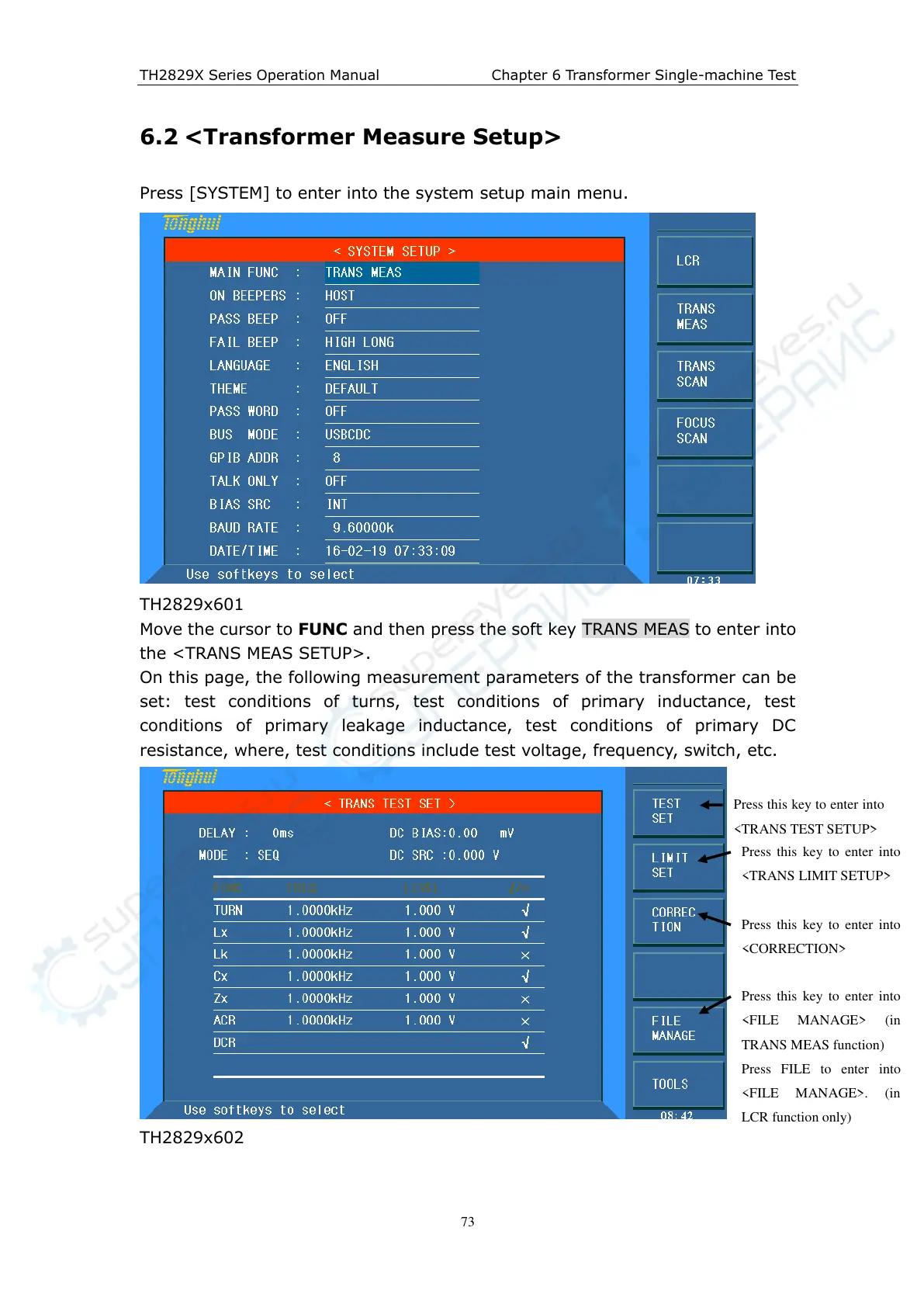
Press [SYSTEM] to enter into the system setup main menu.
TH2829x601
Move the cursor to FUNC and then press the soft key TRANS MEAS to enter into
the <TRANS MEAS SETUP>.
On this page, the following measurement parameters of the transformer can be
set: test conditions of turns, test conditions of primary inductance, test
conditions of primary leakage inductance, test conditions of primary DC
resistance, where, test conditions include test voltage, frequency, switch, etc.
TH2829x602
Press this key to enter into
<TRANS TEST SETUP>
Press this key to enter into
<TRANS LIMIT SETUP>
Press this key to enter into
<CORRECTION>
Press this key to enter into
<FILE MANAGE> (in
TRANS MEAS function)
Press FILE to enter into
<FILE MANAGE>. (in
LCR function only)



 To Next Page