TH2829X Series Operation Manual Chapter 2 Introduction
Chapter 2 Introduction
In this chapter, the basic operation features of TH2829X series are described.
Please read the content carefully before using TH2829X series instruments, thus
you can learn the operation of TH2829X.
2.1 Introduction to front panel
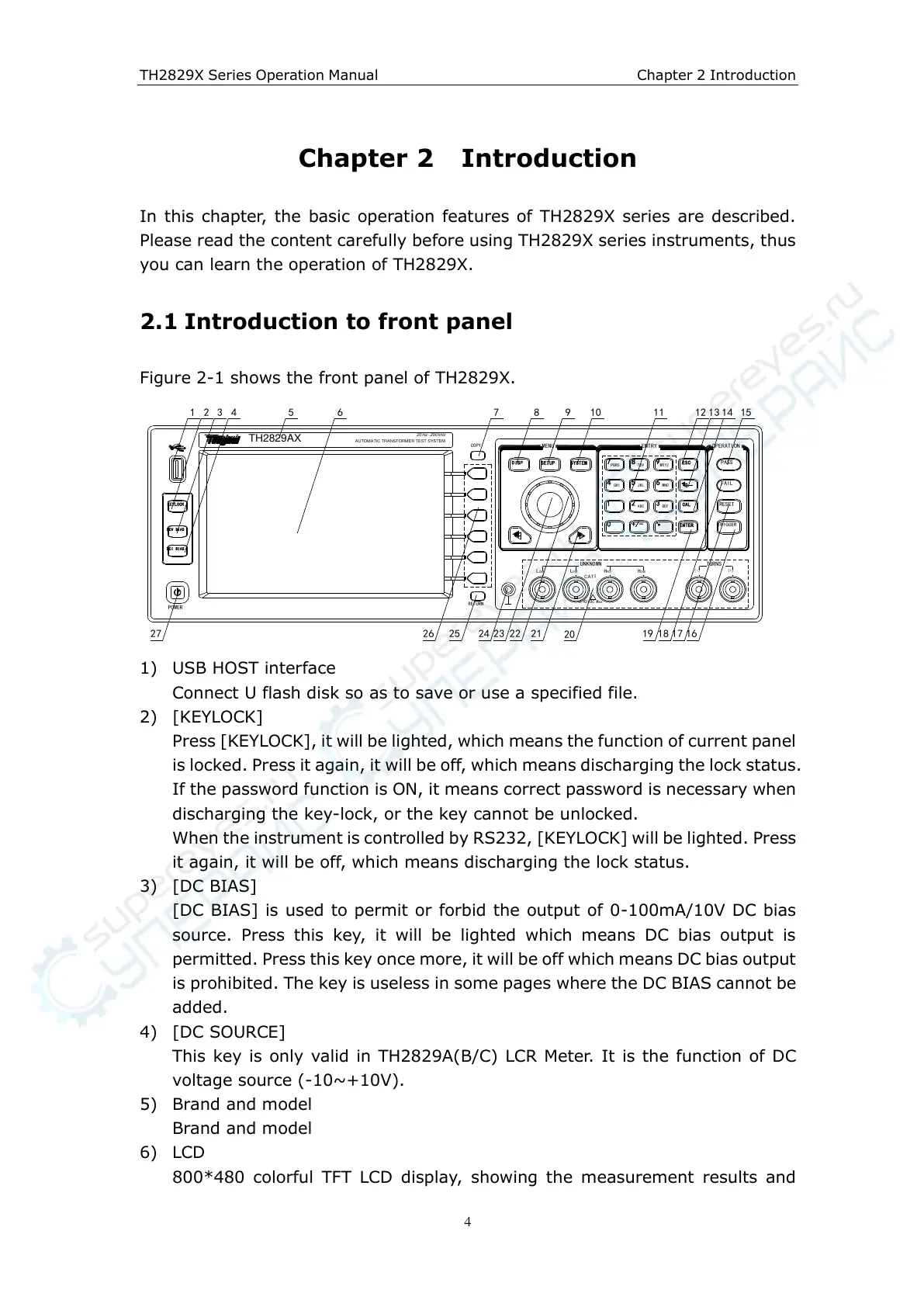
Figure 2-1 shows the front panel of TH2829X.
DCV BIAS
KEYLOCK
DCI BIAS
DISP
SETUP
SYSTEM
7 8 9
ESC
654
1 2 3
0
+/-
ENTER
RESET
PASS
FAIL
TRIGGER
CAL
PQRS
TUV WXYZ
GHI
JKL
MNO
ABC
DEF
TH2829AX
AUTOMATIC TRANSFORMER TEST SYSTEM
-Hz20 Hz200k
MENU
OPERATION
(-) (+)
LCUR LPOT HPOT HCUR
±42 Max
!
VDC
TURNS
UNKNOWN
CAT
Ⅰ
ENTRY
COPY
RETURN
POWER
1 2 3 4 5 6 7 8 9 10 11 12 13 15
161718212223242526
14
1927
20
1) USB HOST interface
Connect U flash disk so as to save or use a specified file.
2) [KEYLOCK]
Press [KEYLOCK], it will be lighted, which means the function of current panel
is locked. Press it again, it will be off, which means discharging the lock status.
If the password function is ON, it means correct password is necessary when
discharging the key-lock, or the key cannot be unlocked.
When the instrument is controlled by RS232, [KEYLOCK] will be lighted. Press
it again, it will be off, which means discharging the lock status.
3) [DC BIAS]
[DC BIAS] is used to permit or forbid the output of 0-100mA/10V DC bias
source. Press this key, it will be lighted which means DC bias output is
permitted. Press this key once more, it will be off which means DC bias output
is prohibited. The key is useless in some pages where the DC BIAS cannot be
added.
4) [DC SOURCE]
This key is only valid in TH2829A(B/C) LCR Meter. It is the function of DC
voltage source (-10~+10V).
5) Brand and model
Brand and model
6) LCD
800*480 colorful TFT LCD display, showing the measurement results and



 To Next Page