TH2829X Series Operation Manual Chapter 7 Transformer Auto Scanning Test
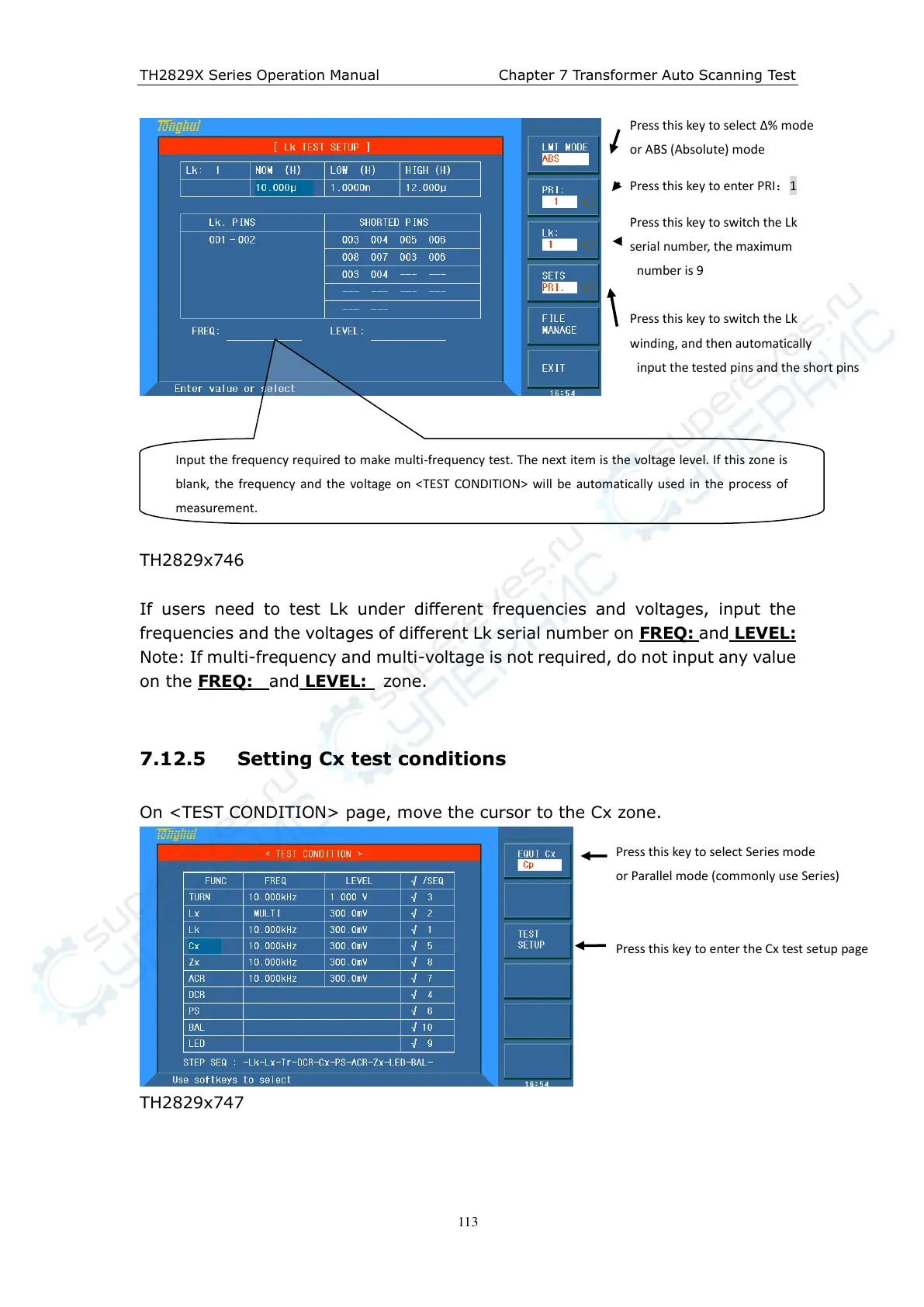
TH2829x746
If users need to test Lk under different frequencies and voltages, input the
frequencies and the voltages of different Lk serial number on FREQ:
and LEVEL:
Note: If multi-frequency and multi-voltage is not required, do not input any value
on the FREQ:
and LEVEL: zone.
7.12.5 Setting Cx test conditions
On <TEST CONDITION> page, move the cursor to the Cx zone.
TH2829x747
Press this key to select ∆% mode
or ABS (Absolute) mode
Press this key to enter PRI:1
Press this key to switch the Lk
serial number, the maximum
number is 9
Press this key to switch the Lk
winding, and then automatically
input the tested pins and the short pins
Input the frequency required to make multi-frequency test. The next item is the voltage level. If this zone is
blank, the frequency and the voltage on <TEST CONDITION> will be automatically used in the process of
measurement.
Press this key to select Series mode
or Parallel mode (commonly use Series)
Press this key to enter the Cx test setup page



 To Next Page