TH2829X Series Operation Manual Chapter 3 Introduction to [MEAS]
compare limits for D, but only 1 pair of compare limit can be set for Cp.
Operation steps for the swap parameter function
Execute the following operations to swap the primary and the secondary
parameters.
1) Move the cursor to PARAM, the following soft key will be displayed.
SWAP PARAM
2) Press SWAP PARAM to swap the primary and the secondary parameters.
3) Press SWAP PARAM to swap the primary and the secondary parameter,
which is to recover the formal setup.
3.8.2 Limit modes of compare function
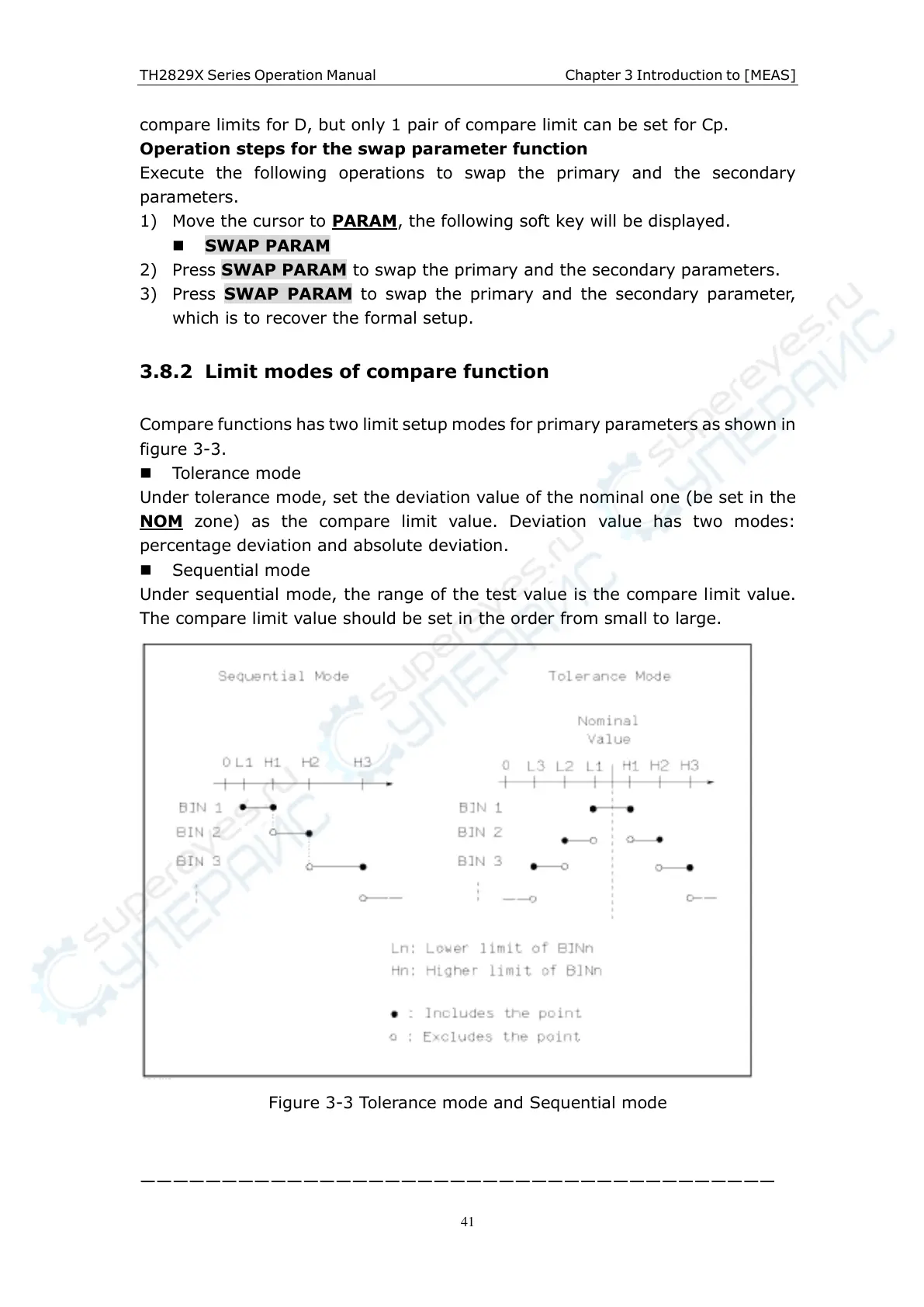
Compare functions has two limit setup modes for primary parameters as shown in
figure 3-3.
Tolerance mode
Under tolerance mode, set the deviation value of the nominal one (be set in the
NOM
zone) as the compare limit value. Deviation value has two modes:
percentage deviation and absolute deviation.
Sequential mode
Under sequential mode, the range of the test value is the compare limit value.
The compare limit value should be set in the order from small to large.
Figure 3-3 Tolerance mode and Sequential mode
———————————————————————————————————————



 To Next Page