TH2829X Series Operation Manual Chapter 7 Transformer Auto Scanning Test
7.12.5.1 Cx test setup page
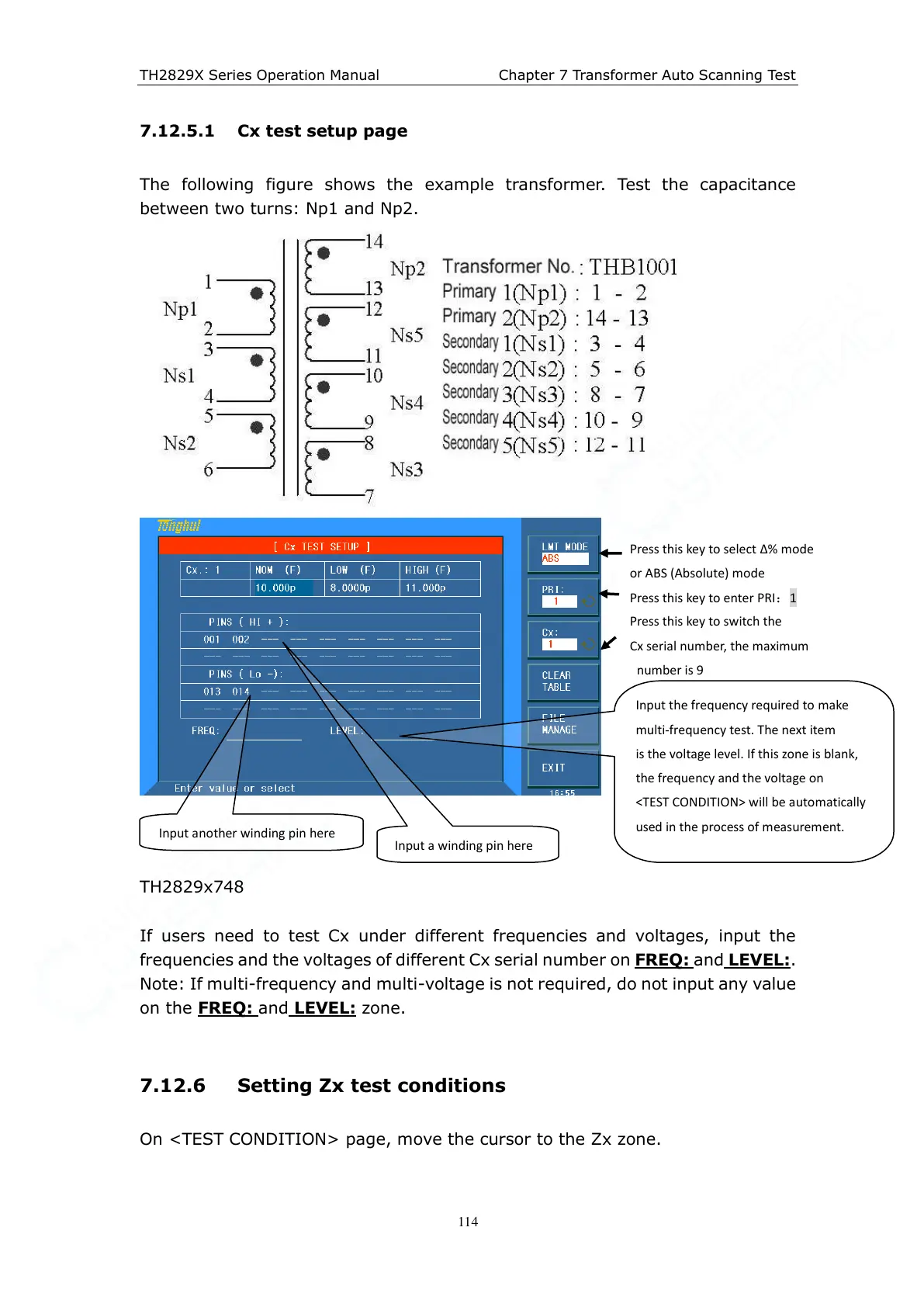
The following figure shows the example transformer. Test the capacitance
between two turns: Np1 and Np2.
TH2829x748
If users need to test Cx under different frequencies and voltages, input the
frequencies and the voltages of different Cx serial number on FREQ:
and LEVEL:.
Note: If multi-frequency and multi-voltage is not required, do not input any value
on the FREQ:
and LEVEL: zone.
7.12.6 Setting Zx test conditions
On <TEST CONDITION> page, move the cursor to the Zx zone.
Press this key to select ∆% mode
or ABS (Absolute) mode
Press this key to enter PRI:1
Press this key to switch the
Cx serial number, the maximum
number is 9
Input the frequency required to make
multi-frequency test. The next item
is the voltage level. If this zone is blank,
the frequency and the voltage on
<TEST CONDITION> will be automatically
used in the process of measurement.
Input another winding pin here



 To Next Page