TH2829X Series Operation Manual Chapter 7 Transformer Auto Scanning Test
7.13 <TRANS SCAN TEST>
After all setups finish, select the TRANS SCAN TEST function and then press [DISP]
to enter into the <TRANS SCAN TEST>.
Before starting test, user can press [.] key to enter <FILE MANGE> page to save
your setup for loading. More details can be referred to <FILE MANAGE>
instruction.
Save the file and return to <TRANS SCAN TEST> page. If user has installed host
and scan box
,now just put the untested transformer to test fixture and press
[START] in scan box to start scanning, and the test value is displayed on LCD
screen, when the test result is bad, the value is displayed in red color.
The instrument displays the scan data and PASS/FAIL according to SCAN
RESULT DISP: on <Transformer ID> page.
In scanning,if some pins of Lx or Zx sets DC bias current,the instrument would
add corresponding DC bias current automatically, and [BIAS] key will be lighted.
Note: I f user does not install DC bias current board, the instrument
would display “NO BIAS CARD”
,and [BIAS] will not light up.
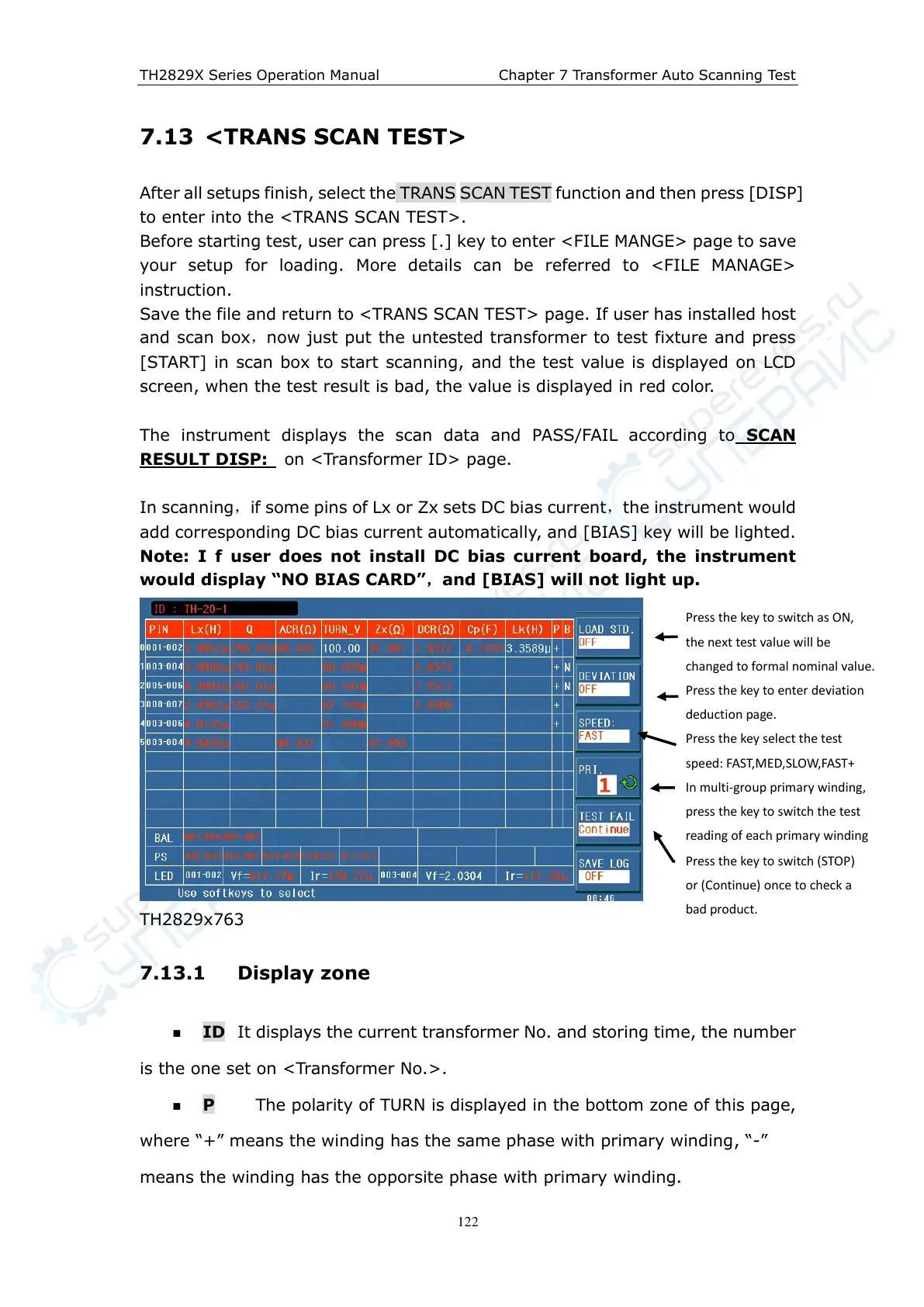
TH2829x763
7.13.1 Display zone
ID It displays the current transformer No. and storing time, the number
is the one set on <Transformer No.>.
P The polarity of TURN is displayed in the bottom zone of this page,
where “+” means the winding has the same phase with primary winding, “-”
means the winding has the opporsite phase with primary winding.
Press the key to switch as ON,
the next test value will be
changed to formal nominal value.
Press the key to enter deviation
deduction page.
Press the key select the test
speed: FAST,MED,SLOW,FAST+
In multi-group primary winding,
press the key to switch the test
reading of each primary winding
Press the key to switch (STOP)
or (Continue) once to check a
bad product.



 To Next Page