TH2829X Series Operation Manual Chapter 4 [SYSTEM] and [FILE]
Chapter 4 [SYSTEM] and <FILE MANAGE>
4.1 <SYSTEM SETUP>
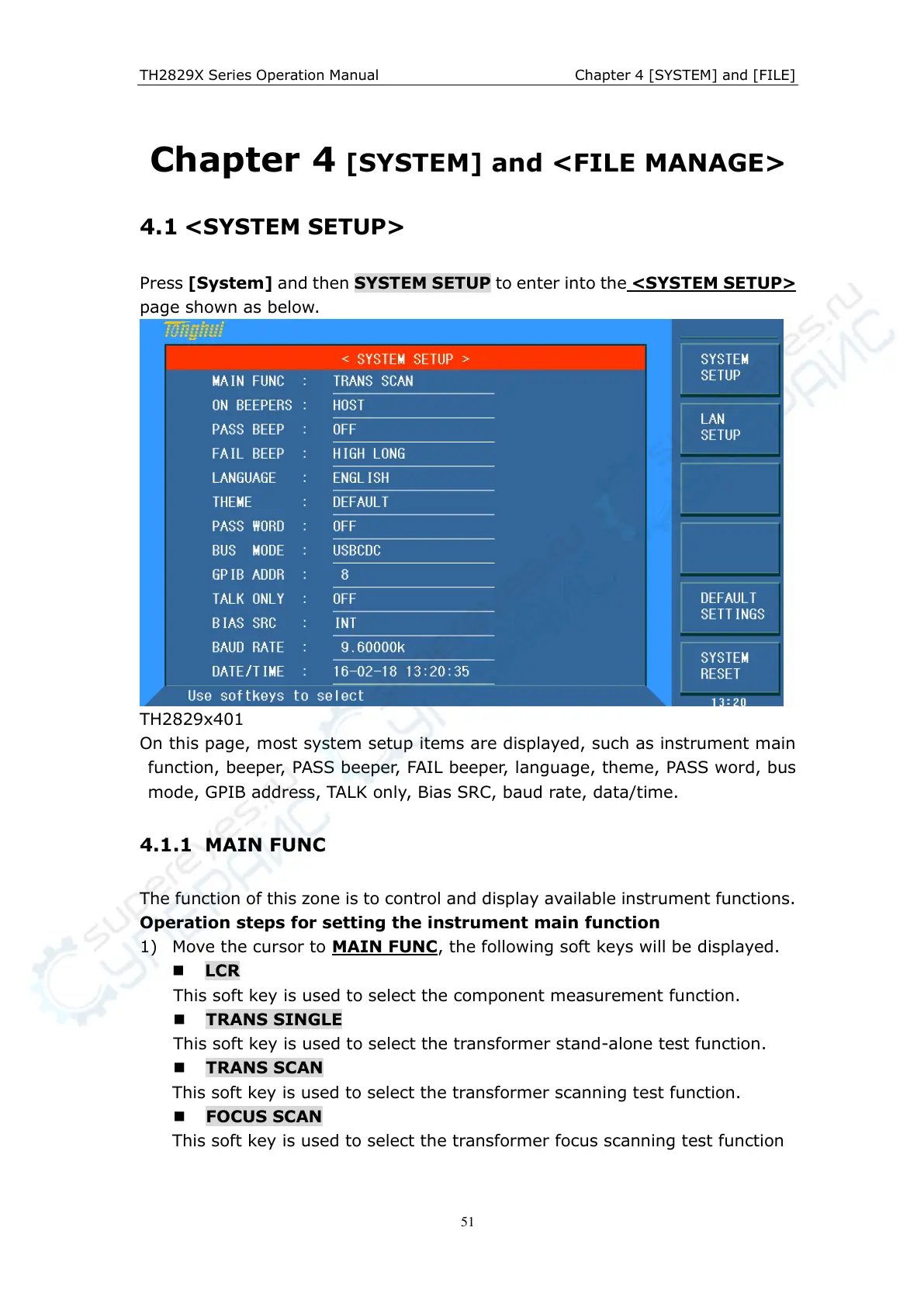
Press [System] and then SYSTEM SETUP to enter into the <SYSTEM SETUP>
page shown as below.
TH2829x401
On this page, most system setup items are displayed, such as instrument main
function, beeper, PASS beeper, FAIL beeper, language, theme, PASS word, bus
mode, GPIB address, TALK only, Bias SRC, baud rate, data/time.
4.1.1 MAIN FUNC
The function of this zone is to control and display available instrument functions.
Operation steps for setting the instrument main function
1) Move the cursor to MAIN FUNC, the following soft keys will be displayed.
LCR
This soft key is used to select the component measurement function.
TRANS SINGLE
This soft key is used to select the transformer stand-alone test function.
TRANS SCAN
This soft key is used to select the transformer scanning test function.
FOCUS SCAN
This soft key is used to select the transformer focus scanning test function



 To Next Page