TH2829X Series Operation Manual Chapter 7 Transformer Auto Scanning Test
7.9 PIN SETUP
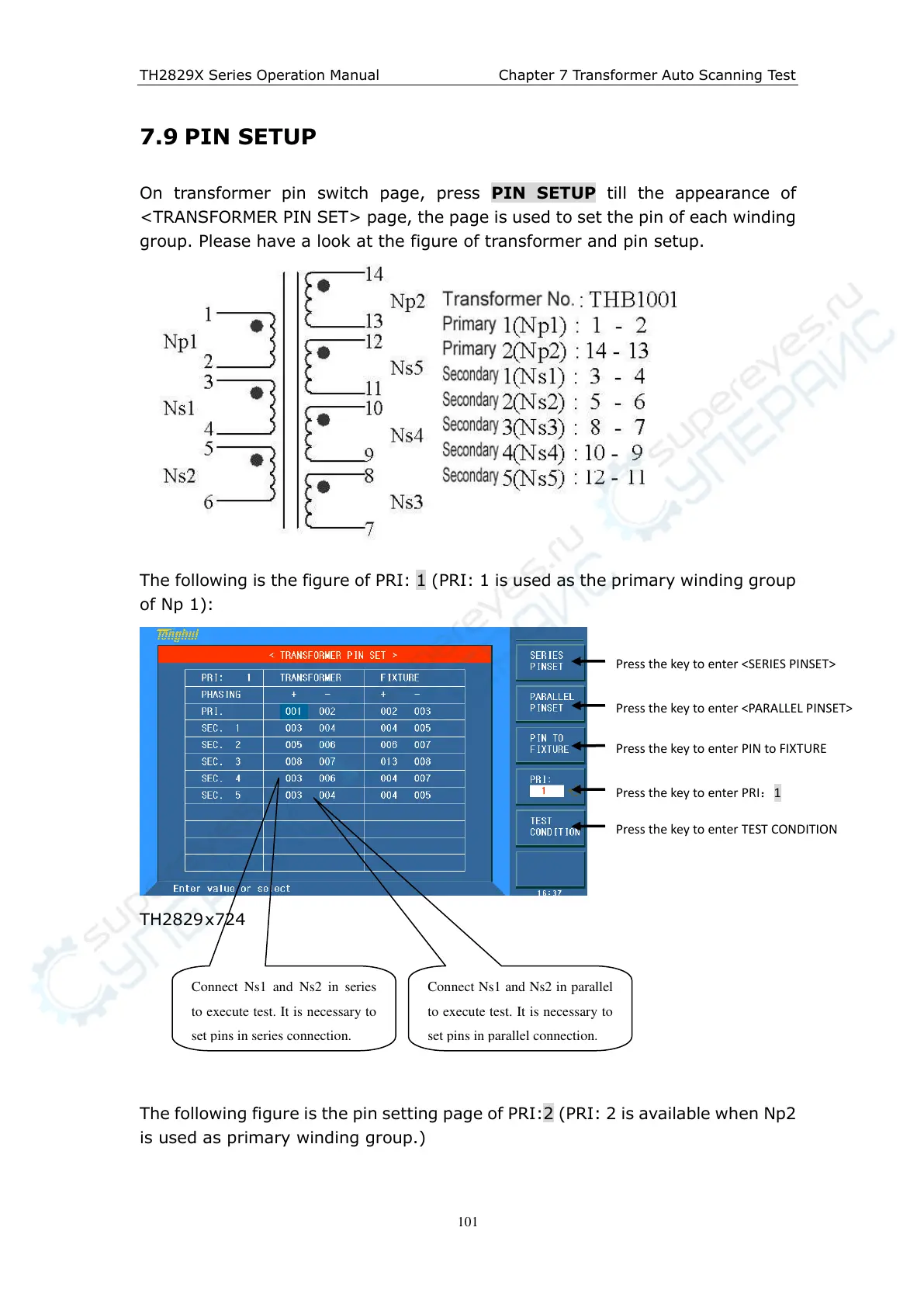
On transformer pin switch page, press PIN SETUP till the appearance of
<TRANSFORMER PIN SET> page, the page is used to set the pin of each winding
group. Please have a look at the figure of transformer and pin setup.
The following is the figure of PRI: 1 (PRI: 1 is used as the primary winding group
of Np 1):
TH2829 x724
The following figure is the pin setting page of PRI:2 (PRI: 2 is available when Np2
is used as primary winding group.)
Press the key to enter <SERIES PINSET>
Press the key to enter <PARALLEL PINSET>
Press the key to enter PIN to FIXTURE
Press the key to enter PRI:1
Press the key to enter TEST CONDITION
Connect Ns1 and Ns2 in series
to execute test. It is necessary to
set pins in series connection.
Connect Ns1 and Ns2 in parallel
to execute test. It is necessary to
set pins in parallel connection.



 To Next Page