TH2829X Series Operation Manual Chapter 2 Introduction
23) Confirmation key
This key is used to end the data input, confirm and save the data input
through knob.
24) Ground terminal
The ground terminal is connected with the case of instrument, which can be
used to protect or shield the ground connection.
25) FILE
This key is used to enter into FILE MANAGE interface (when in LCR funtion, it
is the only way to enter into the FILE MANAGE interface).
26) Soft keys
Six soft keys are used to select parameters. The corresponding function of
each soft key has been displayed on its left (the right part of LCD). The
function definition varies with different pages.
27) POWER
Power switch
2.2 Introduction to rear panel
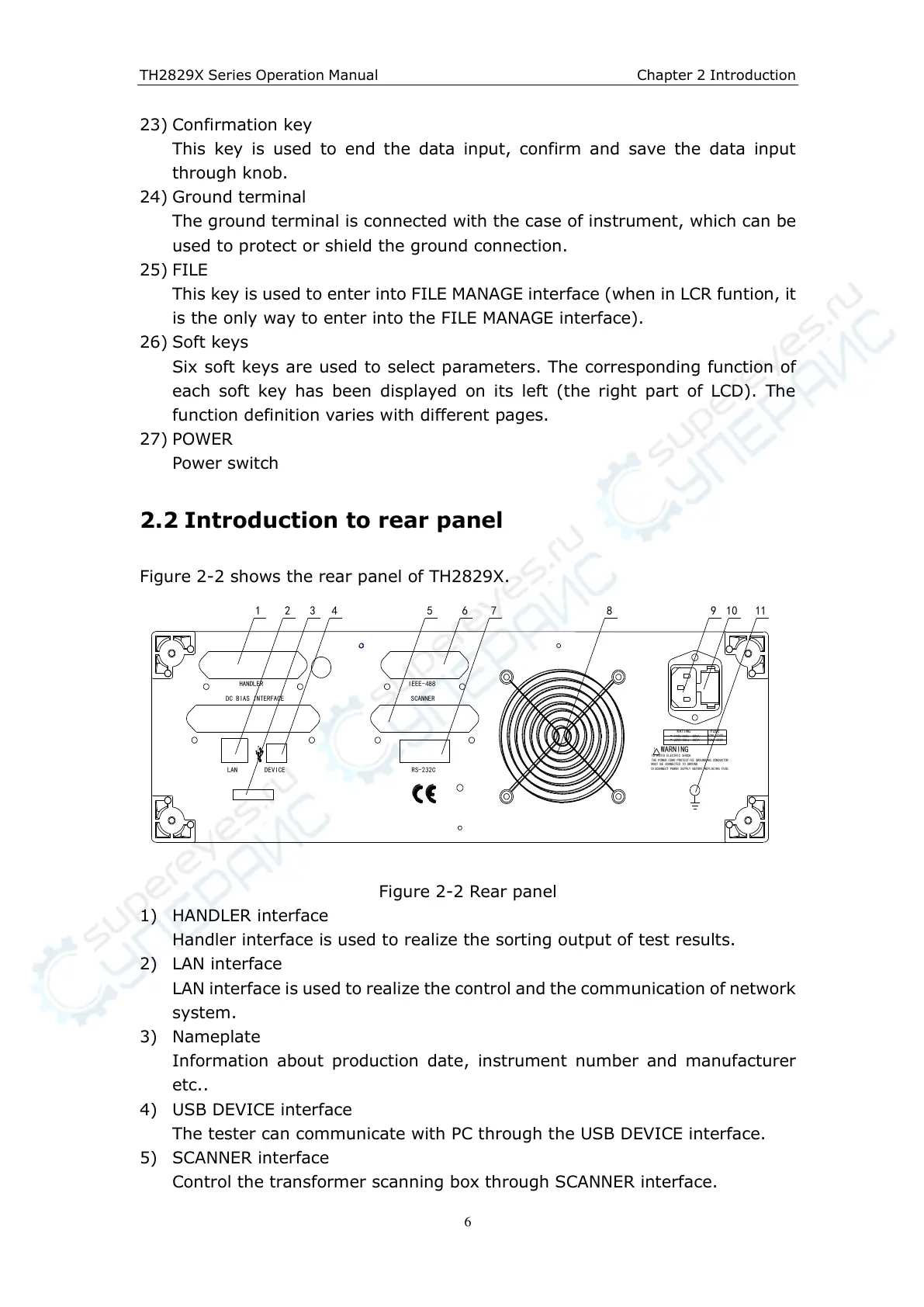
Figure 2-2 shows the rear panel of TH2829X.
RATING
FUSE
110V/60Hz 80VA
220V/50Hz 80VA
T2AL 250V
~
~
T4AL 250V
!
TO AVOID ELECTRIC SHOCK,
THE POWER CORD PROTECTIVE GROUNDING CONDUCTOR
MUST BE CONNECTED TO GROUND.
DISCONNECT POWER SUPPLY BEFORE REPLACING FUSE.
WARNING
RS-232C
LAN
DEVICE
SCANNER
HANDLER
DC BIAS INTERFACE
IEEE-488
1 2 3 4 5 6 7 8 9
10
11
Figure 2-2 Rear panel
1) HANDLER interface
Handler interface is used to realize the sorting output of test results.
2) LAN interface
LAN interface is used to realize the control and the communication of network
system.
3) Nameplate
Information about production date, instrument number and manufacturer
etc..
4) USB DEVICE interface
The tester can communicate with PC through the USB DEVICE interface.
5) SCANNER interface
Control the transformer scanning box through SCANNER interface.



 To Next Page