TH2829X Series Operation Manual Chapter 7 Transformer Auto Scanning Test
output of PIN3, FAIL is the output of PIN4.
GD1|GD2: only test 2 pages of data, if one page of the two pages of data is PASS,
output PASS signal PIN25, or output the FAIL signal PIN24.
When using HFLX double cylinder scanner box, select DEFAULT to work normally.
②DEV SCAN
When using the same DUT to carry out deviation deduction of several
transformers, select ON of this function can achieve one step test and deduct the
same DUT. Also, it is convenient to put the DUT on another PIN of the transformer;
after deviation deduction of all the transformers has been finished, this function
will be turn off automatically, which is convenient for the follow-up test.
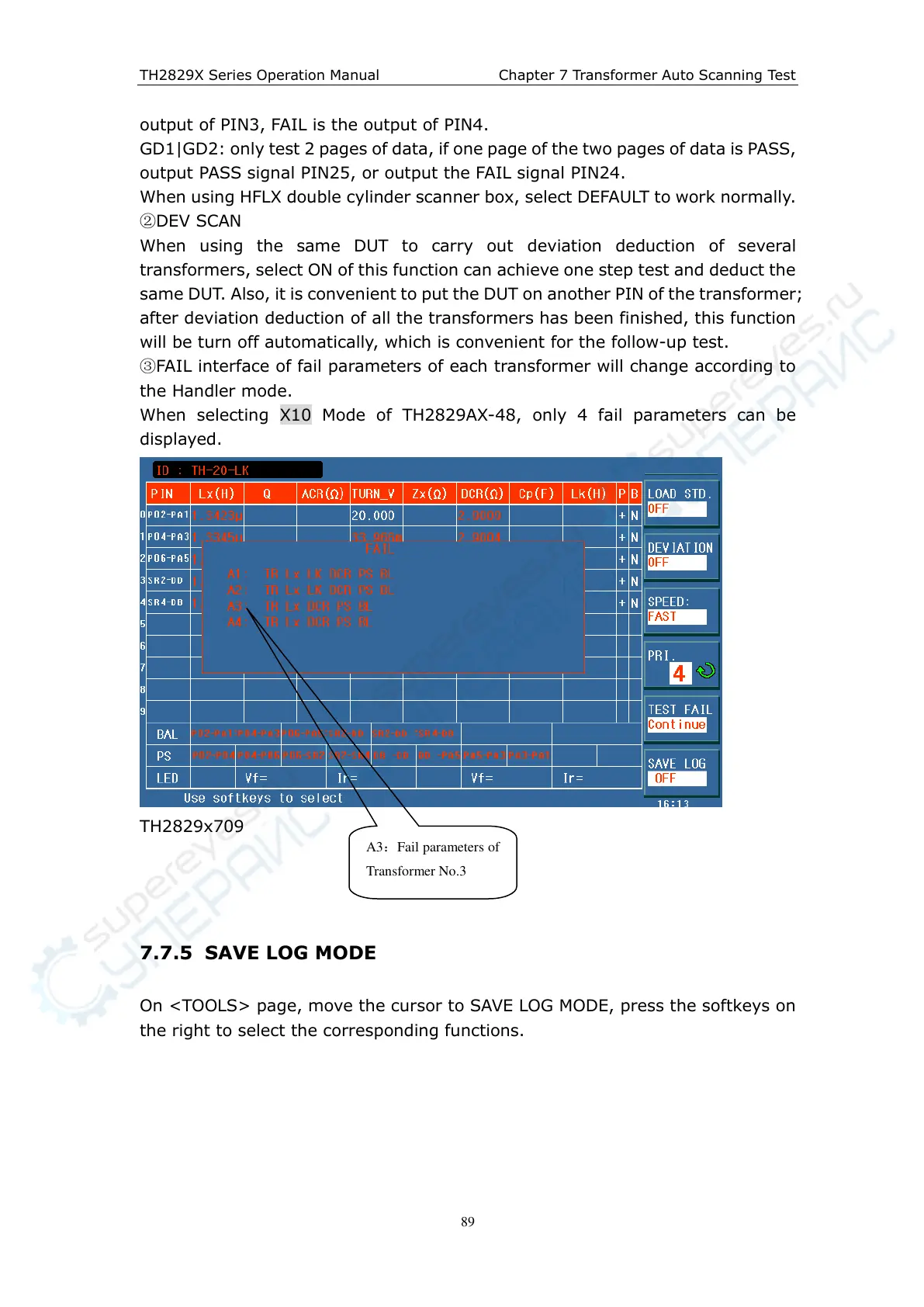
③FAIL interface of fail parameters of each transformer will change according to
the Handler mode.
When selecting X10 Mode of TH2829AX-48, only 4 fail parameters can be
displayed.
TH2829x709
7.7.5 SAVE LOG MODE
On <TOOLS> page, move the cursor to SAVE LOG MODE, press the softkeys on
the right to select the corresponding functions.
A 3:Fail parameters of
Transformer No.3



 To Next Page