TH2829X Series Operation Manual Chapter 7 Transformer Auto Scanning Test
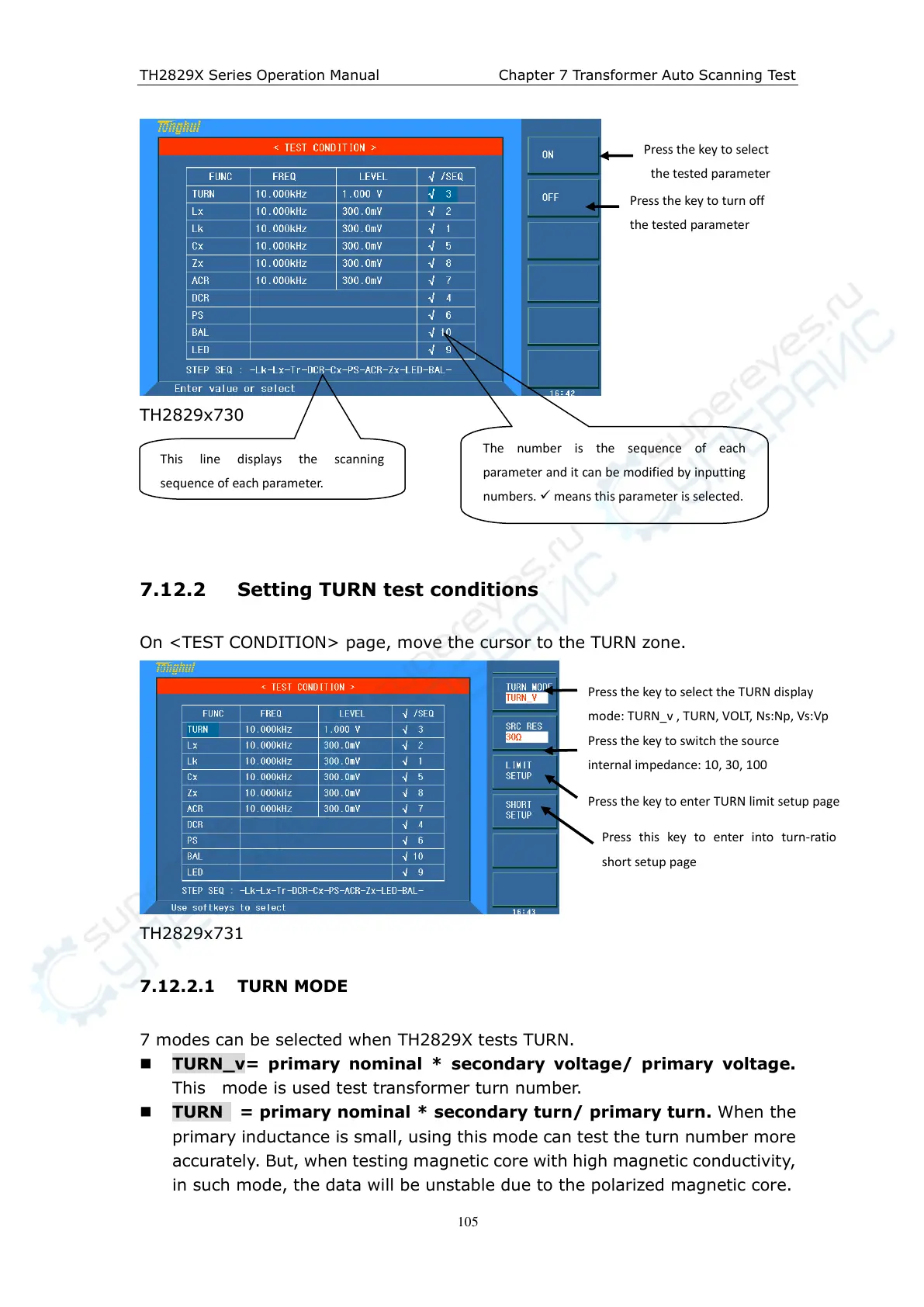
TH2829x730
7.12.2 Setting TURN test conditions
On <TEST CONDITION> page, move the cursor to the TURN zone.
TH2829x731
7.12.2.1 TURN MODE
7 modes can be selected when TH2829X tests TURN.
TURN_v= primary nominal * secondary voltage/ primary voltage.
This mode is used test transformer turn number.
TURN = primary nominal * secondary turn/ primary turn. When the
primary inductance is small, using this mode can test the turn number more
accurately. But, when testing magnetic core with high magnetic conductivity,
in such mode, the data will be unstable due to the polarized magnetic core.
Press the key to select
the tested parameter
Press the key to turn off
the tested parameter
This line displays the scanning
sequence of each parameter.
The number is the sequence of each
parameter and it can be modified by inputting
numbers. means this parameter is selected.
Press the key to select the TURN display
mode: TURN_v , TURN, VOLT, Ns:Np, V s :V p
Press the key to switch the source
internal impedance: 10, 30, 100
Press the key to enter TURN limit setup page
Press this key to enter into turn-ratio
short setup page



 To Next Page