TH2829X Series Operation Manual Chapter 4 [SYSTEM] and [FILE]
5) Press Yes to load the currently selected file. Then TH2829X will return the
current display page.
D. Copy a file to an U disk by the following steps
1) Assuming that it is necessary to copy internal files 2 to external storage.
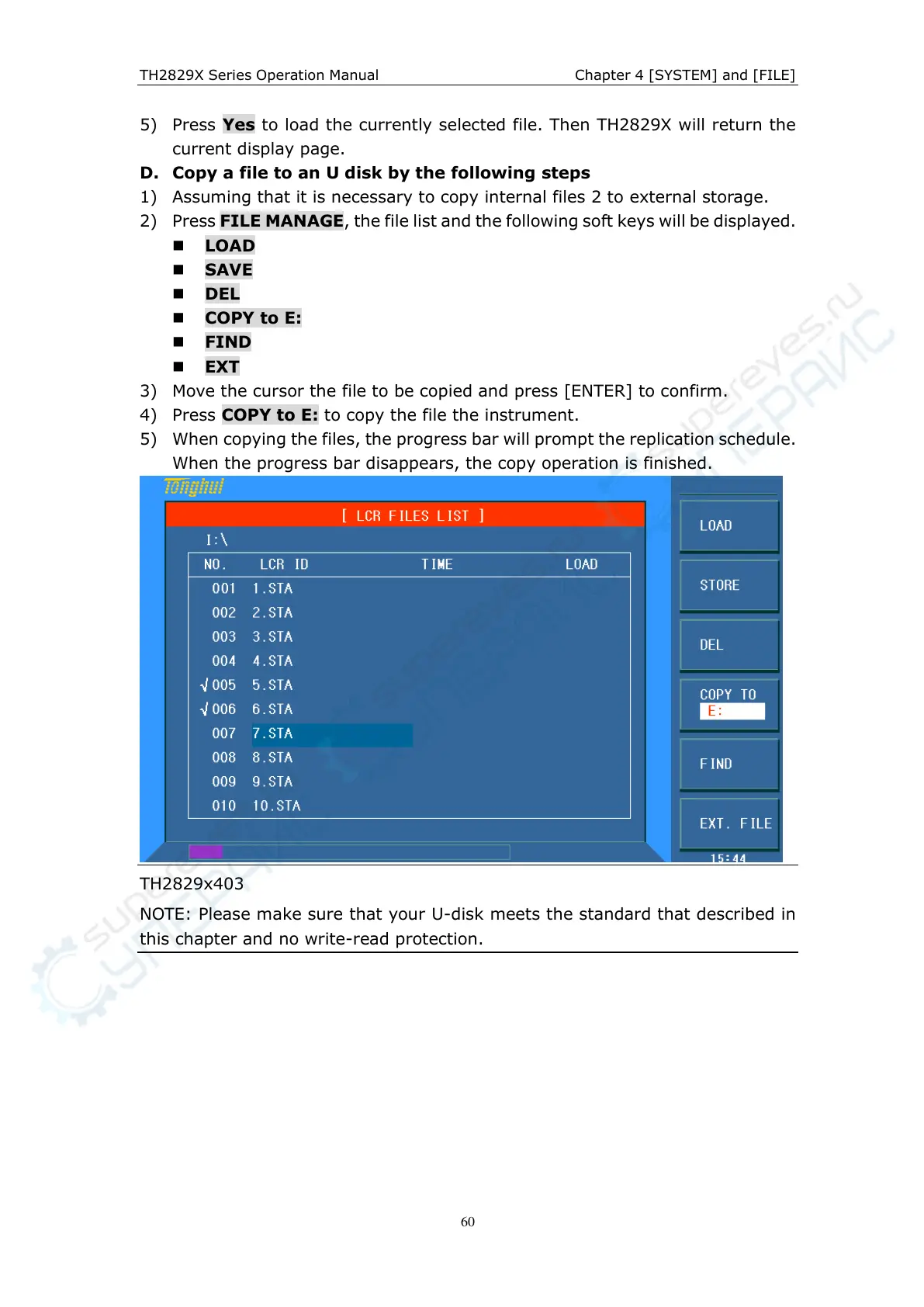
2) Press FILE MANAGE, the file list and the following soft keys will be displayed.
LOAD
SAVE
DEL
COPY to E:
FIND
EXT
3) Move the cursor the file to be copied and press [ENTER] to confirm.
4) Press COPY to E: to copy the file the instrument.
5) When copying the files, the progress bar will prompt the replication schedule.
When the progress bar disappears, the copy operation is finished.
TH2829x403
NOTE: Please make sure that your U-disk meets the standard that described in
this chapter and no write-read protection.



 To Next Page